Most lead magnets ask the visitor to consume information.
Interactive lead magnets ask the visitor to participate.
Instead of downloading the same ebook as everyone else, the user answers questions, enters data, or selects preferences. The experience then produces a result shaped by those inputs.
That result might be a savings estimate, product recommendation, maturity score, benchmark comparison, or personalized action plan.
Interactive lead magnets can create stronger relevance and richer lead data. They also require more effort from the user and more work from the business.
They succeed only when the value of the result justifies that added complexity.
This guide explains what interactive lead magnets are, how they work, the main formats available, their advantages and limitations, and how to build one that supports both the user and the lead generation system.
Key Takeaways
- Interactive lead magnets produce results based on information supplied by the user.
- Common formats include calculators, quizzes, assessments, recommendation tools, benchmarks, and scorecards.
- Their main advantage is the ability to combine personalized value with lead qualification.
- Every interactive experience creates an interaction tax because users must invest time, attention, or information.
- The result must become more useful as the effort required from the user increases.
- Gating, qualification, and follow-up should be decided before the tool is built.
- The most important performance metrics extend beyond email submissions to qualified leads, pipeline, and revenue.
- A static resource may be the better choice when personalization does not materially improve the answer.
Affiliate Disclosure: Some of the links on this site are affiliate links. That means if you click and make a purchase, I may earn a small commission at no extra cost to you. I only recommend tools and resources I genuinely believe in and that align with the content we share here.
What Are Interactive Lead Magnets?
An interactive lead magnet is a tool that asks visitors for information and uses their answers to produce a personalized result.
The visitor does not simply download or read the same resource as everyone else. They participate in the experience.
For example:
- A calculator asks for numbers and produces an estimate.
- A quiz asks about preferences and recommends a product.
- An assessment asks about the user’s current situation and returns a score.
- A benchmarking tool compares the user’s performance with a relevant standard.
The exchange is simple:
The user provides information. The tool returns an answer shaped by that information.
Consider a customer acquisition cost resource.
A traditional lead magnet might be a PDF that explains the customer acquisition cost formula. Every reader receives the same instructions.
An interactive calculator asks the user to enter marketing spend and the number of new customers acquired. It then calculates that company’s customer acquisition cost.
Both resources teach the same concept.
The difference is that the PDF explains how to find the answer, while the calculator produces the answer for the individual user.
Interactive lead magnets can include:
- ROI calculators
- Product recommendation quizzes
- Readiness assessments
- Maturity scorecards
- Pricing estimators
- Benchmarking tools
- Personalized planners
These tools are still lead magnets because they provide useful value while creating an opportunity to capture, qualify, or nurture a prospect.
The defining feature is not the format itself.
It is whether the user’s input changes the result.

How Interactive Lead Magnets Work
Most interactive lead magnets follow the same basic process.
- The visitor arrives on a landing page or embedded experience.
- The page explains the result the visitor will receive.
- The visitor answers questions or enters information.
- The tool processes those inputs using calculations, scoring rules, or branching logic.
- The visitor receives a result.
- The business may request contact information before or after presenting that result.
- The responses may be stored or sent to a CRM.
- The user enters a follow-up path based on the result.
The experience can be simple.
A short quiz might place users into one of three product categories.
A more complex calculator might combine several numerical inputs and generate a personalized report.
Branching logic can also change which questions the user sees.
Someone who selects one answer may follow a different path from someone who selects another. This can reduce irrelevant questions and keep the experience focused.
The mechanics matter because they determine both the user experience and the quality of the data collected.
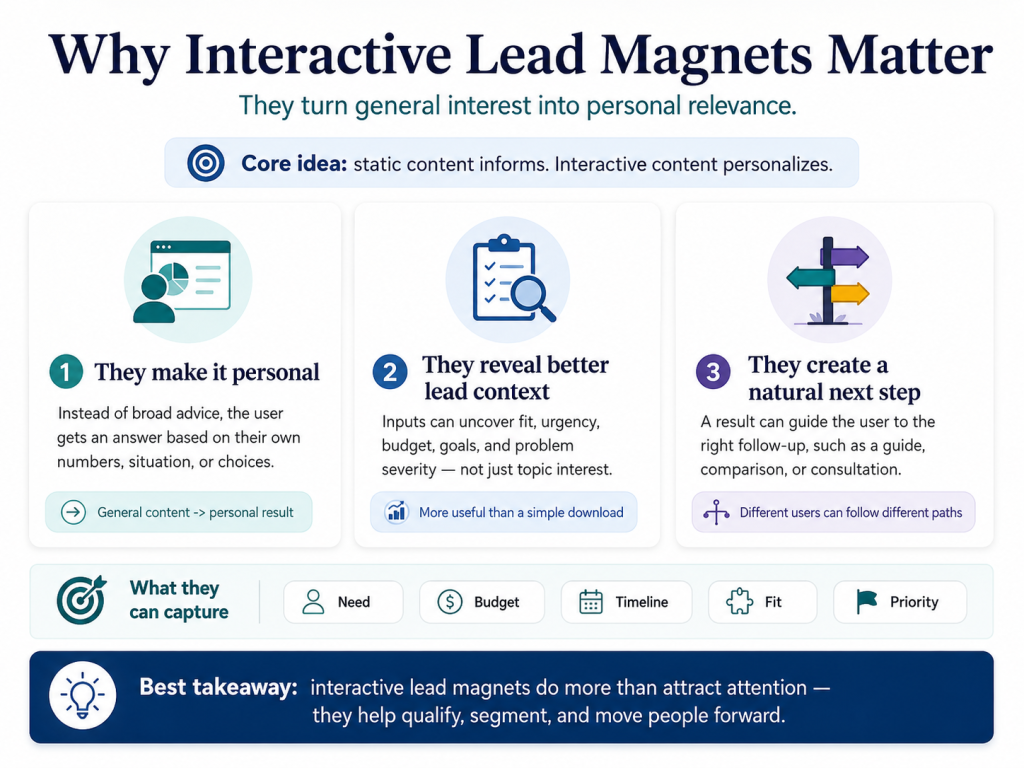
Why Interactive Lead Magnets Matter
Interactive lead magnets move the user from general information to personal relevance.
A blog post might explain the cost of employee turnover.
A turnover-cost calculator asks the reader to enter employee count, average salary, and annual turnover rate. The result connects the broader issue to the reader’s own organization.
That difference matters for three reasons.
They Apply Information To The User
Static content usually explains what is true in general.
Interactive content helps the user understand what may be true in a specific situation.
The visitor does not need to translate an abstract idea into a personal answer. The tool performs part of that work.
They Reveal More Than Topic Interest
A PDF download shows that someone is interested in a subject.
An interactive experience can reveal:
- The severity of the problem.
- The scale of the organization.
- The desired outcome.
- The available budget.
- The expected timeline.
- The user’s preferences.
- The likely product fit.
These responses can support segmentation and qualification when they are connected to a defined lead management process.
They Create A Natural Next Step
A result can lead directly to a useful recommendation.
A low maturity score may lead to an educational guide.
A strong return estimate may lead to a consultation.
A product recommendation may lead to a comparison page.
The experience can move the user forward without forcing every participant into the same sales path.
HubSpot allows businesses to build lead scores from property values and behavioral events. Inputs collected through an interactive lead magnet can contribute to that process when they are mapped to meaningful CRM data.
The Main Types Of Interactive Lead Magnets
The best format depends on the question the user needs answered.
| Format | Primary Function | Best Use Case |
|---|---|---|
| Calculator | Produces a numerical estimate | ROI, savings, pricing, capacity |
| Quiz | Matches the user with an option | Products, services, plans |
| Assessment | Evaluates the current situation | Readiness, maturity, risk |
| Scorecard | Grades performance against criteria | Audits, compliance, strategy |
| Benchmark Tool | Compares the user with peers | B2B, finance, operations |
| Configurator | Builds a suitable package | Products, plans, technical solutions |
| Interactive Survey | Collects responses and returns value | Research, segmentation, discovery |
| Interactive Checklist | Adapts tasks to the user | Onboarding, implementation, planning |
The formats can overlap.
A product quiz may also act as an assessment. A readiness assessment may use scorecard logic. A calculator may generate a personalized report.
The name matters less than the job the tool performs.
Calculators
Calculators are strongest when changing the inputs should change a numerical result.
Common examples include:
- Return on investment calculators.
- Savings estimators.
- Pricing calculators.
- Staffing calculators.
- Break-even calculators.
- Budget planners.
- Capacity calculators.
A calculator is not valuable merely because it performs arithmetic.
The result must help the user make a decision.
A tool that estimates the cost of an inefficient process may help a prospect decide whether the problem deserves further attention.
A calculator that returns an obvious or meaningless number adds friction without adding value.
Quizzes
Quizzes use a series of questions to place users into categories or recommend an option.
Common examples include:
- Product recommendation quizzes.
- Solution selectors.
- Buyer-type quizzes.
- Style finders.
- Knowledge quizzes.
- Learning-path quizzes.
Quizzes work well when the user is unsure which option fits.
They are especially useful when a business offers several products or services that solve different problems.
Interact reports a 40.1% average start-to-lead conversion rate for quizzes built on its platform. This figure measures people who began a quiz and later became leads. It does not measure all landing-page visitors.
Assessments And Scorecards
Assessments evaluate the user against a set of criteria.
The result may be:
- A maturity level.
- A readiness score.
- A risk category.
- A performance grade.
- A capability profile.
These formats work well when the user needs to understand the current condition before choosing a solution.
A cybersecurity company might offer a readiness assessment.
A consultancy might offer an operational maturity scorecard.
A marketing platform might evaluate the strength of a company’s demand generation system.
The result should do more than assign a label. It should explain what the score means and what the user can do next.
Product Recommendation Tools
Recommendation tools reduce choice overload.
They ask about preferences, goals, limitations, or use cases, then narrow the available options.
An e-commerce tool might ask about:
- Style preference.
- Product experience.
- Budget.
- Desired outcome.
- Personal requirements.
A B2B recommendation tool might ask about:
- Company size.
- Industry.
- Team structure.
- Technical requirements.
- Current workflow.
The value comes from making the choice easier.
The tool should not collect several answers only to show the user the entire product catalog.
Interactive Surveys
Interactive surveys collect audience information while returning something useful to the participant.
A conventional survey mainly benefits the organization collecting the responses.
An interactive lead magnet must also benefit the user.
That benefit may include:
- A comparison with other respondents.
- A personalized summary.
- A score.
- A recommendation.
- Early access to the final research.
Without a participant benefit, the experience is research collection rather than a lead magnet.
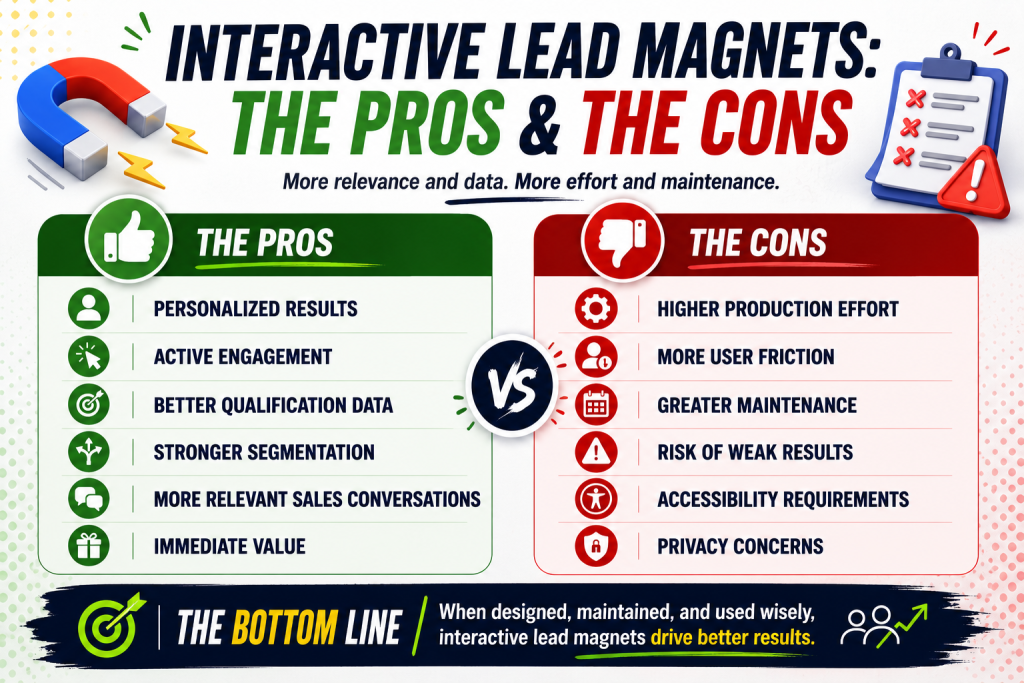
The Pros And Cons Of Interactive Lead Magnets
Interactive lead magnets can provide more relevant results and stronger lead data than traditional downloads. They also require more effort from the user and more resources from the business.
Their value depends on whether personalization meaningfully improves the answer.
Pros Of Interactive Lead Magnets
Personalized Results
Interactive lead magnets use the visitor’s inputs to shape the output.
A calculator can estimate savings using actual costs. A product quiz can recommend an option based on preferences. An assessment can identify gaps based on the user’s current situation.
This makes the result easier to connect to a real decision.
Active Participation
The user takes part in the experience instead of downloading a resource to read later.
Answering questions or entering data can make the problem feel more immediate. It can also help users recognize needs they had not considered before starting.
Better Qualification Data
Interactive tools can collect information about company size, current costs, goals, urgency, or product fit.
That data can support lead scoring, segmentation, and routing when it is connected to a clear follow-up process.
More Relevant Follow-Up
The user’s answers can determine what happens next.
A low-readiness result may trigger educational content. A high-fit result may lead to a sales conversation. A product quiz may direct the user to one specific category.
This creates a more continuous experience than sending every lead the same follow-up.
Faster Time To Value
A well-designed tool can provide an answer during the session.
The user does not need to download a long document and search for the main insight.
Cons Of Interactive Lead Magnets
Higher Production Effort
Interactive lead magnets require more than writing and design.
The team may need to create scoring rules, calculations, branching logic, CRM fields, result pages, and follow-up workflows.
More User Friction
Every question asks the visitor to invest time, attention, or information.
Users may abandon the experience when the tool asks too much or when the result does not appear worth the effort.
Ongoing Maintenance
Calculations, benchmarks, product data, and recommendations can become outdated.
The tool needs a clear owner who can review its logic and integrations after launch.
Risk Of Weak Results
A polished interface can make an inaccurate score or estimate appear more credible than it is.
The underlying logic must be defensible, and important assumptions should be clear.
Privacy And Accessibility Requirements
Interactive tools may collect sensitive information and must work for users who rely on keyboards, screen readers, or other assistive technologies.
These requirements need to be considered during design, not added after launch.
The Central Tradeoff
The strengths and weaknesses come from the same source: participation.
More participation can create more relevant results and better lead data. It can also create more friction and complexity.
The format works when the value of the result is greater than the effort required to obtain it.
The Interaction Tax: When Interactivity Earns The User’s Effort
Every interactive lead magnet creates an interaction tax.
The user must invest time, attention, and information before receiving a result.
A static checklist may require one email address.
An assessment may require ten answers.
A calculator may ask for operational or financial data.
A product quiz may require the user to move through several screens.
That additional effort is not automatically a problem.
It becomes a problem when the result does not become more useful as the effort increases.
A practical principle is:
The more work the user performs, the more specific, credible, and actionable the result must become.
| User Effort | Result That May Justify It |
|---|---|
| Very Low | Checklist or simple recommendation |
| Low | Short score or product match |
| Moderate | Personalized diagnosis or estimate |
| High | Detailed report, benchmark, or action plan |
| Very High | Strategic analysis with clear commercial value |
A ten-question assessment that returns three generic sentences fails this test.
A detailed calculator that produces a credible financial estimate may justify the same level of effort.
Interactivity must earn the participation it requests.

How To Choose The Right Interactive Lead Magnet Format
The format should follow the user’s decision.
Use A Calculator When The User Needs A Number
Examples include:
- Potential savings.
- Estimated cost.
- Return on investment.
- Resource requirements.
- Time recovered.
- Revenue opportunity.
Use A Quiz When The User Needs A Match
Examples include:
- Best product.
- Suitable service.
- Recommended plan.
- Appropriate learning path.
- Preferred solution.
Use An Assessment When The User Needs A Diagnosis
Examples include:
- Current maturity.
- Readiness.
- Risk.
- Capability gaps.
- Performance level.
Use A Benchmark Tool When The User Needs Context
Examples include:
- Performance against peers.
- Industry averages.
- Cost comparisons.
- Operational efficiency.
- Conversion performance.
Use An Interactive Checklist When The User Needs A Process
Examples include:
- Launch planning.
- Compliance preparation.
- Software implementation.
- Campaign setup.
- Hiring readiness.
The tool should answer one central question.
Combining a quiz, calculator, assessment, survey, and sales form into one experience usually creates unnecessary complexity.
Interactive Lead Magnet Examples By Business Type
Different business models can use the same format for different purposes.
| Business Type | Interactive Lead Magnet | Result |
|---|---|---|
| SaaS | ROI calculator | Estimated savings or productivity gain |
| E-Commerce | Product recommendation quiz | Suggested products |
| Agency | Marketing maturity assessment | Score and action plan |
| Financial Services | Savings calculator | Projected savings range |
| Consulting | Readiness assessment | Priority gaps and next steps |
| Real Estate | Affordability calculator | Estimated buying range |
| Education | Course selector | Recommended learning path |
| Human Resources | Turnover cost calculator | Estimated annual cost |
| Cybersecurity | Risk scorecard | Risk level and recommendations |
| Logistics | Shipping cost estimator | Estimated service cost |
| Professional Services | Solution finder | Recommended engagement type |
The example should match a real decision.
A software company does not need a quiz simply because quizzes are popular.
It needs a quiz only when matching the user with the right product or workflow creates clear value.
Gated Vs. Ungated Interactive Lead Magnets
Gating is a separate decision from format.
An interactive lead magnet can be fully gated, partially gated, or ungated.
Fully Gated
The user provides contact information before beginning or before receiving any result.
This may work when:
- The brand already has strong trust.
- The result has obvious value.
- The audience understands the tool.
- Lead capture matters more than reach.
The risk is that the user must commit before seeing evidence of value.
Ungated
The full experience and result are available without contact information.
This may work when:
- The goal is reach or brand awareness.
- The tool supports organic search.
- Repeat use is valuable.
- The result leads naturally to a commercial next step.
The risk is that the business learns less about individual users.
Partially Gated
The user receives a basic result, then submits contact information for something more valuable.
That additional value might be:
- A detailed report.
- A saved result.
- A downloadable PDF.
- A comparison with peers.
- A personalized action plan.
- An emailed breakdown.
This model allows the tool to prove its value before requesting personal information.
The gate should not feel like a trap.
A page that promises an immediate result should not conceal the entire answer after the user completes a long assessment.
Using Interactive Lead Magnets For Qualification
Interactive lead magnets can help distinguish general curiosity from commercial fit.
Useful qualification signals may include:
- Company size.
- Industry.
- Current system.
- Problem severity.
- Annual spending.
- Desired timeline.
- Required features.
- Expected outcome.
- Decision authority.
The strongest qualification questions also improve the user’s result.
Team size may affect a software recommendation and help the business evaluate fit.
A purchasing-timeline question may benefit sales but do little for the user. It may still be appropriate, but only when the value exchange supports it.
Qualification should determine what happens next.
| Lead Profile | Appropriate Next Step |
|---|---|
| High Fit And High Intent | Sales outreach |
| High Fit And Low Intent | Focused nurture |
| Low Fit And High Interest | Alternative offer or education |
| Early-Stage User | Foundational content |
| Existing Customer | Expansion or support path |
The purpose is not to assign a score for its own sake.
It is to create a better next step for the user and the business.
Typeform supports tagging and segmentation based on responses. HubSpot supports scoring based on fit properties and engagement events.
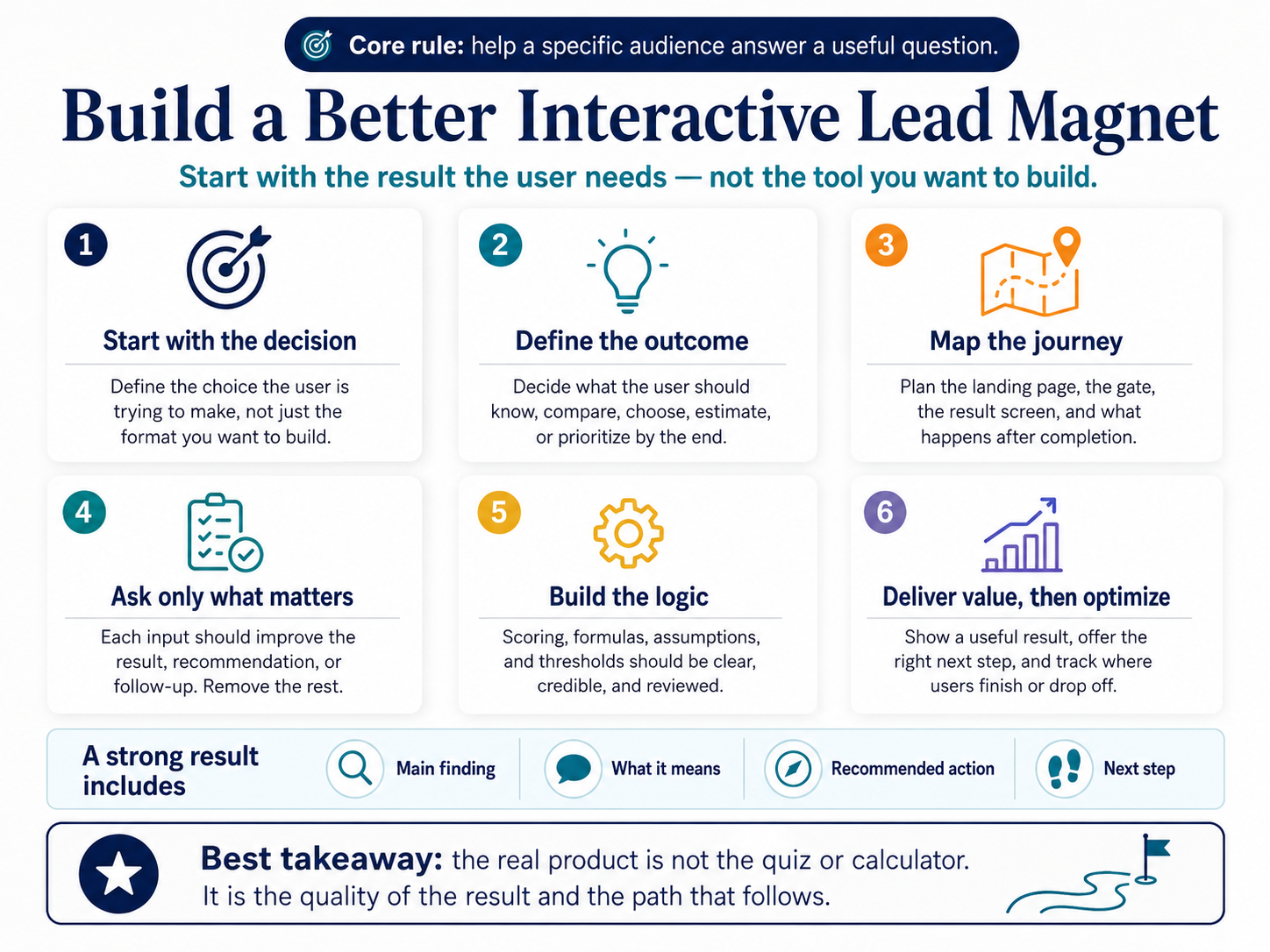
How To Build An Interactive Lead Magnet
A strong interactive lead magnet starts with the result, not the technology.
The goal is not to build a quiz, calculator, or assessment. The goal is to help a specific audience answer a useful question.
1. Define The Decision It Supports
Start with the decision the user is trying to make.
Weak objective:
“Create an engaging quiz.”
Strong objective:
“Help small e-commerce brands identify which email automation workflow they should build first.”
The stronger objective identifies the audience, problem, and intended outcome.
A useful interactive lead magnet should help the user estimate, diagnose, compare, select, or prioritize something.
2. Define The Result
Decide what the user should understand or be able to do after completing the experience.
The result might help them:
- Estimate a cost or return.
- Compare possible options.
- Identify a capability gap.
- Select a product.
- Understand their current maturity.
- Prioritize a next action.
Avoid results that only repeat the answers the user provided.
If someone says they lack a defined process, the result should provide more value than, “You need a process.”
3. Map The User Journey And Gate
Outline the complete experience before writing the questions.
Decide:
- What the landing page promises.
- Where the experience begins.
- When contact information is requested.
- What the user sees before submitting a form.
- What the final result contains.
- What happens after completion.
The gate can appear before the tool, before the full result, or after a useful summary.
The right placement depends on the strength of the result and the amount of effort required from the user.
A long assessment should not conceal all value after the participant has completed it.
4. Identify The Minimum Necessary Inputs
Every input should serve a clear purpose.
It should:
- Change the result.
- Improve the recommendation.
- Prevent an inaccurate output.
- Support relevant qualification.
- Determine the appropriate follow-up.
Remove questions that are merely interesting to marketing or sales.
Business-focused questions may still be useful, but they should not overwhelm the user or weaken the value exchange.
5. Design The Logic
Map how each input affects the result.
For a quiz, define the categories, answer weights, scoring rules, and thresholds.
For a calculator, define the variables, formulas, assumptions, acceptable ranges, and error conditions.
For an assessment, define the evaluation criteria, score weights, maturity levels, and recommendations.
The logic should be reviewed by someone with relevant subject expertise.
A polished interface cannot compensate for weak calculations or arbitrary scoring.
6. Write Clear Questions
Questions should be brief, specific, and easy to answer.
Avoid technical language unless the audience uses it regularly. Explain unfamiliar terms and use ranges when users may not know an exact figure.
Each question should make it clear:
- What information is needed.
- Why it matters.
- How the user should answer.
- Whether an estimate is acceptable.
The questions should feel like part of the solution, not an interrogation.
7. Create A Useful Result And Next Step
The results page is the product.
It should provide more than a score, category, or number.
A useful result may include:
- The primary finding.
- An explanation of what it means.
- The inputs used.
- Important assumptions.
- A comparison or range.
- Recommended actions.
- Relevant resources.
- A logical next step.
The next step should match the result.
A low-readiness user may need educational content. A high-fit user with an urgent problem may be ready for a sales conversation.
The user should still receive meaningful value without being forced to speak with sales.
8. Add Tracking Before Launch
Define the events that will be measured before the tool goes live.
At minimum, track:
- Landing-page visits.
- Experience starts.
- Step completion.
- Abandonment points.
- Completed experiences.
- Result views.
- Contact submissions.
- Report requests.
- Meetings booked.
Pass relevant inputs and results into the CRM using consistent field names.
Analytics should show both where users struggle and whether completed experiences create qualified leads.
9. Test The Complete Experience
Test more than whether the form submits.
Functional testing should cover formulas, scoring rules, branching paths, and every possible result.
Usability testing should cover question clarity, mobile layout, completion time, and perceived value.
Technical testing should cover CRM data, email delivery, analytics events, loading speed, and error handling.
Accessibility testing should cover keyboard navigation, field labels, instructions, error messages, and result presentation.
The tool is ready only when the result makes sense, the data reaches the correct systems, and the user receives the intended next step.
How To Measure Interactive Lead Magnet Performance
Email submissions measure only one stage of the experience.
A complete measurement system should show whether the right people arrive, begin the tool, complete it, become qualified leads, and create commercial value.
The metrics form a chain. A weakness at one stage affects every stage that follows.
Measure Reach And Participation
Start by measuring whether the right audience reaches the experience and chooses to begin.
Track:
- Landing-page visitors.
- Traffic source.
- Cost per visitor.
- New versus returning users.
- Device type.
- Experience starts.
- Cost per start.
The start rate shows whether the page and offer create enough interest for visitors to participate.
Start Rate = Experience Starts ÷ Landing-Page Visitors × 100
A low start rate may indicate weak positioning, poor audience fit, or an unclear promise.
Measure Completion And Friction
Completion metrics show whether users can move through the experience successfully.
Track:
- Completion rate.
- Abandonment point.
- Time to complete.
- Completion by device.
- Errors by question or step.
- Result-view rate.
Completion Rate = Completed Experiences ÷ Experience Starts × 100
Do not look only at the overall completion rate.
Identify the exact question or screen where users leave. A sharp drop may indicate confusing language, a sensitive request, technical friction, or a gate that appears too early.
Measure Lead Capture
Lead capture rates show whether users are willing to exchange contact information for the result or next step.
Track:
- Visitor-to-lead rate.
- Start-to-lead rate.
- Completion-to-lead rate.
- Report-request rate.
- Meeting-booking rate.
Visitor-To-Lead Rate = Leads ÷ Landing-Page Visitors × 100
Start-To-Lead Rate = Leads ÷ Experience Starts × 100
Completion-To-Lead Rate = Leads ÷ Completed Experiences × 100
These rates are not interchangeable.
A start-to-lead rate includes only people who began the experience. A visitor-to-lead rate includes everyone who reached the page.
Always state the denominator when reporting performance.
Measure Lead Quality
A high opt-in rate has limited value when the leads do not fit the business.
Track:
- Ideal customer profile match.
- Marketing-qualified lead rate.
- Sales-qualified lead rate.
- Sales acceptance rate.
- Disqualification reasons.
- Cost per qualified lead.
Qualified Lead Rate = Qualified Leads ÷ Total Leads × 100
Qualification data helps determine whether the tool attracts the right audience, not merely a large audience.
A high lead volume with a low qualification rate may indicate broad targeting, weak result positioning, or questions that do not reveal commercial fit.
Measure Pipeline And Revenue
Pipeline and revenue metrics determine whether the asset justifies its production and maintenance costs.
Track:
- Opportunity rate.
- Pipeline generated.
- Lead-to-customer rate.
- Revenue per lead.
- Revenue per 1,000 visitors.
- Payback on production cost.
Opportunity Rate = Opportunities ÷ Qualified Leads × 100
Pipeline Per 1,000 Visitors = Pipeline Value ÷ Visitors × 1,000
Pipeline per 1,000 visitors is especially useful because it connects traffic, conversion, qualification, and opportunity value.
It prevents the team from treating the asset with the most email submissions as the automatic winner.
Diagnose Performance Across The Funnel
The relationship between metrics often reveals the underlying problem.
| Performance Pattern | Likely Issue |
|---|---|
| High traffic, low start rate | Weak promise or poor audience fit |
| Strong start rate, low completion | Excessive friction or confusing questions |
| Strong completion, low lead capture | Weak gate or insufficient additional value |
| High lead volume, low qualification | Broad targeting or poor qualification logic |
| Strong qualification, low opportunity rate | Weak follow-up or sales handoff |
| Strong pipeline, weak revenue | Sales-cycle, pricing, or closing issue |
The purpose of measurement is not to collect every possible metric.
It is to identify where the experience loses value and whether the asset moves the right users toward a meaningful business outcome.
A quiz with many email submissions but few qualified opportunities may be less valuable than an assessment with a lower opt-in rate and stronger pipeline impact.
Common Interactive Lead Magnet Mistakes
Interactive lead magnets usually fail for practical reasons, not because the format itself is ineffective.
The most common problems come from choosing the wrong use case, asking too much from the user, or failing to connect the result to the next step.
Starting With The Format
“We should build a quiz” is not a strategy.
The format should follow the user’s problem. Start by identifying the decision, estimate, diagnosis, or recommendation the user needs. Then choose the format that delivers that result most clearly.
Asking Too Many Questions
More questions do not automatically produce better qualification.
Every question should improve the result, support a relevant recommendation, or change what happens next. Remove fields that serve only the business without improving the user experience.
Delivering A Generic Result
The output should reflect the information the user provided.
A tool that asks several questions and then returns a broad, generic conclusion creates disappointment. The result should feel specific enough to justify the effort required.
Hiding All Value Behind A Gate
A visitor may feel misled after completing a long experience only to discover that the result is completely locked.
A better approach is to show a useful summary, then offer a detailed report, saved result, or personalized action plan in exchange for contact information.
Using Weak Assumptions
Calculators, benchmarks, and assessments lose credibility when their logic is unclear.
Important assumptions should be visible. Use ranges when the data cannot support a precise result, and explain which inputs have the greatest effect on the outcome.
Treating Every Lead The Same
Interactive lead magnets collect information that can support segmentation and follow-up.
That value is lost when every participant receives the same email sequence or sales message. The next step should reflect the user’s result, fit, or level of intent.
Ignoring Accessibility
An interactive tool must work for users who rely on keyboards, screen readers, or other assistive technologies.
Clear labels, logical navigation, understandable error messages, and accessible results should be considered during design and testing.
Failing To Maintain The Tool
Interactive lead magnets can become outdated even when the page still looks polished.
Prices, formulas, benchmarks, product options, and recommendations should be reviewed regularly. The tool should have a clear owner responsible for keeping it accurate.
The Pattern Behind These Mistakes
Most of these problems come from prioritizing the business’s desire for data over the user’s need for a useful result.
A strong interactive lead magnet keeps the exchange balanced.
The user provides information. The tool returns something specific, credible, and worth the effort.
Interactive Lead Magnets Vs. Static Lead Magnets
Interactive and static lead magnets perform different jobs.
| Factor | Interactive Lead Magnet | Static Lead Magnet |
|---|---|---|
| Output | Personalized | Consistent |
| User Effort | Moderate to high | Low to moderate |
| Qualification Data | Potentially rich | Usually limited |
| Production Cost | Moderate to high | Low to moderate |
| Maintenance | Logic and data updates | Content updates |
| Best For | Estimates, matches, diagnoses | Education, reference, processes |
| Main Strength | Relevance | Portability and depth |
| Main Risk | Friction | Low post-download engagement |
Use an interactive format when the answer should change.
Use a static format when the information should remain stable and reusable.
The strongest strategy may combine both.
A calculator can generate a personalized result. A downloadable PDF can package that result into a document the user can save or share. A follow-up sequence can then help the user apply it.
Conclusion
Interactive lead magnets turn content into a participatory experience.
Their value comes from helping users calculate, diagnose, compare, or choose. The same inputs can also provide businesses with useful context for qualification and follow-up.
That potential does not make interactivity the right choice for every offer.
Each question creates an interaction tax. Each calculation creates a maintenance obligation. Each personalized result creates an expectation of relevance.
The tool must earn those costs.
Start with the decision the user needs to make.
Choose the simplest format capable of producing a useful answer.
Ask only for information that improves the result or the next action.
Then measure success through qualified pipeline and revenue, not email submissions alone.

Frequently Asked Questions
What Is An Interactive Lead Magnet?
An interactive lead magnet is a digital tool that produces a result based on information supplied by the user.
Examples include calculators, quizzes, assessments, scorecards, recommendation tools, and configurators.
What Is The Best Type Of Interactive Lead Magnet?
The best format depends on the user’s goal.
Use a calculator for numerical estimates, a quiz for matching, an assessment for diagnosis, and a benchmark tool for comparison.
Do Interactive Lead Magnets Convert Better Than PDFs?
They can, but no format wins automatically.
Performance depends on the audience, traffic source, value of the result, number of questions, gating strategy, and follow-up.
The formats should also be compared using qualified leads and pipeline, not raw opt-ins alone.
Should An Interactive Lead Magnet Be Gated?
Not necessarily.
It can be fully gated, ungated, or partially gated.
A common approach is to provide a useful summary first, then request an email address for a detailed report or saved result.
How Many Questions Should An Interactive Lead Magnet Include?
Use the fewest questions required to produce a credible result.
There is no universal ideal number.
A product quiz may need five questions, while a detailed assessment may require more. The result must justify the effort.
What Makes An Interactive Lead Magnet Effective?
An effective interactive lead magnet:
- Solves a specific problem.
- Produces a meaningful result.
- Uses clear questions.
- Requests only necessary information.
- Works well on mobile devices.
- Supports accessibility.
- Connects the result to relevant follow-up.
- Measures qualification and revenue.
Can Interactive Lead Magnets Help Qualify Leads?
Yes. User responses can reveal fit, need, urgency, company size, preferences, or potential value.
The information becomes useful when it feeds a lead-scoring, segmentation, routing, or nurture system.
Are Interactive Lead Magnets Expensive To Create?
The cost depends on complexity.
A basic quiz can be built with no-code software. A custom calculator may require strategy, design, development, integrations, and ongoing maintenance.
The production investment should reflect the potential commercial value of the result.
- Lead Magnets Strategy.
- Check out these Lead Magnet Ideas.
- Lead Magnet Examples.
- Best Lead Magnet Templates.
- Lead Magnets Guide.
- Interactive Calculators Vs Static PDFs.
- What Is Cheat Sheet Lead Magnet?
- Checklist Lead Magnet.
- Interactive Calculator Vs Static PDFs.
- How to create an eBook that converts.
- Swipe Files Explained.