A lead magnet succeeds when it helps the right person make meaningful progress.
That progress can take different forms.
An interactive calculator might estimate potential savings, recommend a product, or show how a company compares with an industry benchmark. A static PDF might explain a complex topic, provide a checklist, or give the reader a reusable template.
Both formats can capture leads. Both can also fail.
A calculator fails when it asks for too much information and delivers a weak result. A PDF fails when it contains more information than the reader has time or reason to use.
The choice is not simply between a modern format and an outdated one. It is between two different ways of delivering value.
Interactive calculators personalize the answer. Static PDFs standardize the information.
This guide compares interactive calculators and static PDFs side by side. It explains what they are, how they work, why the difference matters, the strengths and limitations of each format, and how to choose the right lead magnet for your audience.
Key Takeaways
- Interactive calculators change their output based on user inputs, while static PDFs deliver the same core information to every reader.
- Calculators work best when the audience needs an estimate, diagnosis, benchmark, or personalized recommendation.
- Static PDFs work best when the audience needs detailed education, a repeatable process, or a resource they can save and share.
- Calculators can collect stronger qualification signals, but only when their inputs connect to lead scoring, segmentation, or follow-up.
- PDFs are usually faster and less expensive to produce, but long documents can create a slow path to value.
- Conversion rates alone cannot determine the better format because calculators, quizzes, forms, and downloads often measure different stages of engagement.
- The most useful comparison is qualified pipeline generated relative to traffic, cost, and production effort.
- A hybrid experience can combine a personalized calculator with a downloadable PDF report.
Affiliate Disclosure: Some of the links on this site are affiliate links. That means if you click and make a purchase, I may earn a small commission at no extra cost to you. I only recommend tools and resources I genuinely believe in and that align with the content we share here.
What Interactive Calculators And Static PDFs Are
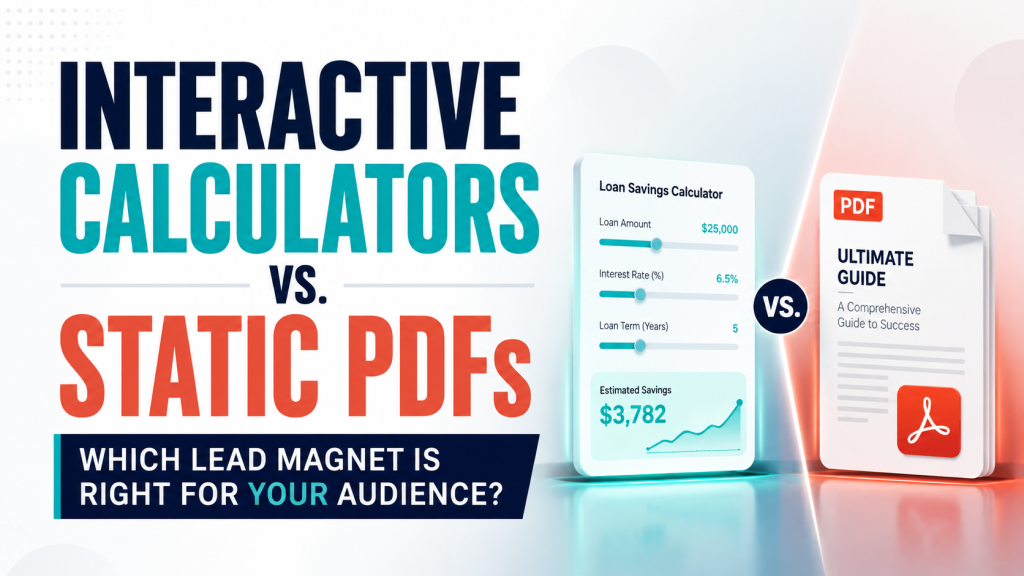
Interactive calculators and static PDFs are both lead magnet formats. They offer something useful in exchange for attention, contact information, or continued engagement.
They differ in how that value is created.
Interactive Calculators
An interactive calculator produces an output based on information entered by the user.
The user might provide:
- Revenue
- Operating costs
- Team size
- Transaction volume
- Current conversion rate
- Project timeline
- Budget range
- Product preferences
- Business goals
The calculator processes those inputs and returns a result.
Common examples include:
- Return on investment calculators
- Cost-savings calculators
- Pricing estimators
- Product recommendation tools
- Readiness assessments
- Maturity assessments
- Benchmarking tools
- Capacity planners
The output should change when the inputs change.
A calculator that gives every user essentially the same result is not delivering meaningful personalization. It is a static message presented through an interactive interface.
Static PDFs
A static PDF delivers the same core content to every reader.
The reader may apply the information differently, but the document itself does not change based on individual inputs.
Common examples include:
- Ebooks
- White papers
- Checklists
- Templates
- Buyer’s guides
- Industry reports
- Worksheets
- Swipe files
- Implementation guides
A PDF can still be highly practical.
A checklist can guide a process. A worksheet can help someone organize information. A research report can support an important decision.
The defining difference is not whether the asset is useful. It is whether the asset adapts to the user.
HubSpot describes lead magnets as valuable resources offered in exchange for prospect information and includes downloadable assets such as ebooks, white papers, and templates. It also identifies live ROI calculators as an interactive lead generation format that helps prospects visualize value using their own numbers.
How Interactive Calculators And Static PDFs Work
The formats create different user journeys.
Those differences affect engagement, data collection, follow-up, and measurement.
How An Interactive Calculator Works
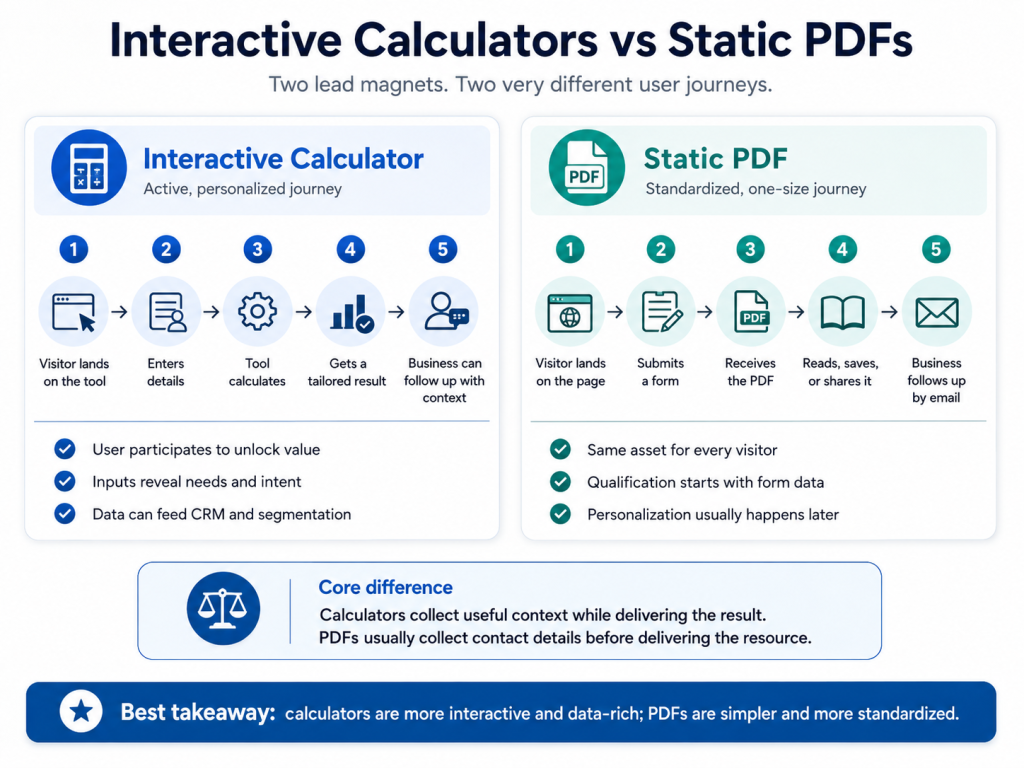
A typical calculator follows this sequence:
- The visitor arrives on the calculator page.
- The page explains what the tool measures.
- The visitor enters relevant information.
- The tool processes the inputs.
- The visitor receives a personalized result.
- The business may request contact information before or after showing the result.
- The inputs and results may be passed to a CRM.
- The visitor receives a tailored follow-up or recommended next step.
The experience is active.
The visitor must participate before receiving the full value.
That participation creates friction, but it can also create context. The answers may reveal the visitor’s needs, circumstances, or buying intent.
How A Static PDF Works
A typical PDF lead magnet follows a different sequence:
- The visitor arrives on a landing page.
- The page explains what the document contains.
- The visitor submits a form.
- The PDF appears on a confirmation page or arrives by email.
- The visitor downloads, reads, saves, prints, or shares the document.
- The business begins an email nurture sequence.
- Qualification depends mainly on form data and later engagement.
The experience is more standardized.
Every visitor receives the same document. Personalization usually happens through the landing page, email sequence, segmentation, or sales follow-up rather than inside the asset itself.
The Operational Difference
A calculator can gather information while delivering the result.
A PDF usually gathers information before delivering the resource.
That difference matters.
Calculator inputs can potentially become CRM properties. They can also contribute to lead scores, workflows, segmentation, or sales routing.
HubSpot’s current lead scoring documentation allows businesses to score contacts and companies using property values and behavioral events. Calculator inputs can support that process when they are captured accurately and mapped to meaningful qualification criteria.

Why The Format Choice Matters
The format determines more than how the content looks.
It shapes the value exchange.
Calculators Reduce The Distance Between Information And Application
A PDF generally explains something.
A calculator applies information to the visitor’s situation.
Consider a company selling warehouse automation software.
A PDF could explain how automation reduces manual labor and fulfillment errors. The reader would still need to calculate what those improvements might mean for the business.
A calculator could ask for:
- Monthly order volume
- Current labor hours
- Average wage
- Error rate
- Cost per error
It could then estimate a possible cost range based on those inputs.
The PDF teaches the principle.
The calculator helps the visitor apply it.
PDFs Support Depth And Reuse
A calculator is usually designed to answer one focused question.
A PDF can provide context around a broader decision.
It can explain:
- Methodology
- Risks
- Implementation requirements
- Technical details
- Regulatory considerations
- Case studies
- Decision criteria
A reader can also save the document, annotate it, print it, or share it with colleagues.
That portability matters when several stakeholders participate in a decision.
The Format Changes The Type Of Lead Data Collected
A PDF form may collect a name, email address, company, and job title.
A calculator can collect those details plus information about the visitor’s problem.
That could include:
- Current costs
- Desired outcome
- Urgency
- Available resources
- Product fit
- Potential contract value
The additional data is useful only when it changes what happens next.
If every lead receives the same email and the same sales call, collecting more information creates friction without improving the experience.

Interactive Calculators Vs. Static PDFs At A Glance
| Comparison Point | Interactive Calculators | Static PDFs |
|---|---|---|
| Core Experience | Personalized and participatory | Consistent and document-based |
| Primary Value | Individual result | Reusable information |
| Common Formats | ROI calculator, estimator, assessment | Ebook, checklist, report, template |
| User Effort | Moderate | Low to moderate |
| Output | Changes with user inputs | Remains the same |
| Data Collection | Contact details plus user inputs | Usually contact and company details |
| Qualification Potential | Strong when inputs reveal fit or intent | More limited unless the form includes qualifying questions |
| Best Funnel Fit | Consideration and evaluation | Awareness through evaluation |
| Content Depth | Usually focused | Can support substantial depth |
| Portability | Must be designed into the experience | Easy to save, print, and share |
| Creation Cost | Moderate to high | Low to moderate |
| Launch Speed | Usually slower | Usually faster |
| Maintenance | Logic, integrations, formulas, and assumptions | Facts, links, branding, and design |
| Technical Requirements | Development or specialized software | Writing and document design |
| Main Risk | Too much effort for too little value | Downloaded but never meaningfully used |
The table does not identify a universal winner.
It shows that each format performs a different job.
The Pros And Cons Of Interactive Calculators
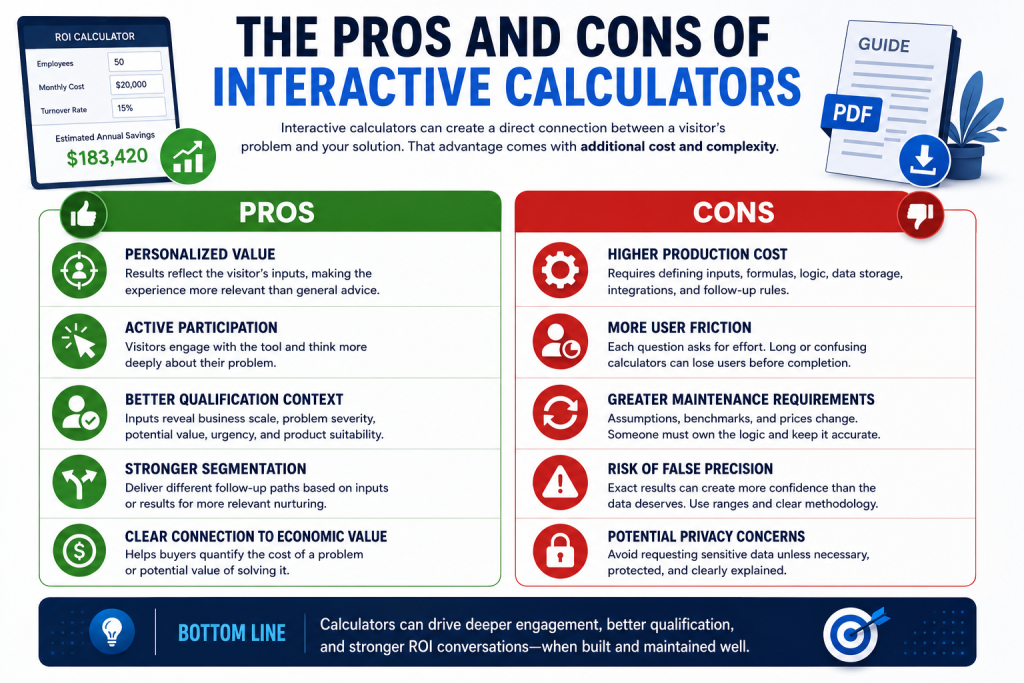
Interactive calculators can create a direct connection between the visitor’s problem and the business’s solution.
That advantage comes with additional cost and complexity.
Pros Of Interactive Calculators
Personalized Value
The result reflects the visitor’s inputs.
That can make the experience feel more relevant than general advice.
A prospect evaluating software may care less about broad productivity claims than an estimate based on the company’s current workload and costs.
Active Participation
The visitor must engage with the asset.
The act of entering data can encourage the user to think more carefully about the problem.
It can also reveal whether the issue is important enough to justify several minutes of effort.
Better Qualification Context
Inputs can show whether a prospect resembles the company’s ideal customer profile.
They can reveal:
- Business scale
- Problem severity
- Potential value
- Purchase urgency
- Product suitability
Sales teams can use that context to start a more relevant conversation.
Stronger Segmentation
Users can receive different follow-up paths based on their inputs or results.
A high-fit prospect might receive a case study and an invitation to speak with sales.
An early-stage prospect might receive educational content.
A poor-fit prospect might receive an alternative recommendation.
Clear Connection To Economic Value
Calculators can help a buyer quantify the cost of a problem or the potential value of solving it.
That is particularly useful when the product requires financial justification.
Cons Of Interactive Calculators
Higher Production Cost
A useful calculator requires more than design.
The team must define:
- Inputs
- Formulas
- Assumptions
- Output logic
- Error handling
- Data storage
- CRM connections
- Follow-up rules
The development effort may be difficult to justify for a low-value offer or a small audience.
More User Friction
Every question asks the visitor to do work.
A long or confusing calculator can lose users before completion.
The result must be valuable enough to justify that effort.
Greater Maintenance Requirements
Prices, benchmarks, assumptions, and product capabilities change.
A calculator can become inaccurate even when the page still appears polished.
Someone must own the logic and review it regularly.
Risk Of False Precision
A precise-looking result can create more confidence than the underlying data deserves.
An estimated return of $183,420 may appear authoritative even when it relies on broad assumptions.
Ranges are often more credible than exact figures.
The methodology should be clear enough for the user to understand what influences the result.
Potential Privacy Concerns
Some inputs may involve commercially sensitive information.
The calculator should not request confidential data unless it is necessary, protected, and clearly explained.
The Pros And Cons Of Static PDFs
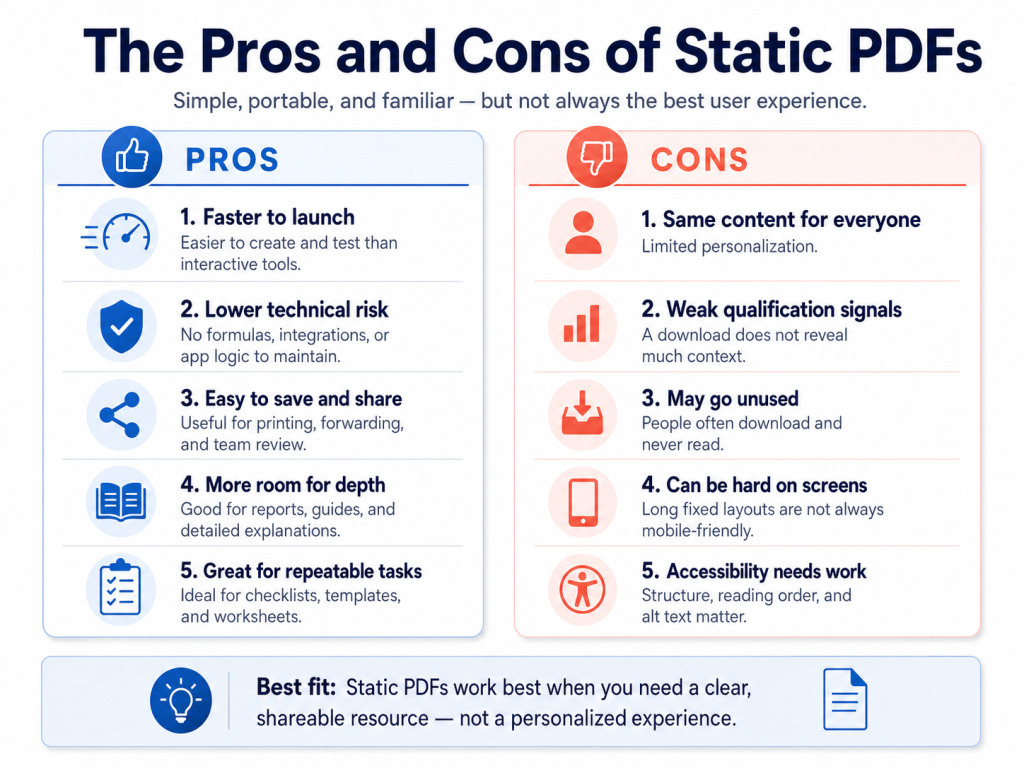
Static PDFs remain effective because they are simple, portable, and familiar.
Their limitations usually appear when they are too long, poorly designed, or used where a web page or interactive tool would serve the user better.
Pros Of Static PDFs
Faster Production
A PDF generally requires research, writing, editing, and design.
It does not usually require application logic, database work, or CRM integration.
That makes it easier to launch and test.
Lower Technical Risk
A PDF does not break because a formula changed or an integration failed.
The technical demands are limited compared with an interactive tool.
Strong Portability
Readers can save, print, annotate, and share the document.
That can be valuable in B2B buying processes where several people need to review the same information.
More Room For Depth
A report or white paper can explain methodology, evidence, implementation, and risk in detail.
A calculator may support a decision. A PDF can explain the reasoning behind it.
Effective For Repeatable Processes
Checklists, templates, worksheets, and reference guides are naturally suited to static formats.
The information does not need to change for each reader.
The reader applies it to a specific task.
Cons Of Static PDFs
Limited Personalization
The same content is delivered to every user.
A small business and a global company may receive identical recommendations despite having different needs.
Weak Qualification Signals
A PDF download shows interest in a topic.
It may not reveal the severity of the problem, the likely value of the opportunity, or the prospect’s readiness to act.
Risk Of Low Usage
A download does not prove that the document was read or applied.
The resource may remain unopened in an inbox or downloads folder.
Poor On-Screen Experience
PDFs are often designed like print documents.
Small text, fixed layouts, multiple columns, and long linear pages can make them difficult to use on phones or small screens.
Nielsen Norman Group has documented recurring usability problems with PDFs used as substitutes for web content. These include navigation difficulties, disorientation, and layouts that do not adapt well to on-screen reading.
PDFs can be made accessible, but accessibility must be considered intentionally. Adobe and the W3C recommend measures such as document tagging, logical reading order, alternative text, descriptive titles, and accessible form fields.
Conversion Rates Do Not Tell The Full Story
Interactive content is often promoted using high conversion statistics.
Those numbers require context.
Interact’s 2026 report states that 40.1% of people who start one of its quizzes become leads on average.
That is a start-to-lead conversion rate.
It does not mean that 40.1% of all page visitors submit their information.
A visitor who starts a quiz has already taken an engagement step. A visitor who lands on a PDF offer page may leave before clicking or starting the form.
Comparing those numbers directly would create a misleading conclusion.
The formats may also use different gating strategies.
A calculator might:
- Request an email before showing any result.
- Show a basic result before requesting an email.
- Remain entirely ungated.
- Request contact information only for a detailed report.
A PDF might:
- Require a form before download.
- Remain ungated.
- Require only an email address.
- Use several qualifying fields.
Each approach changes the measured conversion rate.
The traffic source matters too.
A calculator promoted to an existing email list should not be compared with a PDF landing page receiving cold paid traffic.
Interact’s data is useful as evidence that a well-designed interactive experience can convert a substantial share of people who choose to begin it. It is not evidence that every calculator will outperform every PDF.

Lead Quality Matters More Than Download Volume
The number of leads is not the final business outcome.
A static PDF might generate more contacts because it requires less effort. A calculator might generate fewer contacts but reveal more about each prospect.
Consider two hypothetical campaigns with the same amount of traffic.
| Result | Static PDF | Interactive Calculator |
|---|---|---|
| Leads Generated | 500 | 250 |
| Sales-Qualified Lead Rate | 3% | 12% |
| Sales-Qualified Leads | 15 | 30 |
The PDF generates twice as many leads.
The calculator generates twice as many sales-qualified leads.
The purpose of this example is not to establish a benchmark. It shows why the evaluation should continue beyond the initial conversion.
A useful comparison should include:
- Visitor-to-lead conversion rate
- Calculator start rate
- Calculator completion rate
- Cost per lead
- Marketing-qualified lead rate
- Sales-qualified lead rate
- Meeting-booking rate
- Opportunity rate
- Lead-to-customer rate
- Pipeline generated
- Revenue per lead
A practical metric is qualified lead yield:
Qualified Lead Yield = Total Visitors × Lead Conversion Rate × Qualification Rate
A deeper model is pipeline yield:
Pipeline Yield = Qualified Leads × Opportunity Rate × Average Opportunity Value
These models help prevent the team from choosing the asset that collects the most email addresses rather than the one that creates the most commercial value.
When Interactive Calculators Work Best
An interactive calculator is the stronger choice when the answer should change based on the user.
The User Needs A Personalized Estimate
Calculators work naturally for questions such as:
- How much could we save?
- What will this cost?
- What return could we expect?
- How many resources will we need?
- Which option fits our situation?
- How do we compare with similar organizations?
A static document can explain the formula.
A calculator can apply it.
The Inputs Reveal Meaningful Intent
The strongest calculator inputs serve two purposes.
They improve the result for the user and provide useful context for the business.
For example, transaction volume might change the estimated savings and help determine whether the prospect fits the service.
An input that benefits only the sales team may feel intrusive.
The Potential Opportunity Justifies The Investment
A custom calculator requires strategy, design, development, testing, and maintenance.
That investment is easier to justify when:
- The average deal value is substantial.
- The sales cycle requires financial justification.
- The problem can be quantified.
- The calculator can support many opportunities.
- The resulting data improves qualification.
The Business Can Maintain The Tool
A calculator should have a clear owner.
That owner should periodically review:
- Formulas
- Pricing
- Benchmarks
- Assumptions
- CRM mappings
- Follow-up rules
- Privacy disclosures
- Error messages
An outdated calculator can damage trust.

When Static PDFs Work Best
A static PDF is the stronger choice when the value should remain stable across readers.
The Reader Needs A Reusable Process
Checklists and worksheets work well when the steps do not depend on complex variables.
Examples include:
- Website launch checklists
- Audit worksheets
- Event planning checklists
- Employee onboarding guides
- Campaign briefing templates
The value lies in structure and completeness.
The Topic Requires Depth
A detailed report can explain evidence, methodology, limitations, and implementation.
This is valuable when the reader needs to understand not only the answer but also the reasoning behind it.
The Resource Must Be Shared
A PDF can move between stakeholders without requiring each person to repeat an interactive experience.
That matters for:
- Buying committees
- Executive reviews
- Compliance teams
- Procurement
- Finance
- Technical evaluation
The Business Needs To Launch Quickly
A focused PDF can help test whether an audience cares about a topic before the business invests in a more complex tool.
If the resource performs well, parts of it can later become interactive.
Personalization Would Add Complexity Without Better Value
Not every problem needs a custom result.
A calculator for a simple five-step process may add friction without adding insight.
In that situation, a checklist is likely the better asset.
Cost, Time, And Maintenance
The content format must fit the economics of the campaign.
| Investment Area | Interactive Calculator | Static PDF |
|---|---|---|
| Research | Inputs, formulas, assumptions, user needs | Topic, examples, evidence, reader needs |
| Content | Interface copy, instructions, results | Long-form copy, templates, explanations |
| Design | Interface and results experience | Page layout and visual hierarchy |
| Development | Often required | Usually not required |
| Testing | Logic, calculations, devices, integrations | Proofreading, links, layout, accessibility |
| CRM Integration | Often valuable | Usually limited to the form |
| Launch Time | Moderate to long | Short to moderate |
| Ongoing Maintenance | Logic, data, integrations, benchmarks | Facts, links, screenshots, branding |
| Repurposing | Reports, follow-up, sales insights | Articles, checklists, social content, email |
A calculator may have greater strategic value.
It also carries more failure points.
A PDF is easier to produce.
It can still waste resources if the topic is too broad or the document does not help the reader act.
The relevant question is not which format costs less.
It is whether the expected value justifies the investment.

How To Choose Between Interactive Calculators And Static PDFs
The decision should begin with the user’s job.
Choose An Interactive Calculator When:
- The user needs a personalized answer.
- Changing the inputs changes the recommendation.
- The result helps the user make a decision.
- The inputs provide useful qualification context.
- The potential opportunity justifies the production cost.
- The company can maintain the calculations.
- The result can support a relevant follow-up.
Choose A Static PDF When:
- The user needs stable information.
- The resource must be saved or shared.
- The topic requires detailed explanation.
- The user needs a checklist, template, or reference.
- The company needs to launch quickly.
- Interactivity would not materially improve the outcome.
- The available data would not support a credible calculation.
The central decision rule is simple:
Use a calculator when the answer should change. Use a PDF when the information should remain stable and reusable.
A Hybrid Approach Can Be Stronger
The business does not always need to choose one format.
Calculators and PDFs can serve different stages of the same experience.
A hybrid process might work like this:
- The visitor uses an ungated calculator.
- The page displays a useful summary.
- The visitor provides an email address to receive a detailed report.
- The business creates a personalized PDF using the calculator inputs.
- The follow-up email explains the result and assumptions.
- High-fit leads are routed to sales.
- Earlier-stage leads receive educational content.
The calculator creates relevance.
The PDF creates portability.
The CRM data creates qualification.
The email sequence creates continuity.
This model also gives the user something valuable before requesting extensive contact information.
HubSpot recommends pairing an interactive ROI calculator with personalized follow-up that helps the prospect interpret the result or take the next step.

How To Measure Both Formats Fairly
A fair comparison requires consistent goals and definitions.
Measure The Same Audience
Do not compare warm email traffic with cold advertising traffic.
Use comparable channels, audience segments, and campaign periods.
Define The Conversion Event
State exactly what counts as a conversion.
For a calculator, that might be:
- Starting the calculator
- Completing the calculator
- Viewing the result
- Submitting contact information
- Booking a meeting
For a PDF, that might be:
- Starting the form
- Submitting the form
- Downloading the document
- Opening the delivery email
- Booking a meeting
These actions are not equivalent.
Track Progress Through The Funnel
The initial opt-in is one stage.
Continue measuring:
- Qualification
- Sales acceptance
- Opportunities
- Customers
- Revenue
Include Production And Maintenance Costs
A calculator that generates more pipeline may still be unprofitable if the build and maintenance costs are too high.
A PDF that generates fewer opportunities may still be efficient if it was inexpensive to produce and can be reused.
Evaluate User Value
Business metrics are not enough.
Review whether users:
- Complete the experience
- Understand the result
- Save or share the resource
- Return to the asset
- Respond positively
- Take the recommended next step
The best lead magnet creates value for both sides.
Conclusion
Interactive calculators and static PDFs solve different lead generation problems.
Calculators are strongest when buyers need a personalized estimate, benchmark, diagnosis, or recommendation. They can also collect inputs that support qualification and more relevant follow-up.
Static PDFs are strongest when buyers need detailed education, a repeatable process, or a resource they can save and share. They are usually faster to produce and easier to maintain.
Neither format wins by default.
A weak calculator can create unnecessary friction. A focused checklist can deliver immediate value. A detailed PDF can support a complex buying decision. A well-designed calculator can turn abstract claims into a relevant business case.
Start with the job the audience needs to complete.
Use a calculator when the answer should change.
Use a PDF when the information should remain stable and reusable.
Measure the result through qualified pipeline, not downloads alone.

Frequently Asked Questions
Are Interactive Calculators Better Than Ebooks?
Interactive calculators are better when the user needs a personalized answer.
Ebooks are better when the user needs depth, context, evidence, or a resource to share.
The better format depends on the task.
Do Calculators Generate More Qualified Leads?
They can produce stronger qualification data because users provide information about their circumstances.
That does not guarantee higher lead quality.
The inputs must reflect fit, need, or intent, and the business must use them in scoring, segmentation, or follow-up.
Are PDFs Still Effective As Lead Magnets?
Yes. PDFs remain useful for checklists, templates, research reports, buyer’s guides, and detailed educational resources.
They are less effective when they are unnecessarily long, difficult to read on mobile devices, or poorly aligned with the reader’s immediate problem.
Should Calculator Results Be Gated?
Not always. One approach is to show a useful summary immediately and request an email address for a detailed report, saved result, or personalized action plan.
This lets the visitor see value before providing contact information.
How Many Questions Should A Calculator Ask?
Ask only for inputs that affect the result, qualification, segmentation, or follow-up.
Every additional field creates friction.
Remove questions that do not improve the user’s answer or the business’s next action.
How Much Does An Interactive Calculator Cost To Build?
The cost depends on the complexity of the formulas, design, integrations, data storage, and reporting.
A simple estimator can be built with specialized software or a no-code platform.
A custom enterprise calculator may require strategy, development, security review, CRM integration, and ongoing maintenance.
Can A Business Use A Calculator And A PDF Together?
Yes. A calculator can produce a personalized result, while a PDF can package that result into a document the user can save and share.
The combination can provide both relevance and portability.
What Should A Business Measure After Launch?
Track more than form submissions.
Measure completion rate, qualified lead rate, meeting bookings, opportunity creation, pipeline value, customer conversion, and revenue relative to production cost.