Introduction
A strong lead magnet idea can lose momentum before you even begin writing.
Once you start thinking about page structure, layout, fonts, colors, and formatting, a simple resource can quickly turn into a much bigger project. A good template removes much of that early work and gives you a clear place to start.
Whether you are creating a checklist, workbook, editable tool, or assessment, the right starting structure can help you organize the content and move toward publication faster. The goal is not to change a few colors and call the asset finished. It is to choose a format that fits what your audience needs and then make the resource your own.
We will compare five template formats, explain when each one makes sense, and show you where to find options you can adapt for your business.
Key Takeaways
- A good template helps you move faster, but the format still needs to match what the reader is expected to understand, decide, or complete.
- Checklists, workbooks, guides, editable tools, and assessments each serve different purposes and should not be chosen by appearance alone.
- Canva, Visme, Notion, Google Workspace, and Creative Market offer different levels of design control, editability, and flexibility.
- Customization should go beyond colors and logos. The promise, examples, instructions, structure, and voice should reflect your audience and expertise.
- Before publishing, review the content, mobile readability, sharing permissions, licensing, links, signup process, and delivery experience.
- Avoid keeping unnecessary pages, adding more content than the format needs, or reusing the same structure without adapting it to the topic.
Affiliate Disclosure: Some of the links on this site are affiliate links. That means if you click and make a purchase, I may earn a small commission at no extra cost to you.
What to Look for in a Lead Magnet Template
A polished design is not always the right design.
The template should support the type of resource you are creating and make the content easier to understand, use, or complete. A checklist, workbook, guide, and assessment each need a different structure.
Look for a template with:
- A layout that fits the purpose. The page structure should match what the reader needs to do, whether that is follow steps, complete exercises, compare options, or review information.
- Clear visual hierarchy. Headings, instructions, examples, and action points should be easy to distinguish at a glance.
- Simple customization. You should be able to change the copy, colors, fonts, images, and page order without rebuilding the entire design.
- Readable formatting. The text should remain clear when viewed on a phone, downloaded as a PDF, or printed.
- Flexible delivery options. Make sure the template supports the file type or sharing method you plan to use.
Avoid choosing a layout simply because the cover looks impressive. The strongest option is the one that helps your audience move through the resource without unnecessary effort.
A good template gives your content structure. It should not force your content into a design that does not fit.
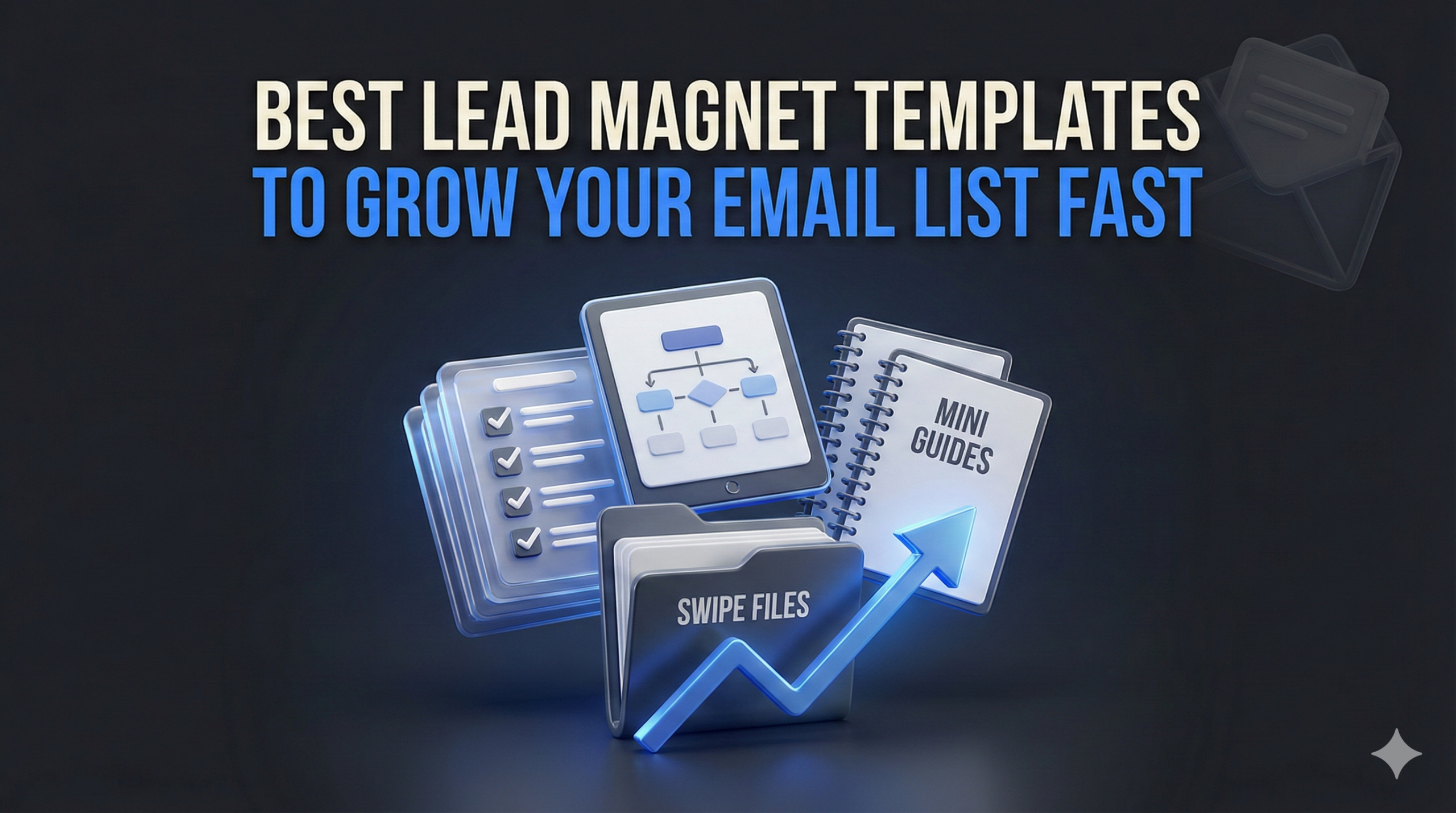
5 Lead Magnet Template Formats and When to Use Them
The right format depends on what your audience needs to understand, decide, or complete.
A short checklist may be enough for a focused task, while a workbook or guide may suit a problem that requires more explanation. Choose the structure that supports the promised result rather than the one that looks most impressive.
Checklist and Cheat Sheet Templates
Checklists and cheat sheets organize essential information into a format readers can scan quickly.
They are a strong fit when people need to:
- Follow a sequence
- Review their work
- Avoid missing important details
- Keep key information nearby
- Complete a focused task
A website designer could create a Homepage Launch Checklist covering copy, links, mobile testing, forms, and basic search settings.
A cheat sheet might summarize useful formulas, prompts, dimensions, commands, or reference information on one or two pages.
The main limitation is depth. A checklist can tell readers what to review, but it may not provide enough explanation when the task is unfamiliar or complex. Add brief instructions or link to supporting guidance when necessary.
Workbook and Planner Templates
Workbooks and planners help readers think through a process rather than simply consume information.
They may include:
- Reflection questions
- Planning pages
- Writing prompts
- Progress trackers
- Decision-making exercises
- Space for notes and answers
A business coach might offer a Quarterly Goal-Planning Workbook that helps readers choose priorities, identify obstacles, and define their next actions.
This format is useful when the value comes from participation. The reader should finish with a clearer plan, decision, or piece of completed work.
The potential drawback is effort. A long workbook can feel like homework, especially when every page contains another open-ended question. Keep the exercises purposeful and remove anything that does not contribute to the promised outcome.
Guide and eBook Templates
Guides and eBooks suit topics that need context, explanation, examples, or a structured process.
They are helpful when readers need to:
- Understand an unfamiliar subject
- Learn a method
- Compare several approaches
- Follow a detailed process
- Review examples before taking action
An accountant could create a Small-Business Guide to Preparing for Tax Season, with sections on recordkeeping, common documents, deadlines, and questions to discuss with a qualified professional.
A clear template can help organize the material into an introduction, logical sections, examples, summaries, and next steps.
The risk is adding pages simply because the template includes them. A guide does not become more valuable by becoming longer. Match the depth to the topic, and use headings, short paragraphs, tables, or examples to keep the material approachable.
Editable Tool and Swipe File Templates
Some lead magnets are designed to be used repeatedly rather than read once.
Editable tools may include:
- Spreadsheets
- Planning documents
- Content calendars
- Comparison sheets
- Trackers
- Scripts
- Fill-in frameworks
Swipe files provide a collection of examples readers can study, compare, and adapt.
A social media consultant might offer a 30-Day Content Planning Sheet, while a copywriter could create a Welcome Email Swipe File with short explanations of what readers should notice in each example.
These formats are attractive because they reduce the work required to begin. Readers receive something they can copy into their own workspace and adjust to their needs.
Editable access can create confusion when instructions are missing. Include a short “Start Here” section, explain how to make a copy, and clarify which parts should be customized. When using third-party examples in a swipe file, source them responsibly and avoid implying that attribution alone grants permission to redistribute someone else’s work.
Quiz and Assessment Templates
Quizzes and assessments are useful when a reader’s answers genuinely affect the result, recommendation, or next step.
They can help people:
- Evaluate their current situation
- Identify a gap
- Compare possible solutions
- Receive a personalized result
- Decide where to begin
A financial coach might create a Money Habits Assessment that groups participants according to their planning, spending, and saving behaviors. Each result could include a brief explanation and a relevant next step.
The value should come from meaningful logic, not simply from making the resource interactive. A weak quiz asks generic questions and produces the same advice for everyone. A stronger one connects each question to the result and gives readers an explanation they can recognize as relevant.
This format requires more setup than a standard download. Scoring, conditional logic, result pages, privacy considerations, and delivery should all be tested before launch.
Each of these formats can become a strong lead magnet when the structure fits the task. Start with what the reader needs to accomplish, then choose the template that makes that result easier to reach.
Where to Find Lead Magnet Templates You Can Customize
The right source depends on what you want to create, how much design control you need, and how your audience will use the finished resource.
Canva and Visme for Designed Downloads
Canva and Visme are practical choices for visually designed resources such as:
- Checklists
- Cheat sheets
- Workbooks
- Guides
- eBooks
- Reports
Both platforms provide editable layouts that can be adapted with your own copy, colors, fonts, images, and branding. They are especially helpful when you want a polished PDF without using professional design software.
Look beyond the cover when choosing a design. Check the interior pages, text spacing, section layouts, and whether the structure fits the amount of content you plan to include. A beautiful ten-page template may create more work when your idea only needs three focused pages.
Notion and Google Workspace for Editable Resources
Notion, Google Docs, and Google Sheets work well when subscribers need a resource they can copy, update, or use repeatedly.
These platforms are a natural fit for:
- Content calendars
- Planning dashboards
- Trackers
- Comparison sheets
- Worksheets
- Resource libraries
- Fill-in templates
Notion offers free and paid options through its template marketplace. Google Docs and Sheets give you flexible starting points for creating documents and spreadsheets that can be shared through a view-only link.
When using these formats, include a short “Start Here” section. Explain how to duplicate the resource, which fields to customize, and how the subscriber should use it.
Also test the sharing settings before launch. You do not want subscribers requesting editing access to your original file—or accidentally changing it for everyone else.
Creative Market for Premium Designs
Creative Market can be a useful source when you want a more distinctive layout or a template created for a particular style, industry, or format.
Before purchasing, check:
- Which software is required
- What files are included
- How easily the design can be edited
- Whether the fonts or images require separate licenses
- Which license applies
- Whether your intended distribution is permitted
Purchasing a template does not automatically allow every type of commercial use, redistribution, or resale. Review the license attached to the specific asset and confirm that it covers how you plan to modify and share the finished lead magnet.
Choose the source that fits your workflow, not simply the platform with the largest template library. The best starting point is one you can edit confidently, deliver easily, and adapt without forcing your content into the wrong structure.
Sources: Official template and product information from Canva, Visme, Notion, Google Workspace, and Creative Market.
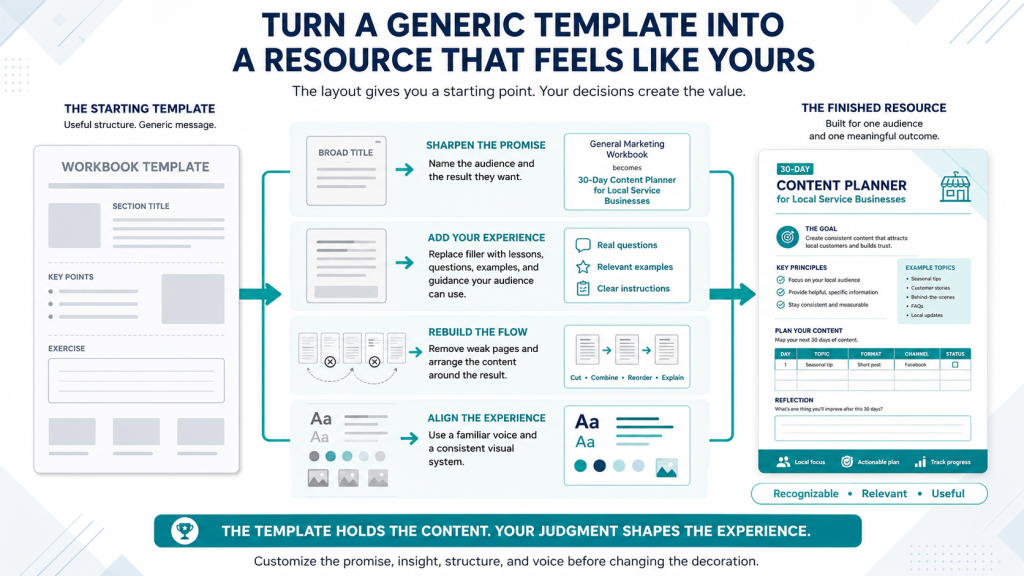
How to Make a Template Feel Like Your Own
A template gives you a place to start. It should not determine the final message, structure, or experience.
Changing the colors and adding a logo may improve the appearance, but the resource will still feel generic if the content could belong to almost any business.
Rewrite the Promise for Your Audience
Start with the title and central outcome.
does not tell readers who the resource is for or what it will help them accomplish.
The second title gives the template a clearer purpose.
Review the headings, examples, instructions, and call to action as well. Each one should reflect the audience’s actual situation rather than the generic topic used in the original design.
Replace Placeholder Advice With Real Insight
Many templates include sample text to demonstrate the layout. That copy is not meant to carry the final resource.
Replace it with:
- Lessons from your own experience
- Questions your customers regularly ask
- Examples that fit the audience
- Recommendations based on your process
- Common mistakes you have observed
- Clear instructions readers can follow
a template may include a page called “Know Your Audience” with a few broad prompts.
You could make that page more valuable by adding the questions you use to identify a buyer’s immediate problem, level of awareness, and reason for taking action.
The design helps organize the lesson. Your experience is what makes the lesson worth reading.
Reshape the Structure Around the Content
Do not keep every page simply because the template includes it.
Remove sections that do not support the promised result. Reorder pages when the ideas would make more sense in a different sequence, and add explanations where the reader may need more context.
You may also need to:
- Combine repetitive pages
- Add a short example
- Include a “Start Here” section
- Break a crowded page into two
- Turn a long paragraph into a checklist
- Add space for notes or answers
- Replace an unnecessary introduction with practical instructions
The finished resource should feel built around the topic—not like copy poured into a preexisting design.
Make the Voice and Design Consistent
The language should sound like the rest of your business.
Replace stiff, overly promotional, or generic wording with the tone your audience already recognizes. Keep the sentences clear, vary their length naturally, and explain ideas the way you would in a helpful conversation.
Visual consistency matters too.
Use your brand colors, fonts, imagery, and logo where appropriate, but avoid decorating every page simply to make it look different. Readability should remain the priority.
Check that:
- Headings follow a consistent style
- Fonts are easy to read
- Colors provide enough contrast
- Images support the content
- Page layouts feel connected
- Branding does not overpower the lesson
A template provides the structure. Your audience insight, expertise, and judgment give the final resource its value.
What to Check Before You Publish
A template can help you finish faster, but the resource still needs a careful final review.
Before you publish, go through the lead magnet as if you were receiving it for the first time.
Verify the Content
Check every instruction, example, statistic, link, and recommendation.
Pay extra attention to:
- AI-generated claims
- Product information
- Dates and deadlines
- Legal, financial, or health guidance
- Third-party quotes or examples
When a statement depends on external evidence, confirm it with a reputable source or remove it.
Review the Reading Experience
Make sure the resource is easy to read on both desktop and mobile.
Check:
- Font size
- Line spacing
- Color contrast
- Heading hierarchy
- Image quality
- Page breaks
- Crowded sections
A design that looks polished on a large screen may become difficult to use on a phone.
Make the Instructions Clear
Readers should know what to do without guessing.
Explain how to:
- Complete the worksheet
- Duplicate the document
- Use the tracker
- Navigate the resource
- Save or print the file
- Apply the examples
A short “Start Here” note can prevent confusion, especially for editable tools, spreadsheets, and Notion templates.
Test Access and Delivery
Complete the full signup process yourself.
Submit the form, open the delivery email, click the link, and access the resource from more than one device.
Confirm that:
- The form works
- The email arrives
- The correct file is delivered
- Download links open
- Sharing permissions are correct
- Duplicate links behave as expected
- The exported file displays properly
One broken link can undo much of the trust the resource was meant to build.
Confirm Licensing and Attribution
Review the usage rights for the template and every third-party asset included in it.
That may include:
- Fonts
- Stock images
- Icons
- Illustrations
- Screenshots
- Quotes
- Examples
- Purchased design elements
Make sure your intended use is permitted, including modification, free distribution, client work, or commercial promotion.
Purchasing or downloading a template does not automatically grant every type of usage right.
End With One Relevant Next Step
The final page should help readers continue without overwhelming them.
That next step might be:
- Reading a related guide
- Joining your newsletter
- Booking a consultation
- Trying a tool
- Viewing a relevant product
- Completing another exercise
Choose one action that connects naturally to the resource.
A template may help you reach the finish line faster. This final review helps ensure the experience is accurate, readable, accessible, and worth the subscriber’s attention.

Mistakes to Avoid When Using Lead Magnet Templates
Templates can save time, but they can also make weak decisions look finished.
Most problems begin when the design starts driving the project instead of supporting it. Avoid these mistakes if you want the final resource to feel intentional rather than assembled.
Choosing the Design Before the Idea
An attractive layout can make you want to build the lead magnet around it.
That reverses the process.
Start by defining the audience, problem, and promised result. Then choose a template that supports what the reader needs to understand or complete.
A detailed workbook may look impressive, but it is the wrong choice when the audience only needs a short reference sheet. The design should serve the idea, not decide it.
Keeping Too Much of the Original Template
Templates often include sample introductions, placeholder quotes, decorative pages, and extra sections designed to show what the layout can do.
You do not need to keep them all.
Remove anything that does not help the reader reach the promised result. A shorter, focused resource usually feels more intentional than one padded with pages that exist only because they came with the design.
Adding More Content Than the Format Needs
More pages do not automatically create more value.
A checklist can become difficult to use when every item includes several paragraphs of explanation. A short guide can lose momentum when it expands into a comprehensive eBook without a clear reason.
Include enough detail to help the reader act, but stop before the resource becomes heavier than the problem requires.
Treating Branding as the Only Customization
Changing the colors, fonts, and logo can make the design look familiar. It does not make the content original.
The examples, instructions, frameworks, and recommendations should reflect your audience and expertise.
Ask whether the resource would still feel distinctive if all visual branding were removed. When the answer is no, the content needs more of your perspective.
Using a Format That Creates Unnecessary Work
A complex template can add production time without improving the subscriber’s experience.
Interactive dashboards, detailed workbooks, and highly designed PDFs may be appropriate for some topics. They can also become distractions when a simple document would deliver the result more clearly.
Choose the simplest format that does the job well.
That often makes the resource easier to create, update, access, and use.
Reusing One Template Without Enough Adaptation
A consistent visual style can strengthen brand recognition, but every lead magnet should still feel suited to its topic.
Reusing the same page structure, exercises, and flow for unrelated resources can make them feel repetitive or forced.
Keep the design elements that support consistency, then adapt the structure to fit the new audience, promise, and content.
A template should shorten the production process without making every resource look or feel the same. Use it as a starting point, then shape the final asset around the result you want the reader to achieve.
Conclusion
Lead magnet templates can save time, reduce design friction, and give your ideas a clear structure.
The template itself is only the starting point. The value comes from how well the final resource fits your audience, solves a specific problem, and reflects your own experience, examples, and perspective.
Choose the format that supports the result you want the reader to achieve. Then remove what does not belong, strengthen what matters, and make the resource feel like it was created for a real person, not filled into a generic layout.
You do not need the most elaborate design or the longest template. You need a structure that helps you move from idea to finished resource without losing clarity along the way.
A good template helps you start faster. A thoughtful adaptation is what makes the final resource worth downloading.
Frequently Asked Questions
Can I use free lead magnet templates for my business?
Often, yes but always review the license for the specific template. Make sure it allows editing, distribution, commercial promotion, or client use before publishing the finished resource.
Which template format is easiest for beginners?
Checklists and short guides are often the simplest places to start. The best choice still depends on what your audience needs to understand or complete.
How much should I customize a template?
Go beyond changing colors and fonts. Adapt the promise, structure, examples, instructions, and call to action so the resource fits your audience and business.
Can I reuse the same template for several lead magnets?
Yes, when the layout still suits the topic. Keep the visual consistency, but adjust the content and structure enough that each resource feels intentionally created.
Do I need design software?
Not necessarily. Canva, Visme, Google Docs, Google Sheets, and Notion can all work depending on the format and level of design control you need.
How do I know whether a template license allows my intended use?
Check the license for permissions related to editing, distribution, client work, commercial promotion, and resale. When the terms are unclear, contact the seller or platform before using the template.