Introduction
An eBook can become one of your most valuable lead magnets or another PDF readers download and forget.
The difference is not page count. It is whether the eBook gives people something a short article, checklist, or cheat sheet cannot: a clear, connected explanation of a problem they genuinely want to solve.
An eBook lead magnet is a focused digital guide people receive in exchange for their email address. It gives you room to develop ideas, explain important details, share examples, and guide readers toward a meaningful result.
A successful eBook should not feel like several blog posts pasted into a document. It should feel like one complete resource clear enough to follow, useful enough to finish, and valuable enough to remember.
This guide will help you turn your expertise into an eBook people have a real reason to download, read, and use.
Key Takeaways
- An eBook is the right lead magnet when the topic needs connected explanations, examples, evidence, and context not simply more pages.
- A focused eBook usually creates more value than a broad one because every chapter can support one clear reader problem and outcome.
- Repurposing existing content can save time, but the material still needs to be updated, reorganized, and rewritten so it reads as one complete resource.
- Readers judge the eBook by more than its design. Accuracy, useful examples, smooth chapter flow, and honest limitations do more to build trust than a polished cover alone.
- The title, landing page, preview, delivery email, and eBook should all make the same promise and guide readers toward the same result.
- An eBook should be tested, maintained, and improved over time especially when it contains statistics, tools, platform information, laws, or recommendations that may change.
Affiliate Disclosure: Some of the links on this site are affiliate links. That means if you click and make a purchase, I may earn a small commission at no extra cost to you.
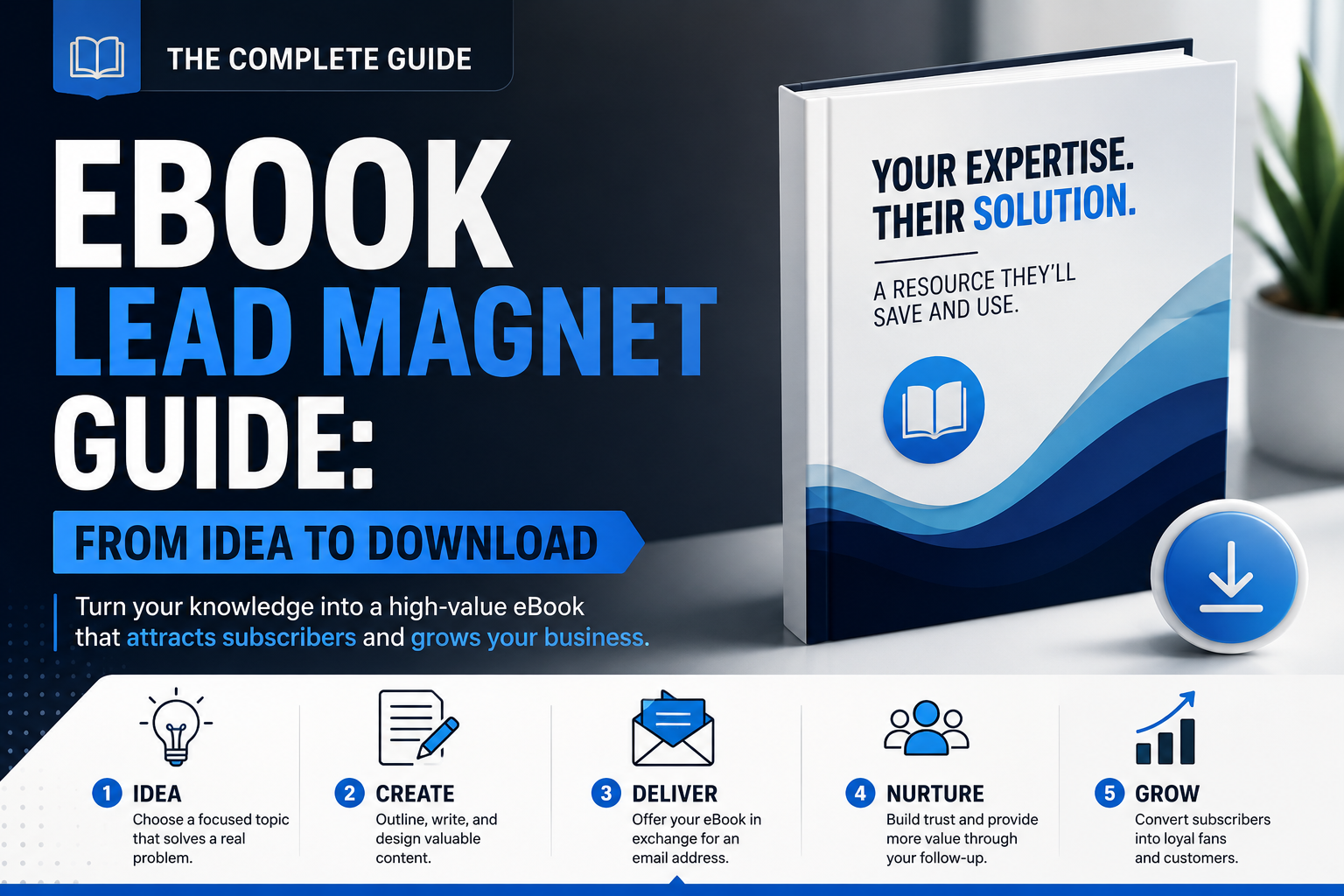
Why eBook Lead Magnets Work
An eBook can be a strong lead magnet when the topic needs more than a quick tip, short list, or one-page reference.
Its value comes from giving readers a clear path through a meaningful problem. Instead of presenting scattered advice, a well-planned eBook connects ideas, explains why they matter, and helps the reader understand how to apply them.
Depth for Topics That Need Explanation
Some problems cannot be solved with a few bullet points.
Readers may need to understand the causes of a problem, compare different approaches, avoid common mistakes, or make decisions based on their situation. An eBook gives you enough space to explain those details without forcing the reader to piece together information from several sources.
a checklist may help someone prepare to launch a podcast. An eBook can explain how to choose a topic, define the audience, select a format, plan episodes, and build a realistic launch strategy.
The extra length is useful only when each section helps the reader move closer to the promised outcome.
A Structured Path Through the Topic
A strong eBook guides the reader from one idea to the next.
The opening should establish the problem and explain why it matters. Later chapters can introduce the main concepts, explore possible solutions, and help the reader put the information into practice.
This structure separates an eBook from a group of unrelated blog posts placed inside one file.
Each chapter should have a clear purpose and connect naturally to the section that follows. Readers should understand why they are learning each idea and how it supports the larger outcome.
Room for Evidence, Examples, and Context
Longer resources allow you to support your advice instead of asking readers to accept broad claims.
Depending on the topic, you may include:
- Research or data
- Short case studies
- Realistic examples
- Screenshots or diagrams
- Expert insights
- Common mistakes
- Practical exercises
These elements make ideas easier to understand and help readers see how the guidance applies in real situations.
Evidence should be accurate and clearly sourced. Examples should clarify the lesson rather than add length for its own sake.
More Time to Demonstrate Useful Expertise
Publishing an eBook does not automatically make someone an authority.
Readers judge expertise through the quality of the thinking inside the resource. Clear explanations, relevant examples, honest limitations, and reliable information give them a better opportunity to understand what you know and how you approach the problem.
A focused eBook can show that you understand the reader’s challenge beyond the surface level. It can also demonstrate your ability to organize complex information and make it easier to use.
That experience may encourage readers to explore more of your work, but trust still has to be earned through the content.
Potential for Long-Term Value
An eBook can continue attracting subscribers after its initial launch when the problem remains relevant and the content stays accurate.
Topics based on stable principles may remain useful for a long time. Resources that include software features, laws, statistics, prices, platform rules, or current recommendations will need more frequent reviews.
Add a visible update date when freshness matters, and revisit the eBook on a regular schedule.
Long-term value comes from maintaining the resource, not publishing it once and assuming it will remain evergreen.
A Natural Bridge to Further Help
A useful eBook can prepare readers for the next stage of solving their problem.
Someone who understands the issue more clearly may want a related article, worksheet, email course, consultation, product, or service. The eBook can point toward that next step when it is relevant to what the reader has just learned.
an eBook about improving a service-business website might lead naturally to a website audit or redesign consultation.
The transition should feel like continued support rather than a sudden sales pitch.
An eBook lead magnet works best when the subject benefits from connected explanation, useful evidence, and enough depth to help the reader make meaningful progress.
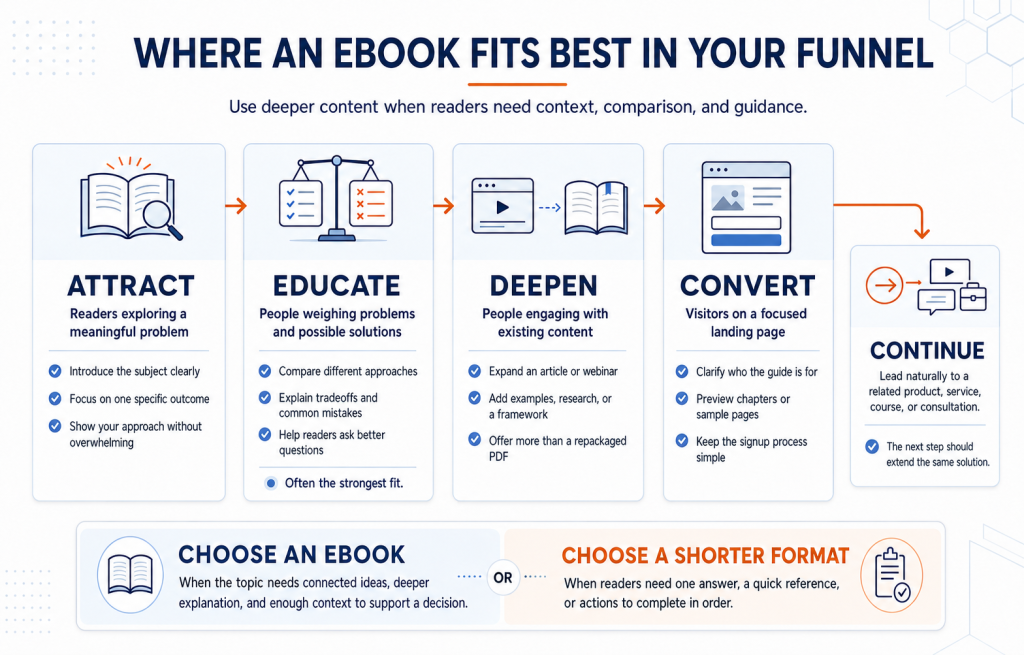
Where an eBook Lead Magnet Fits Best in Your Funnel
An eBook can support different stages of your funnel, but it works best when readers need more than a quick answer.
Because it asks for more time and attention than a checklist or cheat sheet, the topic must be important enough to justify a deeper resource.
Attract Readers Who Want More Than a Quick Answer
An eBook can work at the top of the funnel when people are actively trying to understand a meaningful problem.
a consultant might offer an eBook about preparing a small business for its first major hire. A financial educator could create a beginner’s guide to understanding cash flow.
These topics need more explanation than a short list can provide. The eBook gives new readers a structured introduction to the subject while helping them become familiar with your approach.
The title should make the audience and outcome clear. Broad topics such as “The Complete Guide to Business” create little urgency because readers cannot tell what specific problem the resource solves.
Nurture People Evaluating a Problem or Solution
The middle of the funnel is often where an eBook provides the most value.
At this stage, readers may understand that a problem exists but still need help evaluating their options, avoiding mistakes, or deciding what kind of solution fits their situation.
An eBook can help them explore:
- Different approaches
- Important tradeoffs
- Common misconceptions
- Questions to ask before choosing
- Signs that professional help may be needed
a web design agency might offer an eBook comparing the main options for rebuilding a service-business website. The resource can educate readers without forcing them toward one decision.
A balanced explanation often builds more trust than a guide written only to promote the author’s offer.
Extend the Value of Existing Content
An eBook can deepen the value of a strong article, webinar, podcast episode, or course lesson.
A blog post may introduce the main problem, while the eBook provides a complete framework, additional examples, supporting research, or an implementation plan.
A webinar could teach one part of a strategy and offer the eBook afterward as a resource attendees can review at their own pace.
The eBook should add something meaningful. Simply copying the original content into a PDF gives readers little reason to download it.
Support High-Intent Landing Pages
A dedicated landing page gives you room to explain why the eBook is worth the reader’s time.
The page should clearly communicate:
- Who the eBook is for
- Which problem it addresses
- What the reader will understand or be able to do
- What the main chapters cover
- How and when the resource will be delivered
A preview of the cover, table of contents, or sample page can help readers judge the quality and relevance of the resource before subscribing.
Keep the signup process simple. Asking for unnecessary information can create friction without improving the experience.
Prepare Readers for a Relevant Offer
An eBook can lead naturally to a product, course, consultation, or service when that offer helps the reader continue solving the same problem.
an eBook about organizing a company’s finances might lead to a bookkeeping consultation. A guide to planning an online course could point toward a course-development service or workshop.
The paid offer should not appear as a surprise after several chapters of education. Mention the next step where it becomes relevant, and explain clearly how it extends the guidance already provided.
Not every topic needs an eBook. When readers need one answer, a quick reference, or a sequence of actions to follow, a cheat sheet or checklist may serve them better.
Choose an eBook when the subject benefits from connected ideas, deeper explanation, and enough context to help readers make a more informed decision.
How to Create an eBook Lead Magnet Step by Step
A strong eBook lead magnet needs more than useful information. It needs a clear purpose, a logical structure, and enough depth to help readers understand and apply the topic.
These eight steps will help you create an eBook that feels complete rather than stretched, repetitive, or assembled from unrelated content.
Define the Reader, Problem, and Outcome
Start by deciding exactly who the eBook is for.
Consider what the reader already knows, what they are struggling with, and why the problem matters to them. Writing for a clearly defined audience helps you choose the right examples, language, and level of detail.
Next, identify the main outcome.
By the end of the eBook, what should readers understand, decide, or be able to do?
The second topic identifies the audience, subject, and intended result. That focus makes it easier to decide what belongs in the eBook and what should be left out.
Develop the Central Idea and Outline
Every chapter should support one central message.
Without that guiding idea, an eBook can become a collection of useful but disconnected tips. Decide what you want readers to understand about the problem before building the outline.
Then arrange the chapters in a logical sequence.
A practical structure might include:
- The problem and why it matters
- Common mistakes or misconceptions
- The main principles readers need to understand
- A clear approach or framework
- Examples and practical application
- Recommended next steps
Each chapter should prepare the reader for what follows. If a section does not support the main outcome, consider removing it or using it in another resource.
Research and Verify the Content
An eBook gives you room to go deeper, but greater depth also creates more opportunities for inaccurate or unsupported claims.
Gather reliable sources, examples, original observations, and relevant data before drafting. Verify statistics, technical instructions, quotations, dates, and other factual details.
Keep a record of your sources as you research rather than trying to find them again later.
When appropriate, include citations or a references section so readers can see where important information came from. Clearly separate established facts from your own experience, interpretation, or recommendations.
Useful depth comes from accurate explanation—not simply adding more pages.
Repurpose Existing Content Carefully
Existing articles, podcast transcripts, videos, or presentations can provide a useful starting point.
However, combining several pieces of content does not automatically create a cohesive eBook.
Review the material and ask:
- Is the information still accurate?
- Does it support the eBook’s main outcome?
- Does it repeat ideas covered elsewhere?
- Does the tone remain consistent?
- Are transitions needed between sections?
- Is important context missing?
Rewrite and reorganize the material so it reads as one connected resource. Add new explanations, examples, and transitions where needed.
Readers should not feel as though they are moving through several unrelated blog posts pasted into the same document.
Write a Clear, Useful First Draft
Focus first on helping readers understand the subject.
Use clear language, varied sentence lengths, short paragraphs, and descriptive headings. Introduce one main idea at a time, then show how it connects to the larger topic.
Examples can make abstract advice easier to understand. Stories and short case scenarios may also help when they illustrate a genuine lesson rather than simply filling space.
Avoid trying to make every sentence sound clever or persuasive. Strong writing comes from clarity, relevance, and logical progression.
Finish the first draft before polishing every paragraph. Editing is easier once you can see the complete argument and identify gaps or repetition.
Add Practical Application
Readers should finish the eBook knowing how to use what they learned.
Depending on the topic, you may include:
- Reflection questions
- Short exercises
- Chapter summaries
- Action steps
- Examples
- Case scenarios
- Planning prompts
- Links to supporting resources
Not every chapter needs every element. Add practical features only where they help readers understand, decide, or act.
an eBook about improving a service-business website might end each chapter with a short review question and one action the reader can complete.
Application turns the eBook from something readers consume into something they can use.
Edit, Design, and Format the eBook
Once the draft is complete, review it at several levels.
First, edit for substance:
- Does every chapter support the promised outcome?
- Are any important explanations missing?
- Do claims need evidence or qualification?
- Are ideas repeated unnecessarily?
- Do the chapters appear in the right order?
Next, edit the writing for clarity, grammar, consistency, and flow.
The design should support comfortable reading. Use clear headings, readable fonts, short paragraphs, sufficient white space, and relevant visuals. Include a table of contents when the eBook is long enough to benefit from one.
A PDF is usually the simplest format for an eBook lead magnet because it preserves the layout and is widely supported. EPUB may be useful when adjustable text and e-reader compatibility matter.
Test the final file on phones, tablets, and computers. Check navigation, links, image quality, text size, file size, and contrast before publishing.
Build the Signup, Delivery, and Update Process
Create a landing page that clearly explains:
- Who the eBook is for
- Which problem it addresses
- What readers will learn
- What the main sections cover
- How the resource will be delivered
A cover image, table-of-contents preview, or sample page can help people assess the eBook before subscribing.
After signup, deliver the file promptly through email or a confirmation page. The first message should provide the download link, explain how to use the resource, and set expectations for future emails.
Follow-up content should build naturally on the eBook’s topic rather than shifting immediately to an unrelated offer.
Finally, plan to review the resource over time. Add a revision date when the eBook includes statistics, tools, platform features, laws, or other information that may change.
A strong eBook is not created by adding as much content as possible. It is created by choosing a meaningful problem, developing the ideas carefully, and helping readers reach a clear outcome.
What Makes an eBook Worth Downloading and Reading
People decide whether an eBook is worth their time before they read the first chapter.
A strong offer makes the topic, value, and intended outcome easy to understand. Once the reader downloads it, the content must continue earning their attention through clear explanations, useful examples, and steady progress.
A Title With a Clear and Credible Promise
The title should tell readers what the eBook will help them understand, solve, or accomplish.
Compare these examples:
The second title identifies the audience and the intended outcome without promising results the eBook cannot guarantee.
Avoid relying on words such as “ultimate,” “proven,” “guaranteed,” or “complete” unless the content genuinely supports those claims. Specificity usually creates more interest than exaggeration.
A Preview That Sets Clear Expectations
Readers are more likely to consider subscribing when they can see what the eBook contains.
A cover image, sample page, table of contents, or short chapter summary can help them judge whether the resource matches their needs.
Get a practical guide covering audience selection, content planning, email platform setup, and the first four campaigns to send.
A useful preview reduces uncertainty and helps attract people who are genuinely interested in the subject.
An Introduction That Rewards Attention
The introduction should quickly confirm that the reader chose the right resource.
It should explain the problem, establish why it matters, and clarify what the reader can expect to understand or accomplish by the end.
Avoid spending several pages describing the author, repeating the landing-page promise, or building unnecessary suspense. Readers should begin receiving useful insight early.
A strong introduction creates momentum by helping people recognize their situation and see a clear path forward.
Useful Progress in Every Chapter
Readers should not have to finish the entire eBook before receiving value.
Each chapter should answer an important question, explain a key idea, help the reader make a decision, or give them something practical to apply.
At the end of a chapter, the reader should be able to identify what they learned and why it matters.
Chapter summaries, reflection questions, or short action steps can reinforce that progress when they fit the topic. The goal is not to add more features, but to help readers move steadily toward the eBook’s main outcome.
Visuals That Improve Understanding
Visuals can make complex information easier to understand when they serve a clear purpose.
Useful options may include:
- Charts that compare data
- Diagrams that explain a process
- Screenshots that demonstrate a tool
- Tables that organize options
- Callout boxes that highlight warnings or key ideas
- Illustrations that clarify relationships
Avoid adding stock images simply to fill space. Decorative visuals can increase file size and distract from the content without helping the reader.
Every image should explain, demonstrate, compare, or reinforce something important.
Evidence That Strengthens Credibility
An eBook becomes more trustworthy when readers can see how its claims are supported.
Depending on the subject, you may include research, original observations, case studies, examples, expert commentary, or relevant data.
Testimonials and results can also help when they are genuine and presented with enough context to understand what happened.
A more credible explanation would identify the conditions, limitations, or factors that influenced the outcome.
Good evidence does not make the writing feel academic. It gives readers a reason to trust the guidance.
Calls to Action That Fit the Content
An eBook can guide readers toward related resources or further support, but the calls to action should match what they are reading.
a chapter about planning a website could link to a planning worksheet. A section about evaluating an existing site might lead to an audit service.
Avoid placing promotional messages throughout every chapter. Too many interruptions can make the eBook feel like a sales brochure rather than a useful resource.
The strongest calls to action appear where the next step feels natural and helpful.
A Companion Resource With a Clear Purpose
A worksheet, template, checklist, or planning tool can make the eBook easier to apply.
- A budgeting eBook could include a planning spreadsheet.
- A hiring guide might include an interview scorecard.
- A content strategy eBook could include an editorial calendar.
- A website guide may include a homepage review checklist.
The companion resource should support the eBook’s main outcome. Adding several unrelated bonuses may make the offer appear larger, but it can also create confusion and reduce focus.
An eBook becomes worth downloading when its promise is clear, its value is visible, and the content continues delivering useful progress after the reader opens the file.
Choosing The Setup for Producing Your eBook
You do not need a complicated collection of software to create a professional eBook. Choose tools based on the work you need to complete, your design experience, and how readers will access the finished resource.
| Production Need | Practical Options | Best Use |
|---|---|---|
| Drafting and editing | Google Docs or Microsoft Word | Writing, organizing chapters, collecting feedback, and managing revisions |
| Simple page design | Canva | Creating a branded cover and readable page layouts without advanced design skills |
| Repurposing existing content | Beacon or Designrr | Importing articles or transcripts as a starting point before rewriting and reorganizing them |
| Advanced layout control | Adobe InDesign or Affinity Publisher | Producing highly customized, polished, or print-ready layouts |
| Final delivery | PDF or EPUB | PDF for fixed layouts and easy downloads; EPUB for adjustable text and e-reader compatibility |
Tools such as Beacon and Designrr can speed up the first stages of production, but imported content still needs careful editing. Automatic formatting cannot create smooth transitions, verify facts, remove repetition, or turn unrelated articles into one coherent eBook.
Run a Quick Check Before You Publish
Review the finished eBook as both an editor and a reader. Make sure:
- The table of contents and internal links work correctly.
- Pages appear in the proper order.
- Text remains readable on phones, tablets, and computers.
- Images are clear without making the file unnecessarily large.
- Headings, fonts, colors, and spacing remain consistent.
- Readers can open the file without uncommon software.
- Fonts, images, icons, and templates are licensed for distribution.
- The file name clearly identifies the resource.
Readability matters more than design complexity. A simple, well-edited eBook will usually provide a better experience than an elaborate layout that is slow to load or difficult to navigate.
Choose the simplest setup that helps you write clearly, present the content professionally, and deliver the eBook without unnecessary barriers.

Why Some eBook Lead Magnets Never Get Read
An eBook can earn plenty of downloads and still fail to create a meaningful impression.
The problem is often not the format itself. Readers stop when the topic feels unfocused, the content does not match the promise, or the experience requires more effort than the value justifies.
The Topic Is Too Broad to Stay Focused
Trying to cover an entire industry, skill, or strategy often leads to shallow chapters and generic advice.
For example:
The second topic gives the writer a clear boundary and gives readers a specific reason to continue.
A focused eBook does not need to answer every question about the subject. It should help one audience understand or solve one meaningful problem well.
The Content Does Not Match the Promise
A strong title may convince someone to subscribe, but the eBook still has to deliver what the landing page promised.
Trust breaks down when the resource promises a practical framework but offers only general tips, or when it claims to be comprehensive while leaving out important parts of the process.
Review the title, landing-page copy, introduction, and chapters together. They should all point toward the same reader outcome.
A smaller promise fulfilled well is more valuable than a dramatic promise the content cannot support.
Repurposed Material Still Feels Pasted Together
Existing articles, podcast transcripts, and videos can save production time, but they rarely fit together without substantial editing.
Common problems include:
- Repeated introductions
- Conflicting terminology
- Sudden changes in tone
- Duplicate examples
- Missing transitions
- Chapters that assume different levels of knowledge
Readers should feel as though they are moving through one connected resource, not several pieces of content collected into one file.
Rewrite the material around the eBook’s central idea, then add transitions and context so each chapter leads naturally into the next.
Chapters Add Length Without Creating Progress
More pages do not automatically create more value.
Each chapter should help the reader understand an important idea, make a decision, avoid a mistake, or apply what they are learning.
Repetition, long background sections, unrelated stories, and filler can make the eBook feel slow even when the individual sentences are well written.
What should the reader understand or be able to do after finishing this section?
When the answer is unclear, the chapter may need to be shortened, rewritten, combined with another section, or removed.
Important Claims Lack Evidence or Context
Long-form content gives readers more opportunities to evaluate the quality of your thinking.
Unsupported statistics, vague references to research, and claims such as “this always works” can weaken the entire resource.
Strengthen important points with:
- Reliable sources
- Relevant examples
- Original observations
- Case studies
- Clear calculations
- Honest limitations
Explain when a recommendation may not apply. Readers are more likely to trust guidance that acknowledges tradeoffs than advice presented as a universal rule.
The Layout Makes Reading Feel Like Work
Even useful content becomes difficult to finish when the design creates friction.
Common layout problems include:
- Long walls of text
- Small fonts
- Weak contrast
- Narrow multi-column pages
- Inconsistent headings
- Oversized decorative images
- Pages crowded with callout boxes
- Too little space between sections
Use short paragraphs, clear headings, readable typography, and enough white space to give the reader visual breaks.
The design should make the ideas easier to follow, not compete for attention.
The File Creates Problems After Download
The subscriber experience does not end when the form is submitted.
A large file may load slowly. A fixed layout may be difficult to read on a phone. Broken links, missing pages, blurry images, or a table of contents that does not work can make the resource feel unfinished.
Before publishing, test:
- The download link
- File size
- Mobile readability
- Page order
- Internal navigation
- External links
- Image quality
- Accessibility and contrast
Open the eBook on more than one device and ask someone else to test it without your help.
The Ending Provides No Meaningful Next Step
A reader who reaches the end should know how to use what they learned.
The conclusion might encourage them to complete an exercise, make a decision, review their current approach, or continue with a related resource.
A relevant next step could include:
- A worksheet
- A checklist
- A deeper tutorial
- An email lesson
- A consultation
- A course
- A related service
The recommendation should extend the value of the eBook rather than suddenly shifting into an aggressive sales pitch.
An eBook is more likely to be read when it makes a focused promise, creates steady progress, respects the reader’s time, and delivers a smooth experience from the first page to the final action.
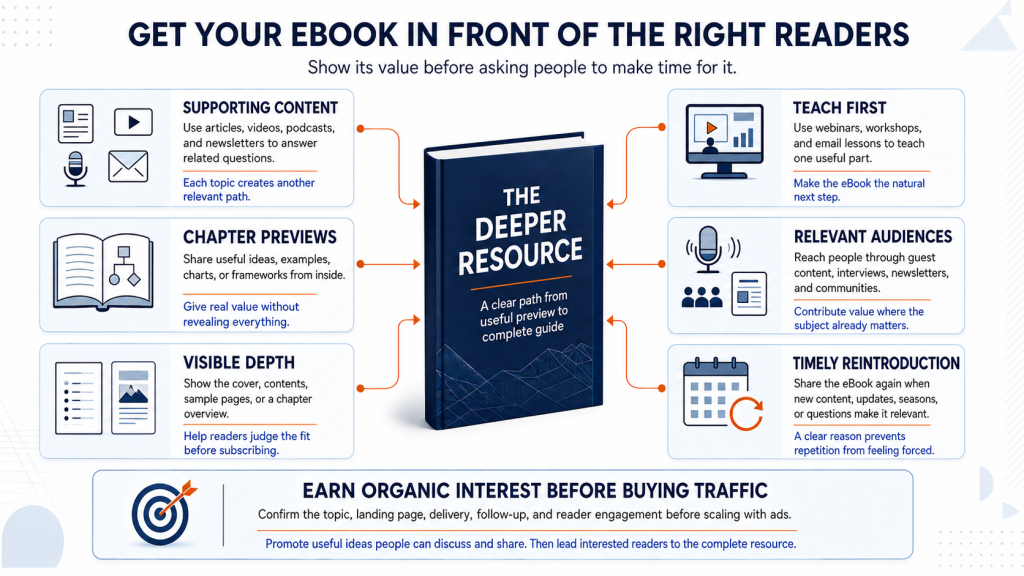
How to Get Your eBook in Front of the Right Readers
An eBook asks for more time and attention than a checklist or cheat sheet. That means promotion should do more than announce that the resource exists.
Potential readers need to understand the problem it addresses, the depth it provides, and why it is worth reading.
Build Supporting Content Around the eBook
Turn the main ideas from your eBook into related articles, videos, podcast episodes, or newsletters.
Each piece can answer one part of the larger problem and introduce the eBook as the deeper resource.
An eBook about creating an email marketing plan might be supported by content about:
- Choosing an email platform
- Planning a welcome sequence
- Deciding how often to send emails
- Measuring campaign performance
This approach gives people useful information before asking them to subscribe. It also creates several relevant paths leading to the same eBook.
Avoid repeating the full resource in every piece of supporting content. Give readers a complete answer to the immediate question, then explain what the eBook helps them understand next.
Share Strong Ideas From the Chapters
Generic messages such as “Download my new eBook” rarely show why the resource deserves attention.
Instead, share individual ideas, examples, diagrams, findings, or frameworks from inside the chapters.
One section might become:
- A short educational video
- A social media carousel
- A simple chart
- A practical email lesson
- A brief case example
- A quotation with added context
An eBook about improving a service-business website could provide a social post explaining three signs that a homepage is confusing potential customers.
The preview should offer genuine value while showing the quality of the complete resource.
Let People See the Depth Before They Subscribe
Because an eBook requires a larger time commitment, readers may want evidence that it contains more than general advice.
Your landing page can show:
- The cover
- The table of contents
- A sample page
- A short excerpt
- A chapter overview
- A visual or framework from inside
A brief description should also explain who the eBook is for and what readers can expect to understand or accomplish.
This 30-page guide explains how local service businesses can choose email topics, plan a welcome sequence, and build a realistic monthly sending schedule.
A clear preview helps interested readers make an informed decision and may reduce signups from people who are not a good match.
Introduce the eBook Through Teaching
Webinars, workshops, presentations, and email lessons give people an opportunity to experience your ideas before downloading the full resource.
Teach one useful part of the eBook rather than turning the event into a long promotion.
A webinar could explain the first stage of a framework, then offer the eBook to attendees who want the complete approach. A workshop might use one chapter as the foundation for an exercise and provide the full guide afterward.
This works because the eBook becomes a continuation of the learning experience rather than an unrelated bonus.
Reach Relevant Audiences Through Expert Contributions
Guest articles, podcast interviews, professional newsletters, and industry communities can help the eBook reach people who already care about the subject.
Choose opportunities where your expertise and the resource fit naturally.
For example:
- A hiring consultant could discuss interview mistakes on a business podcast and offer a deeper hiring guide.
- A financial educator might contribute an article about cash-flow problems to an entrepreneur newsletter.
- A copywriter could teach landing-page fundamentals during a workshop and share an eBook covering the full writing process.
Focus on contributing something useful to the audience. The eBook should support the conversation, not feel like a link inserted only for promotion.
Reintroduce It When the Topic Becomes Relevant
An eBook does not need to disappear after its launch.
Mention it again when:
- You publish related content
- A seasonal need returns
- You answer a common audience question
- New research or examples are added
- The resource receives a meaningful update
- A current event makes the topic timely
For instance, an eBook about annual business planning may become especially relevant near the end of the year. A guide to hiring may deserve renewed promotion when you publish new salary data or interview advice.
Each mention should have a clear reason. Relevance makes repeated promotion feel useful rather than repetitive.
Test Paid Traffic After Organic Interest
Paid ads can increase visibility, but they cannot fix an unclear topic, weak landing page, or poorly matched offer.
Before paying for traffic, confirm that:
- People respond to the topic through your existing content
- The title communicates a clear outcome
- The landing page explains the value
- The signup and delivery process works
- Readers engage with the follow-up emails
- The eBook connects to a relevant business goal
Begin with a limited test and compare more than the cost per signup.
Look at whether those subscribers open emails, click related resources, reply, book consultations, or explore the offer connected to the eBook.
Make the Ideas Easy to Discuss and Share
Readers may be more likely to share a useful insight than promote an entire eBook.
Create memorable frameworks, diagrams, examples, or chapter summaries that people can reference and attribute. Include your business name and a link to the resource without covering the page in promotional messages.
You may also invite readers to forward the delivery email or share the landing page with someone facing the same problem.
The strongest eBook promotion gives people a useful glimpse of the thinking inside. Show the value in relevant places, then give interested readers a clear path to the complete resource.

eBook Lead Magnet Examples by Business Type
The strongest eBook topics need room for explanation, context, examples, and connected ideas.
A topic may sound useful, but it does not automatically need an eBook. When the reader only needs a quick reference or a series of steps, a cheat sheet or checklist may provide a better experience.
The following examples show when a longer, structured resource makes sense.
A Strategic Guide for Consultants
A consultant could create an eBook titled:
How Growing Online Stores Can Prepare for Their First Operations Hire
Hiring for an important role involves more than following a short list of tasks. Business owners may need help recognizing when to hire, defining the role, estimating the cost, comparing employment options, and avoiding common mistakes.
The eBook could cover:
- Signs the business may be ready to hire
- Problems the new role should solve
- Responsibilities that belong in the position
- Budget and compensation considerations
- Employee versus contractor tradeoffs
- Interview and evaluation criteria
- Common first-hire mistakes
The depth gives the consultant room to explain how each decision connects to the larger business problem.
A Debt-Planning Guide for Financial Educators
A more credible topic than “proven ways to pay off debt fast” would be:
How to Compare Debt Repayment Approaches and Build a Realistic Plan
Readers may need help understanding how different repayment approaches work, what tradeoffs they involve, and which questions to consider before choosing one.
The eBook might explain:
- How to organize balances, rates, and minimum payments
- Common repayment approaches
- The tradeoffs between different strategies
- How monthly cash flow affects the plan
- When consolidation may or may not help
- Questions to ask a qualified professional
- How to review progress over time
Examples can show how different choices may affect a hypothetical borrower without promising identical results for every reader.
The resource should clearly state that it provides general education rather than personalized financial advice.
A Beginner’s Guide for Software Educators
“Mastering Excel” is too broad for one lead magnet. A more focused eBook could be:
A Beginner’s Guide to Using Excel for Small-Business Expense Tracking
This topic benefits from a connected learning path. Readers may need to understand how to structure the spreadsheet before learning individual formulas or features.
The eBook could include:
- How to create expense categories
- Which columns to include
- How to enter and format data
- Basic formulas for totals
- Sorting and filtering records
- Common data-entry mistakes
- A sample monthly tracking process
Screenshots and completed examples
A companion spreadsheet could help readers apply the lessons as they progress.
An Original Research Report for B2B Companies
A company with access to original data may publish an eBook-style research report about a specific industry problem or trend.
For example:
The 2027 Small-Business Customer Support Benchmark Report
The resource could include:
- The research question
- Participant or data-source information
- Methodology
- Key findings
- Charts and tables
- Differences between business segments
- Expert interpretation
- Practical implications
- Limitations of the research
Original research can attract attention because it gives readers information they cannot find in a general article.
The methodology should be transparent enough for readers to understand how the findings were produced. The company should also distinguish measured results from its own interpretation.
A Case-Study Collection for Service Businesses
A case-study collection can demonstrate expertise without becoming a long sales brochure.
A focused title might be:
Five Website Redesign Case Studies: Problems, Decisions, and Lessons
Each case could explain:
- The client’s original situation
- The main challenge
- Important constraints
- Options considered
- The approach selected
- The outcome
- Factors that influenced the result
- Lessons readers can apply
Including challenges and limitations makes the cases more believable. Readers learn more from understanding why a decision was made than from seeing a collection of polished before-and-after images.
Results should be accurate, supported, and shared with the client’s permission. Avoid implying that every reader or client will achieve the same outcome.
A Decision Guide for Buyers
An eBook can help readers compare options when the decision involves several factors and no single choice is right for everyone.
For example:
How to Choose the Right Website Platform for a Service Business
The guide might compare platforms based on:
- Ease of use
- Setup requirements
- Customization
- Ongoing maintenance
- Ownership and portability
- Available integrations
- Expected costs
- Technical support
- Situations where each option may fit
A balanced decision guide should explain tradeoffs instead of presenting one solution as universally superior.
A comparison table may summarize the choices, while the chapters provide the context readers need to interpret that comparison correctly.
Choose an eBook when readers need explanation, context, examples, and connected ideas. When the information would work just as well as a short reference or sequence of actions, a cheat sheet or checklist may be the better lead magnet.
Conclusion
An eBook lead magnet earns its length when the topic needs connected explanations, useful examples, supporting evidence, and enough context to help readers make meaningful progress.
Start with one important problem your audience wants to understand. Define the result readers should reach, organize the ideas in a logical order, and create a focused first version that delivers on its promise.
Then test the eBook with real readers. Use their questions, feedback, and behavior to improve unclear sections, remove unnecessary content, and update information that may change over time.
A useful eBook gives the right people a practical reason to join your email list. It also shows them how clearly and thoughtfully your business can help them understand a problem they care about.
Frequently Asked Questions
How Long Should an eBook Lead Magnet Be?
There is no ideal page count for every eBook. The right length depends on the complexity of the topic, what the reader already knows, and how much explanation or evidence the promise requires. Make it long enough to feel complete, but focused enough that every chapter supports the main outcome.
When Should I Choose an eBook Instead of a Checklist or Cheat Sheet?
Choose an eBook when readers need connected explanations, context, examples, or help thinking through a complex topic. A checklist is better for actions they need to complete, while a cheat sheet works best for information they need to reference quickly.
Should I Require an Email Address to Access the eBook?
Requiring an email address makes sense when your goal is to grow your list and continue helping readers through relevant follow-up content. You may also offer the eBook freely when reach, customer education, or easy sharing matters more than collecting leads. In either case, explain clearly what readers will receive.
Can I Repurpose Blog Posts Into an eBook?
Yes, but combining several articles is only the starting point. Update the information, remove repetition, add transitions, and reorganize the material around one clear outcome. The final eBook should read like one complete resource rather than a collection of pasted blog posts.
What Is the Most Important Part of a Successful eBook?
The eBook must make a clear promise and fulfill it. That requires a focused topic, accurate information, logical chapters, useful examples, and enough depth to help readers make meaningful progress. Strong design cannot rescue weak or unfocused content.
Which Format Should I Use for an eBook Lead Magnet?
A PDF is usually the simplest option because it preserves the layout and is easy to deliver. EPUB may be better when readers need adjustable text or want to use an e-reader. Whichever format you choose, test it on the devices your audience is likely to use.
How Should I Promote an eBook Lead Magnet?
Share useful ideas, excerpts, diagrams, or examples from inside the eBook so people can judge its value before subscribing. Promote it through related articles, emails, webinars, expert contributions, and partnerships where readers are already exploring the topic. A clear preview usually works better than a generic “download my eBook” message.
How Often Should I Update My eBook?
The review schedule depends on how quickly the subject changes. Statistics, software features, laws, platform rules, and current recommendations may need frequent updates, while stable topics may require only an annual review. Add a revision date when freshness affects the accuracy of the resource.