Introduction
A valuable lead magnet does not need to be long. It needs to solve the right problem in a format people can use quickly.
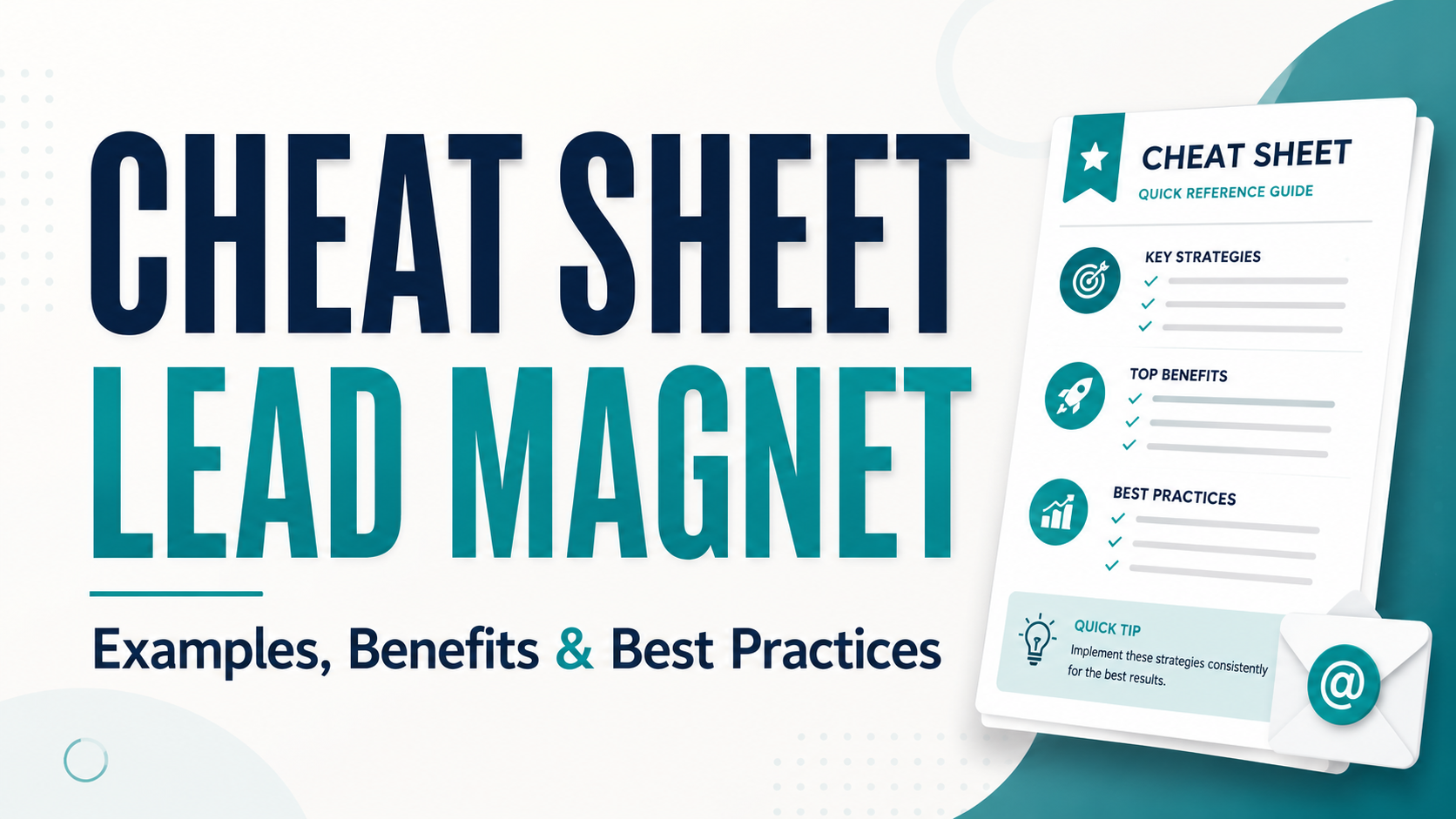
That is what makes a cheat sheet lead magnet so useful. It condenses important formulas, examples, shortcuts, rules, or reference information into a clear resource people can access in exchange for their email address.
Unlike a checklist, which guides readers through a series of steps, a cheat sheet gives them essential information they can scan and apply while completing a task or making a decision.
This guide will show you how to create a focused cheat sheet that delivers practical value and gives the right people a reason to join your email list.
Key Takeaways
- A cheat sheet works best when readers need information they can reference quickly, such as formulas, examples, definitions, comparisons, shortcuts, or specifications.
- Unlike a checklist, which guides people through a sequence of actions, a cheat sheet helps them find and apply the right information while they work.
- The strongest topics focus on one specific reference need and connect naturally to the content, service, or offer your business provides.
- Usefulness depends on selection and organization. A short resource can still fail when the information is crowded, poorly labeled, outdated, or missing important context.
- The offer becomes more appealing when readers can clearly see what the cheat sheet contains, how they will use it, and why it is worth saving.
- A cheat sheet should be tested during the task it supports and updated whenever formulas, platforms, standards, or other important details change.
Affiliate Disclosure: Some of the links on this site are affiliate links. That means if you click and make a purchase, I may earn a small commission at no extra cost to you.
Why Cheat Sheet Lead Magnets Work
A cheat sheet can be valuable because it gives readers important information in a form they can understand and use quickly.
Its effectiveness does not come from being short, free, or visually polished. The real value comes from choosing the right information, organizing it clearly, and making it easier to apply.
Less Time Spent Searching for Answers
Long guides are useful when someone wants to learn a subject in depth. However, they are less convenient when the reader needs a specific formula, example, shortcut, or rule right away.
A cheat sheet brings those essential details together in one place. Instead of searching through several pages or resources, the reader can scan the document and find what they need more quickly.
An Excel formula cheat sheet may group common formulas by purpose, such as calculations, text formatting, or date functions. That structure helps the user find a relevant formula without reading a full tutorial.
Complex Information Becomes Easier to Use
Some information is difficult to remember because it includes technical terms, formulas, specifications, or several related options.
A well-organized cheat sheet can make that material easier to understand by using tables, labels, examples, and clear groupings.
A financial ratios cheat sheet, for instance, might show each ratio alongside its formula, purpose, and a brief explanation of what the result means. The resource does not replace a full lesson, but it makes the information easier to reference and apply.
Accuracy matters here. When a cheat sheet contains formulas, measurements, technical instructions, or other factual information, every detail should be checked before publication.
Useful Support at the Moment of Action
A cheat sheet is often most helpful while the reader is already doing something.
They may use it while writing an email, editing an image, calculating a figure, planning content, or comparing options. Rather than stopping to review a full lesson, they can refer to the resource and continue working.
A photographer might keep a camera settings cheat sheet nearby during a shoot. A copywriter could use a headline structure reference while drafting a landing page.
This in-the-moment usefulness can make the resource feel practical from the first use.
Value That Extends Beyond the First Download
Many lead magnets are read once and forgotten. A strong cheat sheet has the potential to remain useful because the reader can return to it whenever the same need appears.
Someone may save it to a desktop, bookmark the online version, print it, or keep it inside a project folder.
That repeated use can create more opportunities for the reader to remember your business. Including subtle branding, a website address, and a relevant next step can help them reconnect with you when they need further guidance.
The information must remain current, though. Add an updated date when the resource includes platform specifications, laws, software features, prices, or other details that may change.
A Clear Reason to Join Your Email List
People are more likely to consider joining an email list when they can quickly understand what they will receive and how it will help them.
Compare these two offers:
The second offer describes the exact information inside the resource. A reader who needs those details can immediately decide whether it is relevant.
A focused cheat sheet does not guarantee more signups than another lead magnet format. Its performance still depends on the audience, topic, landing page, promotion, and connection to the business’s offer.
However, when the information is useful, accurate, and easy to reference, a cheat sheet gives the right reader a practical reason to subscribe.
When and Where a Cheat Sheet Fits Into Your Funnel
A cheat sheet can support people at different stages of their relationship with your business. Its role depends on what information they need and when they need it.
The format works best when readers want a quick reference, comparison, or explanation they can use while learning, evaluating options, or putting advice into practice.
Attract New Subscribers With Immediate Utility
At the top of the funnel, people are often looking for a quick answer to a specific question.
A focused cheat sheet can give them immediate value without asking them to read a long guide first.
- Common Excel Formulas for Beginners
- Essential Camera Settings by Shooting Situation
- Standard Social Media Image Sizes
- Basic Bookkeeping Terms for New Business Owners
Each offer makes the benefit clear before the reader signs up. Someone can quickly see what information the resource contains and decide whether it is relevant.
The topic should also connect naturally to your business. A useful cheat sheet may attract attention, but it will be more valuable when it reaches people who may also benefit from your content, service, or paid offer.
Support Evaluation and Decision-Making
In the middle of the funnel, readers may already understand the problem but still need help comparing options or making sense of unfamiliar information.
A cheat sheet can support that process by organizing key differences, definitions, metrics, or decision rules in one place.
- Website Platform Comparison Guide
- Common Mortgage Terms Explained
- Email Campaign Metrics Reference Sheet
- Service Package Comparison Chart
These resources can also work well as content upgrades for articles, webinars, podcasts, or email lessons. They give readers a practical reference they can use while reviewing the broader material.
The goal is not to push someone toward a decision before they are ready. It is to make the available information easier to understand and apply.
Help Customers Put an Offer Into Practice
Cheat sheets can also support people after they purchase a product, join a course, attend a workshop, or begin working with a service provider.
A software company might give customers a keyboard shortcut guide. A course creator could include a terminology reference for students. A consultant may provide clients with a quick-reference sheet for the framework used during the engagement.
In these situations, the cheat sheet is not primarily used to collect new leads. It helps customers apply what they have learned and get more value from the offer.
A useful support resource may also reduce repeated questions by placing commonly needed information in an easy-to-find format.
Place It Where the Information Is Needed
The best placement depends on the moment when the reader is most likely to need the information.
- Beside a related blog post
- Under a tutorial or video
- Inside a course lesson
- On a service page
- After a webinar
- In a client welcome email
- Within a software help center
For example, a guide about measuring email performance could offer an email metrics cheat sheet near the section that explains open rates, click rates, and conversions.
Context matters more than placing the resource everywhere. The offer is more useful when readers see it while already thinking about the topic it covers.
A cheat sheet is most valuable when people need information they can reference quickly. When they need to complete a series of actions in order, a checklist may be the better format.
How to Create a Cheat Sheet Lead Magnet Step by Step
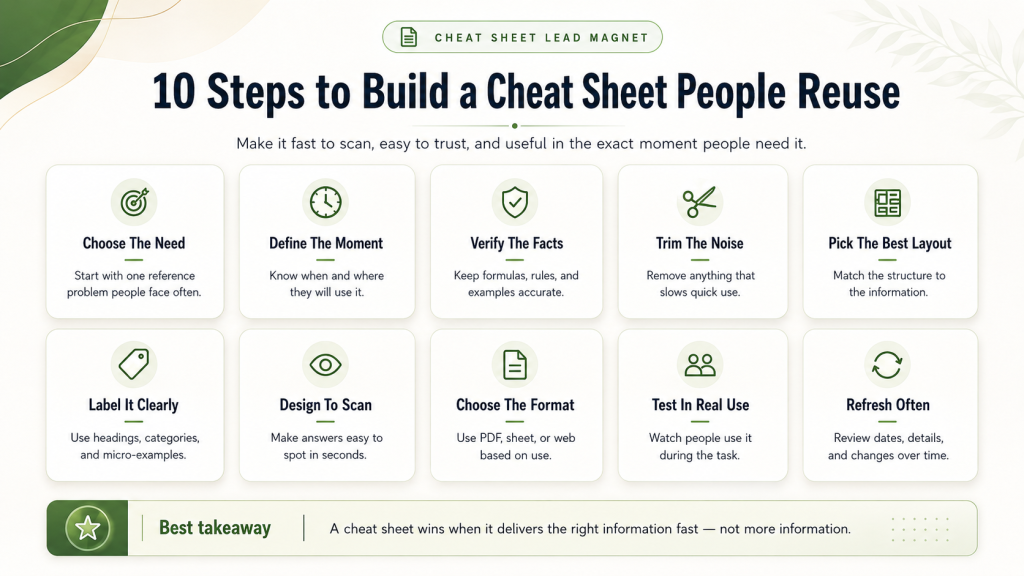
A useful cheat sheet does more than shorten information. It selects the details readers need most and arranges them so they can find and apply them quickly.
The following steps will help you create a resource that is focused, accurate, and easy to use.
Choose One Specific Reference Need
Start with a situation where your audience regularly needs information close at hand.
That information may include:
- Formulas
- Definitions
- Examples
- Specifications
- Shortcuts
- Comparisons
- Rules
- Commands
- Common terms
a photographer might create a camera settings reference for different lighting conditions. An email marketer could develop a guide to common campaign metrics and formulas.
Avoid choosing an entire subject such as “Digital Marketing” or “Photography.” Focus on one reference need the reader can understand immediately.
Define When the Reader Will Use It
Think about the moment when someone will open the cheat sheet.
Will they use it while writing, calculating, designing, studying, comparing options, or completing a technical task?
That context should guide what you include.
A headline formula cheat sheet, for instance, may be used while someone drafts a landing page. A measurement conversion chart may sit beside someone while they cook.
When the intended use is clear, it becomes easier to decide which information belongs and which details can be left out.
Gather and Verify the Essential Information
Collect the facts, formulas, examples, rules, or specifications the reader genuinely needs.
Do not rely only on memory, especially when the resource contains technical, financial, legal, medical, platform-specific, or frequently changing information. Confirm important details with reliable sources before publishing them.
Check that:
- Formulas are correct
- Terms are defined accurately
- Examples match the rule they illustrate
- Measurements and specifications are current
- Links lead to the correct resources
- Advice does not overstate what the information can do
A polished design cannot make up for inaccurate content.
Remove Anything That Slows the Reader Down
A cheat sheet should not try to teach the entire subject.
Long introductions, background explanations, personal stories, and loosely related tips may be useful elsewhere, but they can make a quick-reference resource harder to use.
Review every item and ask:
- Does the reader need this while completing the task?
- Does it help them understand or apply the information?
- Can it be shortened without losing meaning?
- Would it be better explained in a separate article or tutorial?
Keep only what supports the main reference need.
Choose the Best Structure for the Information
Do not assume that every cheat sheet should be a page of bullet points.
The right structure depends on the material.
A table may work well for formulas and definitions. A comparison chart can help readers evaluate several options. A decision tree may be useful when the correct answer depends on a series of choices.
Other possible formats include:
- Formula reference
- Glossary
- Comparison grid
- Labeled diagram
- Shortcut list
- Decision guide
- Example library
- Conversion chart
- Command reference
Choose the structure that helps readers locate the right information with the least effort.
Add Clear Labels and Brief Examples
Readers should not need a separate guide to understand how the cheat sheet is organized.
Use clear headings, categories, labels, legends, and short notes to explain what each section contains.
Brief examples can also make condensed information easier to apply.
instead of listing only an email click-through-rate formula, you could show:
Example: 50 clicks ÷ 1,000 delivered emails × 100 = 5%
The example adds context without turning the resource into a full lesson.
Design for Fast Scanning
The design should help readers find information quickly.
Use readable type, clear contrast, short sections, consistent spacing, and enough white space to separate related ideas. Important labels should stand out, but too many colors, icons, or decorative elements can make the page harder to scan.
Create a clear visual order:
- Main title
- Section headings
- Key information
- Supporting examples or notes
The most important content should be easy to spot within a few seconds.
Select an Accessible Format
Choose a format based on how people will use the resource.
A PDF works well when readers may want to save, print, or view the cheat sheet without editing it. A spreadsheet may be better for searchable tables, formulas, or information that users need to customize.
A web page or online document can be useful when the content changes often or benefits from links and search functions.
Whichever format you choose, test it on the devices your audience is likely to use. Make sure the text remains readable, links work, and the file opens without unnecessary barriers.
Test It During the Actual Task
Do not test the cheat sheet only by reading it.
Ask someone from the intended audience to use it while completing the task it supports. Watch whether they can find the right information, understand the labels, and apply the details without asking for your help.
Pay attention to:
- Where they hesitate
- Which sections they overlook
- What they misunderstand
- Which information they expected but could not find
- Whether the layout helps or slows them down
Real use often reveals problems that are easy to miss during editing.
Add a Date and Plan for Updates
Some cheat sheets can remain useful for years. Others become outdated quickly.
Platform dimensions, software features, laws, technical standards, prices, and industry rules may change. Add a “last updated” date or version number when the accuracy of the resource depends on current information.
Set a reminder to review the cheat sheet regularly. The review schedule may be monthly, quarterly, or yearly depending on how often the information changes.
An outdated cheat sheet can damage trust, especially when readers rely on it while making decisions or completing important work.
Once the resource is ready, create a clear signup page that explains who it is for, what information it contains, and how it will help. Deliver it promptly, then follow up with content that supports the same topic.
A strong cheat sheet is focused enough to scan quickly, complete enough to be useful, and reliable enough that readers feel confident returning to it.

What Makes a Cheat Sheet Worth Downloading
A cheat sheet earns attention when people can immediately understand what it contains, why it matters, and how they will use it.
The strongest offers do not rely on hype or unnecessary bonuses. They make the value easy to see before someone enters an email address.
A Specific, Useful Outcome
A broad promise makes it difficult for readers to judge whether the resource is relevant.
Compare these examples:
The second title tells readers what information they will receive and when they may use it.
Focus the offer on one task, decision, or reference need. Avoid promising results the resource cannot control, such as guaranteed sales, traffic, or conversions.
A Clear Preview of the Resource
People may hesitate to subscribe when they cannot tell what they are getting.
Show a mockup, partial screenshot, sample table, or short preview of the information inside. A brief description can also explain the format and contents.
Get a one-page reference featuring 20 common Excel formulas, plain-language explanations, and examples of when to use each one.
A clear preview reduces uncertainty and helps the right readers decide whether the resource is useful to them.
Immediate Practical Value
The cheat sheet should support a real task the reader is already trying to complete.
A camera settings reference is useful during a photo shoot. A financial ratios guide can help someone review business reports. A headline formula sheet may support a writer while drafting copy.
The closer the resource is to a current need, the easier it is for someone to understand its value.
Do not rely only on phrases such as “save time” or “get better results.” Explain what the reader will be able to find, compare, calculate, or apply.
A Simple, Low-Friction Offer
The signup process should be as clear as the cheat sheet itself.
Use a focused landing page, a short form, and a direct call to action. Ask only for information you genuinely need.
After signup, deliver the resource promptly. Unnecessary steps, confusing confirmation messages, or delayed access can weaken an otherwise useful offer.
A Companion Resource That Adds Value
A companion resource can strengthen the offer when it helps readers apply the information.
For example:
- A formula cheat sheet could include a practice spreadsheet.
- A copywriting reference could include completed examples.
- A terminology guide could include a short video explanation.
- A comparison chart could include a decision worksheet.
Keep the additional resource closely connected to the main topic. Adding several unrelated bonuses may make the offer feel larger, but not necessarily more useful.
Genuine Proof and Credibility
Relevant proof can make the offer feel safer and more trustworthy.
You might include a testimonial from someone who has used the resource, a brief explanation of your experience, or the reliable sources used to verify the information.
Specific feedback is more useful than vague praise.
“The formula examples helped me understand which calculation to use in my monthly report.”
Only use real comments with permission. Avoid invented testimonials, unsupported performance claims, or language that implies every reader will achieve the same result.
Real Urgency or Scarcity When Relevant
Urgency can encourage action when there is an honest reason to act now.
A deadline may be appropriate when the cheat sheet is connected to:
- A live workshop
- A seasonal campaign
- An upcoming deadline
- A limited bonus
- A resource that will soon be updated or replaced
Explain the limitation clearly and honor it.
Fake countdown timers, invented availability limits, and repeatedly extended deadlines may increase short-term attention, but they can damage long-term trust.
A Natural Next Step
The experience should not end when the file is downloaded.
A relevant next step may help readers understand the resource, apply it more effectively, or continue solving the same problem.
That step could be:
- A related article
- A short tutorial
- An email lesson
- A worksheet
- A consultation
- A product or service
someone who downloads an email metrics cheat sheet might receive a follow-up lesson on interpreting campaign results.
The next step should feel like a continuation of the value already provided, not an unrelated sales pitch.
A cheat sheet becomes worth downloading when the offer is specific, credible, easy to understand, and closely connected to a task the reader already wants to complete.
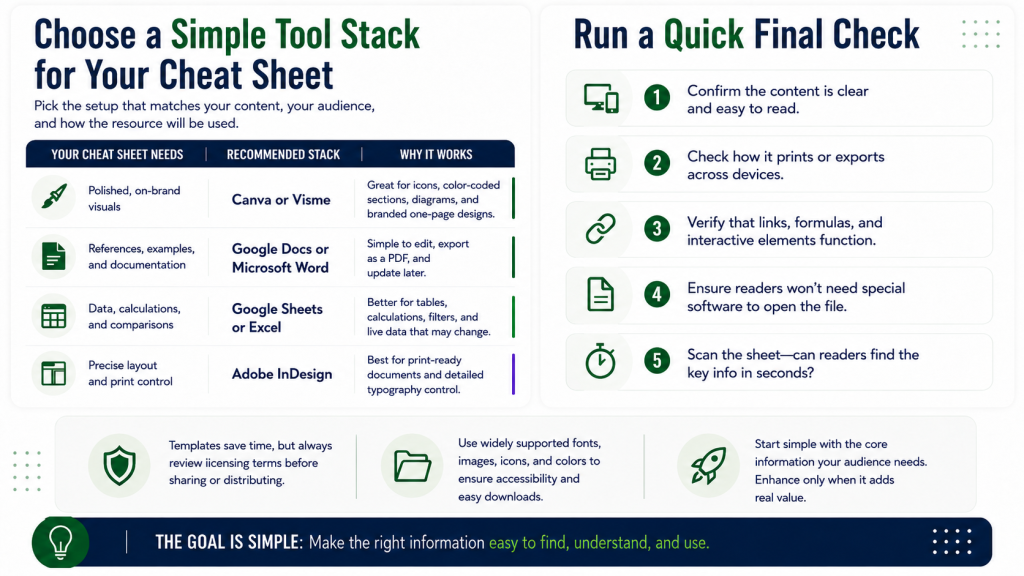
A Simple Setup for Creating Your Cheat Sheet
You do not need a complicated set of tools. Choose one that fits the type of information you are presenting and how your audience will use it.
| Your Cheat Sheet Needs | A Practical Option | Why It Fits |
|---|---|---|
| A polished visual layout | Canva or Visme | Useful for icons, color-coded sections, diagrams, and branded one-page designs |
| Definitions, examples, or written references | Google Docs or Microsoft Word | Simple to edit, export as a PDF, and update later |
| Formulas, comparisons, or searchable data | Google Sheets or Excel | Better for tables, calculations, filters, and information that may change |
| Precise control over a custom layout | Adobe InDesign | Suitable for experienced designers creating detailed or print-ready resources |
Before You Publish
Test the cheat sheet on the devices and formats your audience is likely to use. Make sure:
- The text is readable on a phone and computer.
- The printed version remains clear when printing is expected.
- Links, formulas, and interactive fields work correctly.
- Readers do not need uncommon software to open the resource.
- The most important information is easy to locate within seconds.
Templates can save time, but check the licensing terms before distributing them. Confirm that any included fonts, images, icons, and design elements may be used in a downloadable lead magnet.
Start with the simplest option that meets the reader’s needs. Add interactive features or advanced software only when they make the information easier to find, understand, or apply.
What Weakens a Cheat Sheet Lead Magnet
A cheat sheet loses value when readers cannot find, understand, or trust the information it contains.
Most problems come from trying to include too much, organizing the content poorly, or creating a resource that does not match the audience’s needs.
Too Much Information in Too Little Space
A cheat sheet should condense information, not squeeze an entire guide onto one page.
Trying to include every fact, explanation, and example often leads to tiny text, crowded sections, and a layout that is difficult to scan. Readers may download the resource but avoid using it because finding one answer takes too much effort.
Include the details people need during the task. Move longer explanations, background information, and advanced lessons to a separate article or tutorial.
Adding another page is better than making the resource unreadable.
Weak Organization
Useful information can still feel confusing when it is grouped or labeled poorly.
Readers should be able to predict where an answer will appear. Similar information belongs together, headings should clearly describe each section, and the order should match how people naturally search for the details.
a camera settings cheat sheet could be organized by lighting condition rather than listing unrelated settings in no clear order.
Consistent labels, spacing, colors, and table structures also help readers understand the resource faster.
Outdated or Unverified Details
Accuracy is essential when readers rely on the cheat sheet while making decisions or completing technical work.
Formulas, software commands, platform specifications, legal requirements, measurements, and industry standards should be checked against reliable sources before publication.
Information that changes regularly also needs an update plan. Include a version number or “last updated” date when appropriate, then review the resource on a schedule that matches how quickly the subject changes.
A visually polished cheat sheet can still damage trust when the information is wrong or outdated.
Missing Context
Condensed information can become misleading when readers do not know when or how it applies.
A formula may require a short definition. A shortcut may work only within a particular program or operating system. A financial ratio may need a note explaining what its result does and does not show.
Use brief examples, labels, legends, or caution notes where misunderstanding is likely.
The goal is not to explain the entire subject. It is to provide enough context for readers to apply the information correctly.
Design That Competes With the Content
A cheat sheet does not need elaborate graphics to feel professional.
Too many colors, icons, font styles, backgrounds, and decorative elements can make important details harder to find. Weak contrast and inconsistent formatting can create the same problem.
Use design to show relationships and priorities. Color may separate categories, bold text can highlight labels, and spacing can distinguish one section from another.
Every visual choice should help the reader locate or understand information. Anything that does neither can probably be removed.
Poor Audience and Offer Alignment
A popular topic does not always attract useful leads.
an accounting firm might collect many email addresses with a general productivity cheat sheet. However, those subscribers may have little interest in bookkeeping or accounting services.
The topic is still practical, but it attracts people with a problem connected to the firm’s expertise.
Choose a subject that serves the audience while leading naturally toward the content, service, or offer your business provides.
No Clear Reason to Save or Use It
A cheat sheet should provide more value than a few obvious tips copied from a basic search result.
Readers are more likely to keep the resource when it organizes scattered information, explains a confusing subject, saves them from repeated research, or helps them complete a recurring task.
Before publishing, ask:
- Does this make useful information easier to find?
- Would the reader need this information again?
- Does the organization add value?
- Is the content specific enough to justify downloading?
A resource that offers nothing new, clearer, or more convenient gives people little reason to keep it.
An Unrelated or Overly Aggressive Next Step
The call to action should connect naturally to the subject of the cheat sheet.
Someone who downloads an email metrics reference may appreciate a tutorial on reading campaign reports. Immediately pushing an unrelated service or product can make the resource feel like a disguised sales pitch.
Choose a next step that helps the reader continue solving the same problem. Depending on their needs, that may be another lesson, a worksheet, a consultation, or a relevant paid offer.
The strongest transition feels like continued support rather than a sudden change from education to promotion.
Avoiding these problems helps your cheat sheet remain clear, accurate, and worth returning to. It also makes the resource more likely to attract subscribers who value your expertise and want further help with the topic.
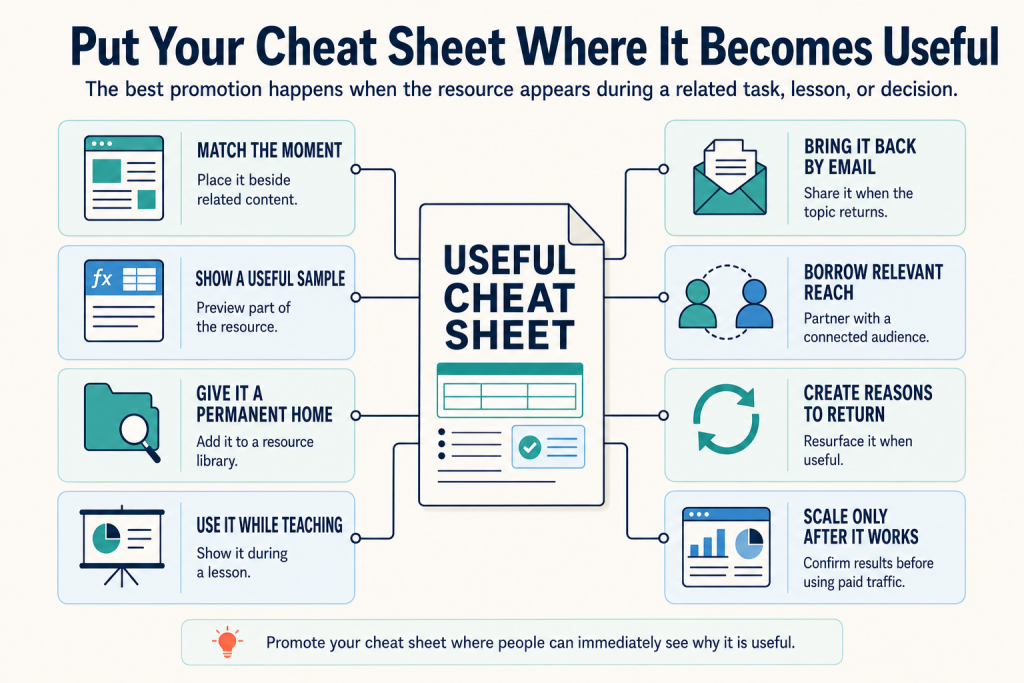
Where to Promote Your Cheat Sheet Lead Magnet
A cheat sheet is easiest to promote when people can immediately see how it will help them find, compare, or apply information.
Instead of advertising it as another free download, place it where readers are already learning about the topic or completing the task it supports.
Place It Near High-Intent Content
Related articles, tutorials, and videos are natural places to introduce a cheat sheet.
A reader studying Excel formulas may appreciate a downloadable formula reference. Someone learning about email performance could use a guide that puts common metrics and calculations in one place.
Position the offer near the part of the content where the information becomes useful. The connection should be obvious rather than forced.
Keep these formulas nearby. Download the Email Marketing Metrics Cheat Sheet for quick reference.
This approach presents the resource as a practical extension of the content rather than an unrelated promotion.
Let People Preview the Information
A cheat sheet is easier to value when readers can see part of it before subscribing.
Share a sample table, formula, comparison, definition, or cropped section from the finished resource. The preview should be useful on its own while showing the organization and depth of the full version.
For example, a social post could explain one financial ratio and then direct readers to a complete reference covering ten commonly used ratios.
A clear preview answers an important question before the opt-in:
Add It to a Resource Library
Cheat sheets often work well inside a dedicated resource area on your website.
A searchable library can organize resources by topic, audience, or task. This gives visitors a place to discover the cheat sheet even when they did not arrive through the original article or campaign.
You might include it within:
- A free resources page
- A learning center
- A client portal
- A course library
- A software help center
- A members-only content area
Use a specific title and short description so readers can quickly understand what information the resource contains.
Use It During Teaching Moments
Webinars, workshops, courses, and live demonstrations give you an opportunity to show the cheat sheet in use.
Rather than mentioning it only at the end, refer to it while explaining a formula, comparison, process, or technical concept. Attendees can then see how the resource supports the lesson.
A course instructor might use a terminology cheat sheet during a module. A software trainer could refer to a shortcut guide while demonstrating the program.
When people see the resource helping with a real task, its value becomes easier to understand.
Introduce It to Your Email Subscribers
Existing subscribers may still benefit from a new cheat sheet, particularly when it covers a recurring problem or complements content they have already received.
Keep the announcement focused. Explain:
- What information the cheat sheet includes
- Who will find it useful
- When they may want to reference it
- Where they can access it
You can also mention the resource later when a related topic appears in your newsletter or email sequence. A useful reference does not have to be promoted only once.
Reach Adjacent Audiences Through Partnerships
A cheat sheet can perform well through partnerships because it gives the other business or creator something practical to share with their audience.
Look for partners whose work connects naturally to the subject.
- A bookkeeper could share an expense-category reference with a small-business community.
- A photographer could offer a camera-settings guide through a photography workshop.
- A copywriter might contribute a headline reference to a website designer’s newsletter.
- A software educator could share a shortcut guide during a podcast interview.
The connection between the audience and the resource should be direct. A large but loosely related audience may produce less useful leads than a smaller group with a clear interest in the topic.
Make the Resource Easy to Revisit
Promotion does not have to end after the initial download.
Include a memorable file name, clear branding, and a link to the current version so readers can find the resource again. An online version may also be bookmarked when the information changes regularly.
You can remind subscribers about the cheat sheet when:
- The resource has been updated
- A related deadline is approaching
- A new tool or rule affects the information
- You publish a tutorial that builds on it
- A seasonal task makes it relevant again
These reminders should be based on usefulness, not repetition for its own sake.
Test Paid Promotion After Confirming the Offer
Paid advertising can expand the reach of a cheat sheet, but first confirm that the offer works with people who already know or trust your content.
Before paying for traffic, check that:
- The title communicates a specific reference need
- The preview makes the value clear
- The signup page works on mobile
- The file is delivered correctly
- The follow-up content relates to the topic
- Subscribers show interest after downloading it
Begin with a limited test and pay attention to lead quality, not only the cost of each signup.
A cheap lead is not necessarily useful when the person has little interest in your future content or offer.
Encourage Relevant Sharing
People may naturally share a cheat sheet that helps colleagues, clients, classmates, or team members.
Make that process simple. You could include a link to the signup page in the resource, invite subscribers to forward the delivery email, or add the cheat sheet to your email signature.
Avoid forcing readers to post publicly or refer several people before receiving access. Sharing works best when it is optional and motivated by the usefulness of the resource.
The strongest promotion strategy is not to place the cheat sheet everywhere. It is to show the resource at moments when people can immediately understand why they would use it.
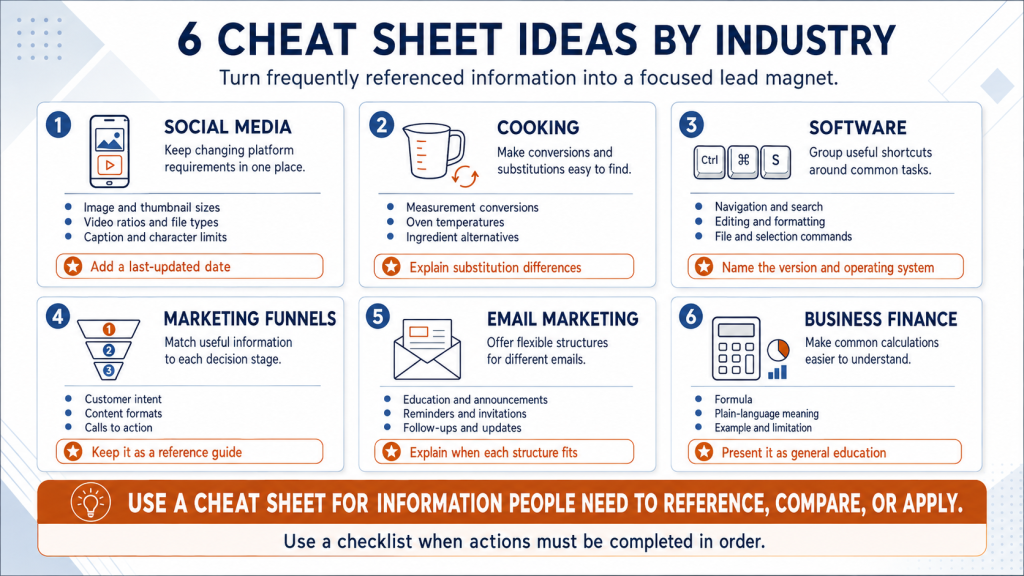
Cheat Sheet Lead Magnet Examples by Industry
The best cheat sheet ideas organize information people need to reference, compare, or apply while completing a task.
The following examples show how different businesses can turn useful information into a focused lead magnet that connects naturally to what they offer.
Social Media Specifications Cheat Sheet
Social media specifications change across platforms and content types, making them difficult to remember.
A useful cheat sheet could include:
- Recommended image dimensions
- Video aspect ratios
- File formats
- Caption or character limits
- Thumbnail sizes
- Content types available on each platform
A clear table can help readers compare platforms without searching through several help pages.
Because platform requirements can change, include a visible “last updated” date and review the resource regularly.
A relevant next step could be a social media planning guide, content audit, template package, or management service.
Recipe Measurement and Substitution Guide
A kitchen reference guide can help readers convert measurements or find common ingredient substitutions while cooking.
It might include:
- Cups, tablespoons, and teaspoons
- Metric and imperial conversions
- Oven temperature conversions
- Common ingredient equivalents
- Basic substitutions
- Storage or preparation notes
Substitutions should include brief context when the replacement may affect flavor, texture, or cooking time. A substitute is not always an exact replacement.
A relevant next step could be a recipe collection, cooking class, meal-planning resource, or kitchen product guide.
Software Keyboard Shortcuts Reference
Keyboard shortcuts are a natural fit for a cheat sheet because users need them while working inside the software.
The resource could organize shortcuts by purpose, such as:
- Navigation
- Editing
- Formatting
- File management
- Search
- Selection
- Frequently used commands
Clearly identify the software version and operating system because shortcuts may differ between Windows, macOS, browser versions, or application updates.
A relevant next step could be a software tutorial, advanced training, course, or consulting service.
Marketing Funnel Reference Guide
A funnel reference guide can help business owners understand how customer needs change across different stages.
It could show:
- Funnel stage
- Typical customer intent
- Common questions
- Suitable content types
- Useful calls to action
- Possible business goals
For example, someone at the awareness stage may need educational content, while a person comparing providers may benefit from case studies, service comparisons, or demonstrations.
The cheat sheet should remain a reference guide rather than becoming a step-by-step funnel-building checklist.
A relevant next step could be a funnel audit, campaign-planning worksheet, workshop, or marketing service.
Email Subject Line Structures With Examples
A subject line cheat sheet can give writers useful structures to reference when they are unsure how to frame an email.
The resource could group examples by purpose, such as:
- Educational emails
- Announcements
- Reminders
- Invitations
- Follow-ups
- Product updates
- Curiosity-based emails
Each structure should include an example and a short note explaining when it may fit.
Avoid calling the examples “high-converting formulas.” Subject-line performance also depends on the audience, sender reputation, timing, relevance, and content of the email.
A relevant next step could be an email-writing guide, welcome-sequence template, copy review, or email marketing service.
Financial Ratios Reference Sheet
A financial ratios cheat sheet can help business owners understand common calculations without searching for each formula separately.
It might include:
- Ratio name
- Formula
- Plain-language definition
- What the ratio may help evaluate
- A simple calculation example
- Important limitations
Possible entries could cover liquidity, profitability, efficiency, or debt-related ratios.
The information should be carefully verified and clearly presented as general education rather than personalized financial, accounting, or investment advice.
A relevant next step could be a financial-reporting guide, bookkeeping consultation, business review, or accounting service.
The strongest cheat sheet topic is usually information your audience needs to reference, compare, or apply. When the reader needs to complete a sequence of actions in order, a checklist may be the better lead magnet.
Conclusion: Turn Useful Information Into a Cheat Sheet Lead Magnet
A strong cheat sheet lead magnet gives a specific audience the information they need in a format they can scan and use quickly.
Start by identifying facts, formulas, examples, comparisons, or definitions your audience needs while completing a task. Keep only the essential details, verify the information, and organize it so readers can find the right answer without unnecessary searching.
Then publish a clear first version and test it with people from your intended audience. Their questions, mistakes, and feedback will show you where the resource needs more clarity or context.
A useful cheat sheet gives the right people a practical reason to join your email list. More importantly, it shows them that your business can make complex information easier to understand and apply.
Frequently Asked Questions
What Is the Ideal Length for a Cheat Sheet?
Many cheat sheets are one or two pages, but length should follow the topic rather than a fixed rule. Use enough space to keep the information readable and well organized. Adding another page is better than shrinking the text or crowding the layout.
How Is a Cheat Sheet Different From a Checklist?
A cheat sheet organizes facts, formulas, examples, definitions, or comparisons for quick reference. A checklist guides readers through actions they need to complete or verify. The right format depends on whether the audience needs information to look up or steps to follow.
Can a Cheat Sheet Cover a Complex Topic?
Yes, but it should focus on one narrow part of the topic. For example, a financial cheat sheet might explain common profitability ratios rather than trying to summarize all of business finance. The goal is to simplify one reference need, not compress an entire course onto a page.
What Design Elements Make a Cheat Sheet Easy to Use?
Use descriptive headings, readable fonts, consistent labels, clear spacing, and strong contrast. Tables, color coding, and icons can help when they make information easier to locate. Every design choice should support quick scanning rather than decoration alone.
How Can I Improve Cheat Sheet Lead Magnet Conversions?
Start with a specific title and clearly explain what information the resource includes. Show a preview, keep the signup form simple, deliver the file promptly, and promote it near content where readers already need the information. A relevant and credible offer is more persuasive than exaggerated promises.
How Often Should I Update a Cheat Sheet?
Update frequency depends on how quickly the information changes. Software features, platform specifications, laws, and industry standards may require frequent reviews, while stable topics may need only an annual check. Add a version number or “last updated” date when readers need to know the information is current.