Introduction
Building a quality email list can help you stay connected with your audience, share useful content, and create more opportunities to grow your business. But before someone joins your list, you need to give them a clear reason to sign up.
That is where a checklist lead magnet can help.
A checklist lead magnet is a short, practical resource that people receive in exchange for their email address. It guides them through the steps needed to complete a task, prepare for an event, avoid common mistakes, or reach a specific goal.
Checklists work especially well when people feel unsure, overwhelmed, or worried about missing an important step. Instead of asking them to read a long guide or watch a full training, a checklist organizes the information into clear actions they can follow at their own pace.
However, simply placing a few tasks next to empty boxes does not guarantee results. A useful checklist must solve a specific problem, match the needs of the audience, and make the next action easy to understand.
This guide will help you turn a simple checklist into a useful resource people want to download, use, and remember. By the end, you’ll know how to create a checklist that gives your audience a quick win while helping you attract more of the right subscribers.
Key Takeaways
- The best checklist ideas often come from tasks where people worry about forgetting a step, making a mistake, or starting in the wrong place.
- A narrow checklist can be more valuable than a broad one because it attracts people with a specific problem your business is equipped to help solve.
- Checklist length matters less than usefulness. A longer checklist can still work well when every step is necessary, clear, and placed in the right order.
- A simple PDF or document can be more effective than an interactive resource when it is easier for the reader to access, understand, and use.
- Where you place the checklist can matter as much as what is inside it. The offer is more relevant when readers see it while already thinking about the task it helps them complete.
- A strong checklist should deliver a useful result on its own while leading naturally to the next step, without turning the resource into a disguised sales pitch.
Affiliate Disclosure: Some of the links on this site are affiliate links. That means if you click and make a purchase, I may earn a small commission at no extra cost to you. I only recommend tools and resources I genuinely believe in and that align with the content we share here.
Why Checklist Lead Magnets Convert
A checklist lead magnet does not convert simply because it has boxes to check. It works when it offers a clear and useful solution to a problem your audience already wants to solve.
The format is especially effective for tasks that involve several steps, important details, or a risk of forgetting something. Instead of giving readers more information to sort through, a checklist helps them focus on what to do next.
They Make a Complicated Task Feel Manageable
A large task can feel difficult when someone does not know where to begin. A checklist breaks that task into smaller actions and places them in a logical order.
“Launch a podcast” may feel overwhelming. A checklist can separate that goal into manageable steps, such as choosing a topic, selecting equipment, recording an episode, and submitting the show to podcast platforms.
The goal is not to include everything the reader could possibly know. It is to show them the essential steps needed to move forward.
They Make Progress Visible
A checklist gives readers a simple way to see what they have completed and what still needs their attention.
Research has found that monitoring progress can help people work toward their goals more effectively. A written checklist also acts as an external reminder, reducing how much information someone must keep in mind at once. Researchers often refer to this use of outside tools as cognitive offloading.
This does not mean checking a box guarantees that someone will finish the task. It simply makes progress easier to track and the next step easier to identify.
They Help People Get a Quick Win
A long guide may contain more information, but not every reader wants more information. Sometimes, they need a practical tool they can use right away.
A focused checklist can help someone prepare for a meeting, review a landing page, organize documents, or complete another small but meaningful task. When the resource helps the reader make progress quickly, it demonstrates the value of your advice before you ask them to take another step with your business.
The win should be useful and realistic. Avoid promising dramatic results that the checklist alone cannot guarantee.
They Are Easy to Scan and Use
Most people do not need to read a checklist from beginning to end before using it. They can scan the sections, identify the steps that apply to them, and begin taking action.
This makes checklists useful for processes that require preparation, review, or verification. They can also be saved, printed, or revisited when the reader needs them again.
However, a checklist is not the best format for every topic. If the reader needs detailed instruction, deep explanation, or help making a complex decision, a guide, workbook, video, or another format may be more appropriate.
They Offer a Clear Value Exchange
People are more likely to consider joining an email list when they understand exactly what they will receive and how it may help them.
Compare these two ideas:
The second option identifies a clear task and outcome. A potential subscriber can quickly decide whether the resource is relevant to them.
That clarity can make the offer more appealing, but the checklist format alone does not guarantee a high conversion rate. Results also depend on the topic, audience, promise, landing page, traffic source, and how well the checklist solves the problem.
The strongest checklist lead magnets make a focused promise, provide a practical next step, and deliver exactly what the subscriber expected.

Where a Checklist Fits in Your Funnel
A checklist can support people at different stages of their relationship with your business. Its role depends less on how long it is and more on what the reader needs at that moment.
The most effective checklist gives the reader a useful next step while connecting naturally to the product, service, or content you offer.
Attract New Subscribers
At the top of the funnel, people may be discovering your business for the first time. They are often looking for a simple answer to an immediate problem.
A focused checklist can give them a quick, low-risk way to learn from you.
A gardening business might offer a “10-Step Checklist for Starting Your First Vegetable Garden.” A nutrition coach might create a “Healthy Grocery Shopping Checklist for Busy Beginners.”
These resources work well because the value is easy to understand. The reader knows what they will receive and how it may help them.
The topic should also connect to your business. A checklist may attract many subscribers, but those subscribers will be less valuable if they have little interest in your main offer.
Build Trust and Engagement
People in the middle of the funnel already know something about your business, but they may still be exploring their options or deciding how much help they need.
At this stage, a checklist can help them review their current situation, identify gaps, or make progress on a more detailed task.
A web designer might offer a “15-Point Website Credibility Checklist” to readers who are considering a redesign. A business coach could create a “Quarterly Planning Checklist” for subscribers who want a more organized way to set goals.
The checklist should provide real value on its own while helping the reader better understand the problem your paid offer solves.
Prepare Prospects to Take the Next Step
Near the bottom of the funnel, people may be close to making a decision but still have questions, doubts, or practical steps to complete.
A checklist can reduce that uncertainty by helping them prepare.
A mortgage broker might provide a “Mortgage Application Document Checklist.” A consultant could offer a “Before Your Strategy Session Checklist” so potential clients know what information to gather in advance.
The goal is not to pressure someone into buying. It is to make the next step feel clearer, easier, and more informed.
Support Clients and Customers
Checklists are also useful after someone becomes a customer.
You can use them to guide client onboarding, prepare customers for an appointment, support course completion, organize project handoffs, or reduce repeated customer-service questions.
A photographer might send a “Family Photo Session Preparation Checklist” after a client books. A course creator could include a weekly action checklist to help students stay on track.
In these situations, the checklist is not mainly used to collect leads. It improves the customer experience and helps people get more value from what they already purchased.
Wherever you use a checklist, make sure its purpose is clear. It should help the reader complete a meaningful step and guide them naturally toward the most relevant next action.
Create High-Converting Lead Magnets in Minutes.
Feed in your video, post, or idea — get a complete download and opt-in page that starts building your list before the day ends.
Step-by-Step: How to Create a Checklist Lead Magnet
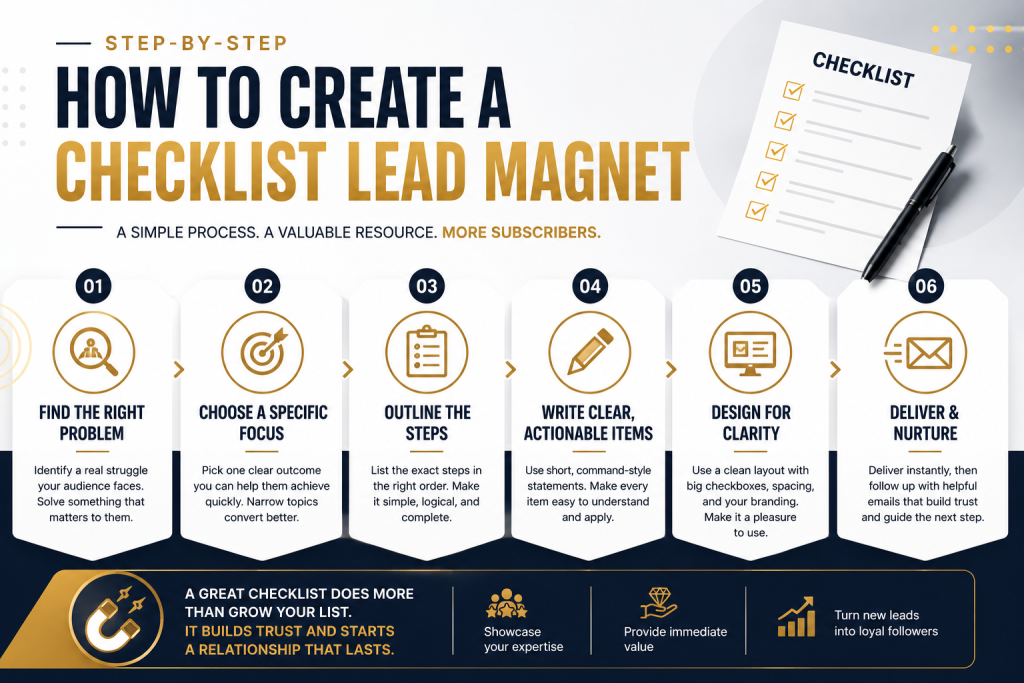
Creating a checklist lead magnet is simple in theory. The challenge is making it specific enough to attract the right people and useful enough that they act on it.
The following steps will help you turn one audience problem into a focused checklist that is easy to understand, use, and remember.
1. Identify a Specific Problem
Start with a problem your audience already wants to solve.
Look at the questions people ask during sales calls, in support emails, under blog posts, inside online communities, or through surveys. Pay attention to tasks they find confusing, time-consuming, or easy to get wrong.
For example, a wedding photographer may notice that clients often ask what to bring to an engagement session. An accountant may hear the same questions every year about which documents small business owners need for tax preparation.
These are strong checklist opportunities because the need already exists.
Avoid starting with a topic simply because it seems popular. The checklist should address a real problem for the type of person your business wants to reach.
2. Choose One Clear Outcome
A strong checklist should help the reader complete one task, prepare for one event, or avoid one group of related mistakes.
Broad topics make it difficult to decide which steps belong in the checklist. They also make the value harder to explain.
Compare these examples:
Too broad: Content Marketing Checklist
More focused: 12 Steps to Prepare and Publish Your First Blog Post
The second title identifies a specific task and gives the reader a clearer idea of what the checklist will help them accomplish.
Your outcome should also be realistic. Avoid promises such as doubling revenue or tripling traffic unless you have strong evidence that the checklist alone can consistently produce that result.
A checklist can guide a process. It cannot guarantee an outcome that depends on many other factors.
3. List Every Step the Reader May Need
Before deciding what belongs in the final version, write down every step that may be involved in completing the task.
Do not worry about length or order yet. The goal at this stage is to capture the full process.
Think about:
- What the reader needs before starting
- Which actions they must complete
- Which decisions they may need to make
- What they should review before finishing
- Which mistakes they should avoid
It can also help to walk through the process yourself as if you were doing it for the first time. Experienced people often skip steps mentally because those actions have become automatic.
Writing everything down first makes it easier to spot missing instructions later.
4. Put the Steps in a Logical Order
Once you have a complete list, arrange the steps in the order the reader should follow them.
Some checklists work best as a timeline. Others may need to be grouped by stage, category, or priority.
For example, an event-planning checklist might be divided into:
- Three months before the event
- One month before the event
- One week before the event
- The day of the event
A website review checklist may be organized by:
- Content
- Design
- Mobile usability
- Calls to action
- Technical checks
The reader should not have to guess what comes first or move back and forth between unrelated tasks. Each step should lead naturally to the next.
5. Write Clear, Action-Based Items
Every checklist item should tell the reader exactly what to do.
Begin with direct verbs such as:
- Choose
- Review
- Confirm
- Download
- Compare
- Schedule
- Remove
- Test
Instead of writing:
Website headline
Write:
Review your website headline and make sure it explains what you offer.
Instead of:
Email platform
Write:
Choose an email platform and create the list that will receive new subscribers.
A reader should be able to understand each action without guessing what you meant.
Keep each item focused on one task when possible. If a sentence asks the reader to complete three unrelated actions, divide it into separate checklist items.
6. Add Only the Guidance Readers Need
Short checklist items are easy to scan, but some tasks need a little context.
You can add a brief note, example, tip, or link when it helps the reader complete the action correctly.
For example:
Write a clear checklist title. Name the audience, task, or outcome whenever possible.
That extra sentence adds useful direction without turning the checklist into a long guide.
Be careful not to overexplain every item. If each checkbox is followed by several paragraphs, the resource may no longer feel like a checklist.
When a topic requires detailed teaching, link to a related article, video, or guide instead of placing all the information inside the checklist.
7. Design the Checklist for Easy Use
The design should help the reader complete the task, not distract from it.
Use clear section headings, readable fonts, visible checkboxes, and enough spacing between items. Keep colors and decorative elements simple so the instructions remain easy to follow.
Also consider how people will use the checklist.
Will they print it? Read it on a phone? Complete it on a computer? Share it with a team?
A printable checklist should have enough room to mark items or write short notes. A digital version should remain readable on smaller screens and use links or fillable fields only when they add real value.
Include your logo, business name, and website, but keep the branding secondary to the usefulness of the resource.
8. Build the Signup and Delivery Process
The checklist is only one part of the lead magnet experience. You also need a clear way for people to request and receive it.
Create a landing page or signup form that explains:
- Who the checklist is for
- Which task it helps them complete
- What they will receive
- What happens after they subscribe
Use a clear call to action, such as:
Send Me the Checklist
After someone signs up, deliver the resource promptly through email or a confirmation page.
The delivery email should include the checklist link, explain how to use it, and tell the subscriber what type of emails they can expect from you next.
Do not make the reader search through several messages or complete unnecessary steps before accessing the resource.
9. Review, Test, and Improve
Before publishing the checklist, review it from the reader’s point of view.
Check that:
- The title matches the content
- The steps appear in the correct order
- Each item describes a clear action
- No essential step is missing
- The design is easy to read
- All links and form fields work
- The next step is clear
Whenever possible, ask someone from the intended audience to use the checklist without your help.
Watch for places where they hesitate, misunderstand a step, or ask for more information. Those moments can reveal instructions that need to be clarified, reordered, or removed.
After launch, continue improving the checklist based on subscriber questions, feedback, and performance. A useful lead magnet does not need to be perfect on the first day, but it should become more helpful as you learn how people use it.
Pro Tips to Make Your Checklist More Useful
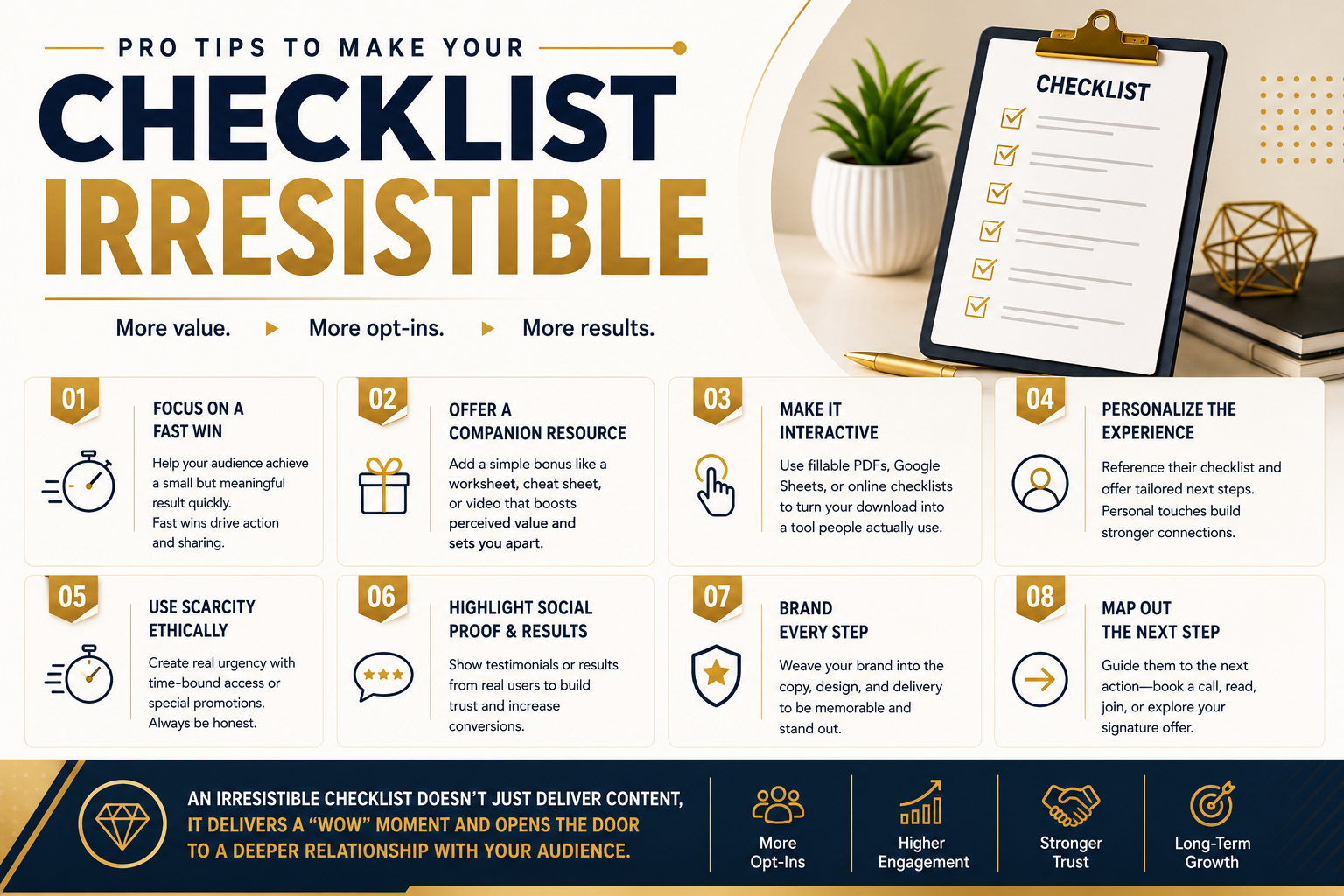
Once the basic checklist is complete, a few thoughtful improvements can make it more helpful, memorable, and relevant to the people who download it.
The goal is not to add more content for the sake of making the resource look valuable. Each addition should make the checklist easier to use or help the reader take the next step.
Focus on One Meaningful Win
A useful checklist should help the reader accomplish something specific.
That win does not need to be dramatic. It might help someone prepare for a meeting, review a website, organize documents, plan a week of meals, or avoid mistakes before launching a project.
What matters is that the result feels meaningful to the reader and matches the promise made on the signup page.
A checklist called “Prepare for Your First Client Discovery Call” should help the reader enter the call feeling organized and confident. It should not promise that the checklist will automatically help them close every client.
A realistic win builds more trust than an exaggerated one.
Add a Companion Resource Only When It Helps
A companion resource can make a checklist easier to use, but it should support the same task rather than distract from it. Useful additions may include:
- A short worksheet
- A completed example
- A planning page
- A brief video walkthrough
- A spreadsheet
- A list of recommended resources
A blog post publishing checklist might include a simple headline worksheet. A home-buying checklist could include a document tracker.
Avoid adding unrelated bonuses simply to make the lead magnet sound larger. One useful checklist is better than a bundle of resources the subscriber does not need.
Choose the Right Format for the Task
An interactive checklist is not always better than a printable one. The right format depends on how and where the reader will use it.
A printable PDF may work well for:
- Event preparation
- Home projects
- Appointment planning
- Packing lists
- In-person tasks
A fillable document or spreadsheet may be more helpful when the reader needs to:
- Add notes
- Track dates
- Assign tasks
- Compare options
- Update information over time
An online checklist may work best for repeated processes or tasks completed by a team.
Choose the simplest format that helps the reader complete the task comfortably. Do not add interactive features unless they make the resource easier to use.
Personalize the Follow-Up
The emails that follow the download should relate to the checklist the subscriber requested.
Someone who downloads a website review checklist may appreciate an email explaining how to fix the most common website problems. Someone who requests an event-planning checklist may need advice about timelines, vendors, or budgeting.
This kind of personalization does not require complicated technology. Even a short email sequence written specifically for one lead magnet can feel more relevant than sending every subscriber the same general messages.
Start by referring to the resource they downloaded, then help them take the next logical step.
Use Genuine Scarcity or Urgency When Appropriate
Scarcity and urgency can help people make a decision when the limitation is real.
For example, urgency may be appropriate when a checklist is connected to:
- An upcoming event
- A seasonal deadline
- A limited workshop
- A live challenge
- A bonus that expires on a stated date
- A resource that will be updated or removed
In these situations, explain the deadline clearly and honor it.
Avoid fake countdown timers, invented availability limits, or deadlines that are repeatedly extended. These tactics may attract short-term attention, but they can damage trust when people realize the limitation was not genuine.
Scarcity and urgency should clarify a real reason to act, not create unnecessary pressure.
Use Genuine Social Proof
Feedback from real users can help potential subscribers understand how the checklist may benefit them.
The strongest testimonials are specific. Compare these two examples:
Only use comments from real people who have given permission for their words to be shared. Do not present sample quotes, invented feedback, or expected results as genuine testimonials.
When possible, include the person’s name, role, business, or another detail that helps readers understand the context of the result.
Keep the Branding Helpful and Subtle
Your checklist should make it easy for readers to remember where the resource came from.
Include your business name, logo, website, and consistent colors or fonts. You may also add contact information or a link to a relevant resource.
However, the branding should not compete with the checklist itself.
Large logos, repeated promotions, and excessive design elements can make the resource harder to use. The reader should notice the value first and the branding naturally as they work through it.
Give the Reader a Relevant Next Step
After completing the checklist, the reader should know what to do next.
That action should connect naturally to the task they just completed. It might invite them to:
- Read a related article
- Watch a tutorial
- Download another relevant resource
- Reply with a question
- Join a workshop
- Book a consultation
- Explore a product or service
Someone who finishes a website credibility checklist might be directed to a guide about improving their homepage. A person who completes a tax preparation checklist might be invited to schedule an appointment with an accountant.
The next step does not always need to be a sale. It should be the most useful action for the reader at that stage.
A strong checklist does more than provide information. It helps the reader complete a meaningful task, builds confidence in your guidance, and makes the next step easier to understand.
Simple Tools for Creating Your Checklist Lead Magnet
You do not need expensive software or a complicated setup to create a professional checklist.
For a polished PDF, Canva offers editable checklist templates that you can customize, download, print, or share. A simple checklist can also be created in Google Docs or Microsoft Word. When readers need to record dates, add notes, compare options, or track ongoing progress, Google Sheets or Excel may be a better fit.
Your email marketing platform may already provide everything else you need. Platforms such as Kit and Mailchimp include landing pages or signup forms that can collect email addresses and connect subscribers to your follow-up emails. Before paying for another service, check which features are already included in the platform you use.
The right tool is the one that makes the checklist easy to create, easy to deliver, and easy for your audience to use. Start with what you already have, then add new software only when it solves a clear problem.
Track How Your Checklist Performs
Use the reporting in your landing-page or email platform to see whether the checklist is attracting subscribers and encouraging them to take the intended next step.
Start with a few basic numbers: page visits, signups, email clicks, unsubscribes, and any consultations or purchases connected to the checklist.
To calculate the signup conversion rate, divide the number of signups by the number of landing-page visitors and multiply the result by 100.
Do not judge the checklist by downloads alone. A smaller number of relevant subscribers who read your emails and take the next step may be more valuable than a large list of people who never engage.
Common Checklist Lead Magnet Mistakes
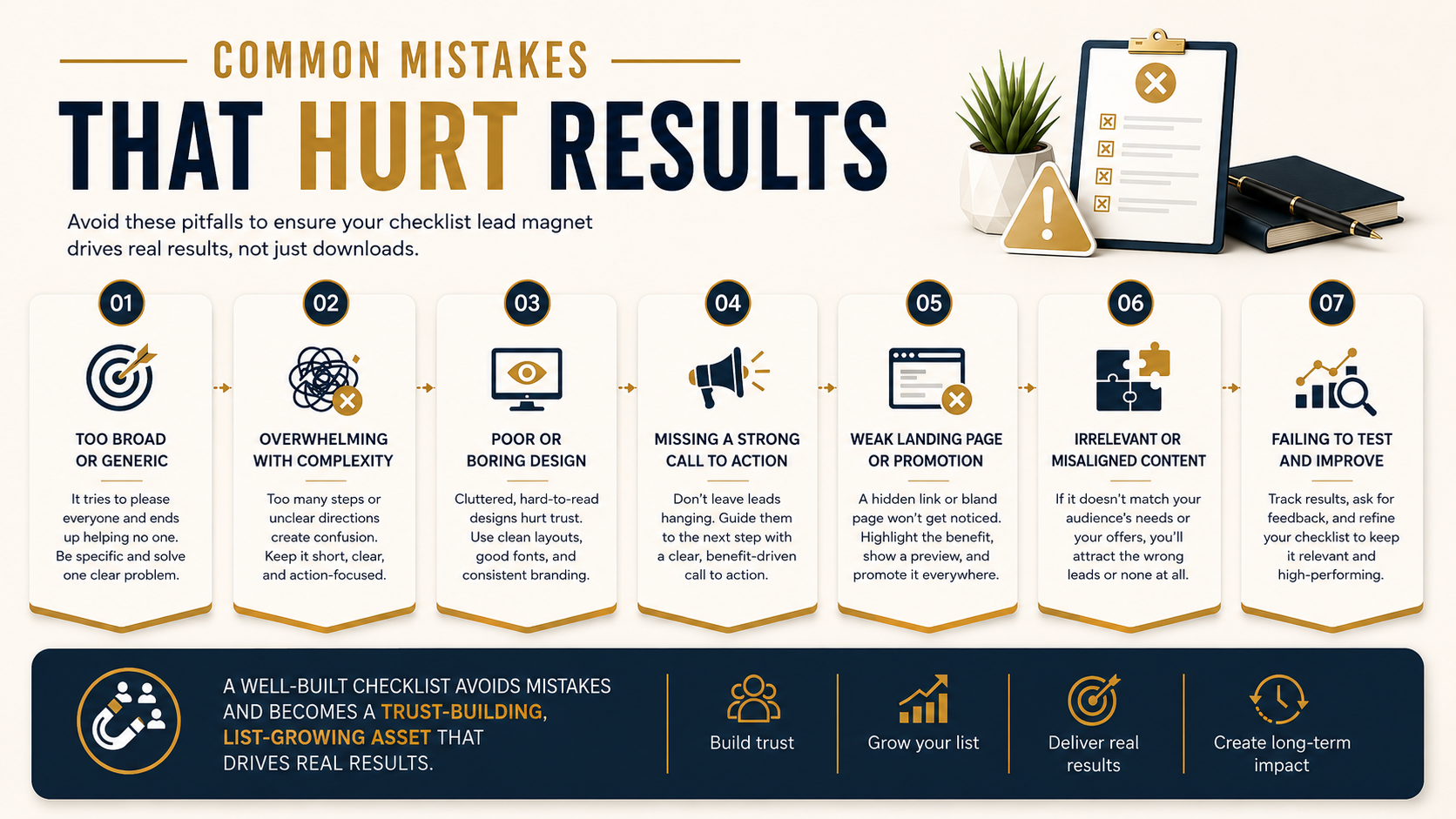
A checklist can be simple and still be effective. Most problems happen when the topic is too broad, the instructions are unclear, or the resource attracts people who are unlikely to benefit from what the business offers next.
Avoiding the following mistakes can make your checklist more useful to readers and more valuable to your business.
Choosing a Topic That Is Too Broad
A broad topic makes it difficult to decide what belongs in the checklist and what should be left out.
The second idea addresses one clear task. It is easier to explain on a landing page, easier to complete, and more likely to attract people interested in that specific outcome.
When choosing a topic, ask whether a potential subscriber can understand the purpose of the checklist within a few seconds.
Attracting the Wrong Subscribers
A checklist should not only attract attention. It should attract people who are a reasonable match for your business.
For example, a web designer could create a general productivity checklist and collect many email addresses. However, those subscribers may have little interest in website design.
The 15-Point Website Credibility Checklist for Local Service Businesses
This topic still provides practical value, but it is more likely to attract people who may also need the designer’s services.
List size matters less when the people joining have no interest in your content, expertise, or offer.
Including Too Many Steps
A long checklist is not automatically a bad checklist. Some tasks genuinely require many steps.
The problem is including unnecessary actions, repeating the same advice, or trying to teach an entire subject inside one resource.
Review each item and ask:
- Is this step essential to the promised outcome?
- Does it belong in this checklist?
- Can it be combined with another item?
- Would a link to a separate guide be more helpful?
The final checklist should feel complete without becoming difficult to use.
Writing Vague Checklist Items
Each item should tell the reader what action to take.
Instructions such as “Improve your website,” “Work on your marketing,” or “Review your strategy” are too broad. They leave the reader guessing about what to do next.
Specific instructions make the checklist more useful and reduce the need for additional explanation.
Making Claims the Checklist Cannot Support
A strong promise can make a checklist more appealing, but it should still be realistic.
Avoid titles and landing-page claims such as:
- Double your sales in seven days
- Guarantee your first client
- Triple your website traffic
- Never make another marketing mistake
A checklist may help someone follow a process, prepare more effectively, or avoid common errors. It cannot guarantee results that depend on experience, timing, budget, competition, or other outside factors.
Promise the benefit the checklist can reasonably deliver.
12 Steps to Prepare Your Website Before Running Your First Ad
This is specific and useful without claiming an outcome the checklist cannot control.
Making the Checklist Difficult to Use
Even strong information can lose value when the checklist is hard to read or complete.
Common usability problems include:
- Small text
- Crowded pages
- Weak contrast
- Unclear section headings
- Broken links
- Checkboxes that are difficult to mark
- A layout that does not work well on mobile or in print
Test the checklist in the format your audience is most likely to use. Open it on a phone, print a copy, and click every link before publishing it.
The design does not need to be elaborate. It needs to support the task.
Leaving the Reader at a Dead End
After completing the checklist, the reader should know what to do next.
That does not mean every checklist must end with a sales pitch. The next step should match the reader’s needs and the purpose of the resource.
You might direct them to:
- A related article
- A short tutorial
- A helpful email lesson
- Another relevant resource
- A consultation
- A product or service
Someone who finishes a home-buying document checklist might be invited to schedule a preparation call with a mortgage broker.
A relevant next step helps the checklist become part of a useful experience rather than a one-time download that is quickly forgotten.
Create High-Converting Lead Magnets in Minutes.
Feed in your video, post, or idea — get a complete download and opt-in page that starts building your list before the day ends.
How to Promote Your Checklist Lead Magnet
Creating a useful checklist is only part of the work. People also need to discover it in places where they are already looking for help.
The goal is not to promote the checklist everywhere. It is to place it in front of people who are likely to need it and benefit from what your business offers next.
Add It to Relevant Blog Content
A checklist can work well as a content upgrade inside a related article.
For example, an article about preparing for a home inspection could offer a printable home inspection checklist. A post about publishing an email newsletter could lead to a checklist that helps readers review each issue before sending it.
The checklist should feel like a natural next step, not an unrelated interruption.
Place the call to action near the section where the reader is most likely to need the resource. You can also include a second invitation near the end of the article for readers who finish the full post.
Share It With Your Existing Email Audience
People already on your email list may still find the checklist useful.
Send a short email explaining:
- Who the checklist is for
- Which problem it helps solve
- When it may be most useful
- Where subscribers can access it
Focus on the value of the resource rather than treating every checklist announcement like a major launch.
You can also mention it again later when the topic becomes relevant, especially if the checklist supports a seasonal task, event, or common question.
Turn Parts of the Checklist Into Social Content
Individual checklist items can become useful social posts on their own.
You might turn a few steps into:
- A short video
- A carousel
- A simple graphic
- A brief tip post
- A before-and-after example
For example, a website checklist could become a post titled “Three Things to Review on Your Homepage Today.”
Provide enough value in the post to make it useful, then invite people to download the complete checklist if they want the full process.
Avoid hiding every useful detail behind the signup form. Giving people a helpful sample shows them the quality of the resource before they subscribe.
Feature It on Your Website
Make the checklist easy to find on the parts of your website where it is most relevant.
You might feature it:
- Inside related articles
- On a resources page
- In the website navigation
- In a sidebar
- On a service page
- In a banner or pop-up
Pop-ups can help draw attention to the checklist, but they should not make the website difficult to use. Keep them relevant to the page, easy to close, and avoid showing them before the visitor has had a chance to engage with the content.
A targeted invitation usually feels more helpful than the same generic offer appearing on every page.
Promote It Through Partnerships
Guest content and partnerships can introduce your checklist to an audience that already cares about the topic.
Possible opportunities include:
- Guest articles
- Podcast interviews
- Newsletter features
- Webinars
- Online communities
- Professional associations
- Joint promotions with related businesses
The strongest partnerships usually involve audiences with a clear connection to the checklist.
For example, a bookkeeping checklist may fit naturally in a small business newsletter. A wedding planning checklist may be useful to the audience of a photographer, venue, or florist.
Follow the rules of any group or community you join. Contribute useful information first, and avoid posting promotional links where they are not welcome.
Use Paid Promotion Carefully
Paid ads can help you reach more people, but they should not be the first solution for a checklist that has not been tested.
Before paying for traffic, make sure:
- The checklist solves a clear problem
- The landing page explains the value
- The signup and delivery process works
- The follow-up emails are ready
- You can track signups and later actions
Start with a small test and compare the cost of attracting subscribers with the quality of those leads.
A low-cost signup is not always a good result if the subscribers never open your emails, click your links, or show interest in your offer.
Make It Easy to Share
A useful checklist may reach more people when subscribers can easily pass it along.
You can add the checklist to your email signature, mention it on thank-you pages, or invite subscribers to forward the delivery email to someone who may find it helpful.
You may also include simple sharing links where appropriate.
Keep the sharing process straightforward. Avoid requiring people to complete several actions before they can access the resource.
Effective promotion is less about being visible everywhere and more about appearing in the right context. Place the checklist where people are already thinking about the problem it solves, then make the value and next step easy to understand.
Create High-Converting Lead Magnets in Minutes.
Feed in your video, post, or idea — get a complete download and opt-in page that starts building your list before the day ends.
Checklist Lead Magnet Examples by Industry
A strong checklist lead magnet should solve a specific problem for people who are also likely to benefit from your content, service, or offer. The following examples show how businesses in different industries can use checklists to attract relevant subscribers and guide them toward a useful next step.
The Blog Post Publishing Checklist
A blog post publishing checklist can help writers review the important details before an article goes live.
- Review the headline
- Edit the introduction
- Check links
- Add images and alt text
- Review basic SEO elements
- Test the page on mobile
- Prepare promotional posts
This type of checklist helps newer writers avoid missed steps while giving experienced creators a more consistent publishing process.
The Home Buyer Preparation Checklist
Buying a home involves many documents, appointments, decisions, and deadlines. A preparation checklist can help first-time buyers understand what they may need before beginning the process.
- Reviewing a budget
- Gathering financial documents
- Listing preferred locations
- Identifying essential home features
- Preparing questions for an agent
- Scheduling inspections
- Tracking important dates
The checklist should make clear that requirements can vary and that it does not replace legal, financial, lending, or property advice.
The Weekly Meal Prep Checklist
A weekly meal prep checklist can help people organize meals without asking them to follow a complicated plan.
- Choose meals for the week
- Review ingredients already at home
- Create a shopping list
- Buy groceries
- Wash and prepare ingredients
- Cook selected meals
- Label and store food safely
The checklist should focus on planning and preparation rather than promising weight loss or other health outcomes it cannot guarantee.
The Event Planning Timeline Checklist
An event checklist becomes especially useful when tasks are organized by deadline. This format helps readers see what needs to happen and when.
- Three months before the event
- One month before the event
- One week before the event
- The day before
- The day of the event
Tasks could include confirming the venue, hiring vendors, sending invitations, reviewing the schedule, preparing signage, and checking final attendance numbers.
Small Business Tax Document Checklist
A tax document checklist can help business owners gather and organize records before meeting with a qualified professional.
- Income records
- Expense receipts
- Bank statements
- Payroll documents
- Contractor records
- Previous tax documents
- Asset purchase information
- Questions to discuss during the appointment
The checklist should explain that required records vary by business and location. It should not be presented as personalized tax advice.
The First Apartment Move-In Checklist
Moving into a first apartment involves more than unpacking boxes. A checklist can help new renters keep track of practical tasks before and after move-in day.
- Review the lease
- Confirm payment requirements
- Photograph the condition of the unit
- Test locks, lights, and appliances
- Set up utilities
- Update the mailing address
- Purchase essential household items
- Save maintenance contact information
This checklist provides practical help at a moment when renters may feel uncertain or overwhelmed.
The best checklist idea is not always the one with the broadest appeal. It is the one that solves a relevant problem for people who may also benefit from what your business offers next.

Conclusion and Action Challenge
A strong checklist lead magnet does one thing well: it helps a specific audience solve a specific problem.
When the topic is focused, the steps are clear, and the next action makes sense, the checklist becomes more than a free download. It becomes a useful first experience with your business.
Your next step is simple:
- Choose one problem your audience faces often.
- Write the essential steps needed to solve or prepare for it.
- Remove anything that does not support the main outcome.
- Create and publish a simple first version.
- Track how people respond, then improve it over time.
You do not need to make the checklist perfect before sharing it. Start with a useful version, learn from real subscribers, and refine it based on their questions, behavior, and feedback.
The goal is not only to collect more email addresses. It is to attract the right people by giving them something genuinely helpful from the start.
Frequently Asked Questions
How Long Should a Checklist Lead Magnet Be?
Most checklist lead magnets contain between 5 and 20 action items, but there is no ideal length for every topic. A simple task may need only a few steps, while a detailed process may require more. Include everything the reader needs to reach the promised outcome, but remove anything repetitive or unrelated.
Can Checklist Lead Magnets Work in Any Industry?
Checklist lead magnets can work in most industries when the audience needs to prepare, organize, review, or complete a process. They are commonly used in business, real estate, education, health, finance, events, and home services. However, another format may be better when the topic requires detailed instruction, personal reflection, or complex calculations.
What Is the Difference Between a Checklist and a Worksheet?
A checklist helps someone complete or confirm a series of actions. A worksheet asks the reader to write, calculate, plan, or think through a decision. The best format depends on whether the reader mainly needs clear steps to follow or space to work through information.
Should You Ask for an Email Before Delivering the Checklist?
Requesting an email address makes sense when the checklist is intended to grow your list and begin a relevant follow-up sequence. Be clear about what the subscriber will receive and what future emails they can expect. You may also offer the checklist without an opt-in when your main goal is reach, easy sharing, or customer support.
How Can You Make a Checklist Stand Out?
Choose a specific problem and promise a clear, realistic outcome. Write direct action steps, organize them in a logical order, and use a clean design that is easy to follow. A checklist stands out by being genuinely useful, not by including unnecessary pages, bonuses, or exaggerated claims.
Can You Create a Professional Checklist With Free Tools?
Yes. Tools such as Canva, Google Docs, Google Sheets, and Microsoft Word are enough for most checklist lead magnets. The resource will feel professional when it is clear, well organized, readable, and easy to use not simply because it was made with expensive software.
How Do You Know Whether Your Checklist Is Working?
Track how many people visit the signup page, how many subscribe, and whether they engage with the delivery and follow-up emails. Also look at meaningful next steps, such as replies, consultation bookings, product visits, or purchases. A checklist is working well when it attracts relevant subscribers who continue interacting with your business.