Introduction
A strong lead magnet can grow your email list. Creating, publishing, delivering, and tracking it across five different tools can slow that growth before the campaign even launches.
The right software removes that friction.
We will compare eight lead magnet tools, explain what each one does best, and help you find the right fit for your content, audience, and existing marketing setup.
Key Takeaways
- A lead magnet software can help you create, publish, deliver, promote, or track lead magnets, but not every platform handles the full process.
- LeadCreator, Beacon, Designrr, Canva, involve.me, Typeform, Kit, and OptinMonster each solve different parts of the lead magnet workflow.
- The best platform is the one that removes your biggest bottleneck without adding unnecessary cost or complexity.
- Check integrations, usage limits, branding restrictions, renewal terms, and automation features before subscribing.
- More features do not automatically make a platform a better fit. Pay for the capabilities you will actually use.
- A lead magnet software can improve speed, presentation, and delivery, but it cannot make a weak offer high-converting.
- Measure more than sign-ups. Email engagement, trials, consultations, purchases, and subscriber quality reveal whether the system is supporting real growth.
Affiliate Disclosure: Some of the links on this site are affiliate links. That means if you click and make a purchase, I may earn a small commission at no extra cost to you. I only recommend tools and resources I genuinely believe in and that align with the content we share here.
What Is a Lead Magnet Software?
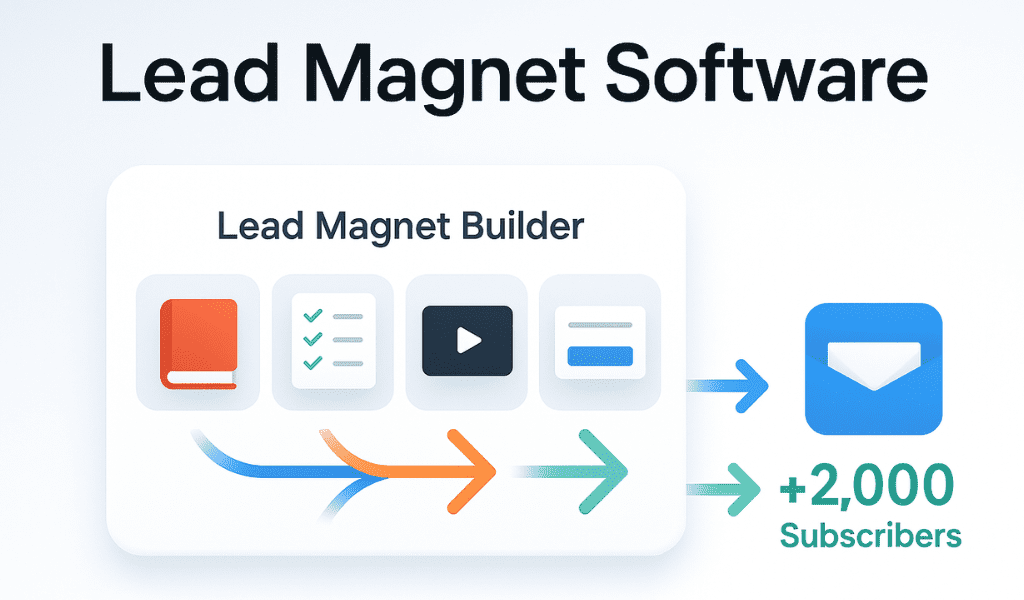
A Lead magnet software helps you create, publish, deliver, promote, or track resources offered in exchange for contact information.
That resource might be a checklist, eBook, template, quiz, calculator, mini-course, or free trial. The software makes it easier to turn the idea into a working campaign without handling every step manually.
Not every platform covers the full process. Some focus on writing and design. Others specialize in quizzes, opt-in forms, landing pages, email delivery, automation, or on-site promotion.
That is why the best tool depends on where your current process slows down. You may need one platform that handles most of the workflow, or a small combination of tools that work well together.
Best Lead Magnet Software for Different Needs
Lead magnet software can solve very different problems.
Some platforms help you write and design the resource. Others create quizzes, capture subscribers, deliver downloads, run follow-up emails, or promote the offer across your website. A tool can be excellent at one part of the process without replacing everything else.
The eight options below stand out for different reasons. Pricing, plan limits, and promotional terms can change, so confirm the current details before subscribing.
1. LeadCreator
Best All-in-One Lead Magnet SoftwareLeadCreator is designed for businesses that want to move from an idea to a published lead magnet without building the process across several disconnected platforms.
You can start with a topic, existing article, written content, or video and use AI to help develop the resource. The platform then lets you refine the content and design, create the opt-in experience, connect an email autoresponder, publish through a custom domain, and track conversions from one dashboard.
LeadCreator covers more of the complete workflow than a typical design tool. It combines creation, publishing, subscriber capture, email validation, campaign tracking, custom domains, and conversion-focused promotional tools in one system.
This makes it especially attractive when speed matters. Instead of designing the resource in one platform, building the form somewhere else, hosting it through another service, and tracking the campaign separately, you can manage most of the process from one place.
LeadCreator may be more platform than you need if you only create an occasional PDF and already have reliable tools for design, forms, email delivery, and analytics.
It also includes scarcity and urgency features such as expiring links, countdowns, and download limits. Those tools can strengthen a genuine time-sensitive offer, but they should reflect real conditions. Artificial scarcity may produce a quick click while weakening the trust the lead magnet is supposed to build.
2. Beacon
Best for Downloadable Lead Magnets and Resource LibrariesBeacon is a dedicated lead magnet platform for creating eBooks, checklists, workbooks, guides, and other downloadable resources.
Unlike a general design tool, Beacon is built around the complete publishing experience. You can create the resource, add lead-capture forms, publish smart PDFs, and organize several assets inside a gated resource library.
Beacon understands the practical needs of ongoing lead magnet campaigns. Reusable templates help maintain consistency, while its capture forms and resource libraries allow several assets to work together rather than existing as isolated PDFs.
That makes it a strong option for content-heavy businesses, agencies, educators, and companies building a growing library of guides or tools.
Beacon is specialized. It is less useful when you need a broader design platform for social graphics, presentations, videos, or everyday marketing content.
Its free and lower-tier plans also limit factors such as the number of lead magnets, stored leads, page views, and custom domains. Review those limits against the number of campaigns you expect to run.
3. Designrr
Best for Repurposing Existing ContentDesignrr helps turn content you already have into eBooks, reports, PDFs, flipbooks, and other downloadable assets.
You can import material from blog posts, Word files, Google Docs, PDFs, audio, and video instead of copying every section into a design manually. This makes it especially valuable for businesses with a strong archive of articles, webinars, podcasts, or videos that could be repackaged into new lead magnets.
Repurposing is where Designrr earns its place. A series of related articles can become an eBook. A webinar can become a written guide. A podcast episode can be transcribed and developed into a downloadable report.
The platform also handles publishing details such as templates, tables of contents, page numbers, and several export formats, reducing the production work required to turn raw content into a finished asset.
Importing content does not eliminate the need for editing.
Designrr’s own guidance recommends reviewing imported material for spelling, grammar, headings, formatting, and misplaced images before publishing. A blog post or transcript may also need restructuring before it feels like a cohesive lead magnet rather than recycled content placed inside a new design.
Designrr primarily creates the asset. You may still need another platform to build the opt-in form, collect subscribers, deliver the resource, and run the email follow-up.
4. Canva
Best for Visual Design and Brand ControlCanva is not dedicated lead magnet software, but it remains one of the most flexible tools for designing attractive checklists, eBooks, planners, workbooks, reports, and guides.
Its large template library gives you a quick starting point, while the editor allows you to change the layout, typography, colors, photography, graphics, and branding.
Canva can support more than the lead magnet itself.
You can use the same platform to design the PDF, its cover mockup, landing-page graphics, social media posts, advertisements, and other promotional materials. This makes it easier to keep the campaign visually consistent.
Canva also provides a broad selection of customizable lead magnet templates, including guides, checklists, eBooks, and workbooks.
Canva creates the asset, but it does not replace your complete lead-generation system.
You will usually need another service to build the signup form, store subscriber data, deliver the resource, segment the leads, and run follow-up emails.
Its flexibility can also encourage overdesign. The goal is not to use every available element. The design should make the resource easier to understand and use.
5. involve.me
Best for Interactive and Personalized Lead Magnetsinvolve.me specializes in interactive experiences such as quizzes, assessments, calculators, product finders, surveys, and qualification funnels.
Instead of giving every subscriber the same static download, you can use their answers to calculate a score, recommend a product, assign an outcome, or place them into a more relevant follow-up path.
involve.me goes beyond collecting an email address.
A consultant could create a readiness assessment. A software company could build a pricing calculator. An online store could recommend products based on a shopper’s needs. The resulting answers can then be passed to email and CRM tools with the score, segment, and quiz data attached.
The platform also combines interactive funnels with built-in email sequences, allowing businesses to follow up based on the answers or outcome rather than sending everyone the same generic message.
Interactive lead magnets require more strategic preparation than a downloadable checklist.
The questions need to be relevant. The scoring or formulas need to be accurate. The result needs to feel worthwhile. A complicated quiz with a vague outcome creates more friction without delivering more value.
Usage limits, branding removal, custom domains, advanced integrations, testing, and verification features also vary by plan.
6. Typeform
Best for Polished Quizzes and AssessmentsTypeform is known for its clean, conversational approach to forms.
Questions are normally presented one at a time, helping a quiz or assessment feel more like a guided interaction than a traditional form. You can add logic, images, videos, branded design, and integrations that send responses to your email platform or CRM.
Typeform provides an approachable experience for the participant.
Its templates and flexible question types make it possible to create a professional quiz without developing the entire experience from scratch. Logic can send people through different paths, and completed responses can be transferred to other systems for segmentation and follow-up.
Typeform’s response limits can become an important cost consideration as traffic grows.
Advanced branding, higher response allowances, conversion tracking, detailed drop-off analysis, and expanded automation may require higher plans or add-ons. Businesses running high-volume quizzes should compare those limits before committing.
Typeform is also strongest at collecting and organizing responses. More advanced email nurturing may still happen through a connected email marketing platform.
7. Kit
Best for Lead Magnet Delivery and Email Follow-UpKit, formerly ConvertKit, is primarily an email marketing platform rather than a lead magnet design tool.
Its role begins once you have something to offer. You can create signup forms and landing pages, deliver a downloadable file automatically, tag subscribers, segment the audience, and move people into a welcome sequence or longer automated journey.
Kit connects the opt-in directly to the email relationship.
A subscriber can complete a form, receive the promised resource, be tagged according to the offer they requested, and enter a relevant sequence without being moved manually between different systems.
Kit supports embedded forms, popups, landing pages, automatic incentive delivery, double opt-in, segmentation, and visual automations.
Kit will not turn your article into an eBook or design a polished workbook for you.
The resource normally needs to be created in LeadCreator, Beacon, Designrr, Canva, or another production tool before Kit can deliver it.
Its cost can also increase as the subscriber list grows, so consider both your current audience size and expected growth.
8. OptinMonster
Best for Promoting Lead Magnets on Your WebsiteOptinMonster helps businesses show the right opt-in offer to website visitors at strategically selected moments.
It supports popups, inline forms, slide-ins, floating bars, full-screen campaigns, content locking, behavioral triggers, targeting rules, testing, and analytics.
A strong lead magnet cannot convert visitors who never notice it.
OptinMonster allows you to place the offer within relevant pages, show it after a visitor has spent time reading, display it after a certain amount of scrolling, or present it as someone prepares to leave.
This gives businesses more control than placing the same static signup form in the sidebar of every page.
OptinMonster promotes and captures interest in the lead magnet. It does not create the downloadable resource or replace a complete email marketing platform.
You still need a valuable offer, somewhere to create or host it, and a system for delivering it and continuing the conversation.
Some of its most advanced targeting, testing, and exit-intent features are also reserved for higher plans. Promotional first-year pricing may differ from renewal pricing, so review the complete billing terms before subscribing.
What Matters More Than the Longest Feature List
The right software depends on where your current process breaks down.
If creating the resource takes too long, prioritize content generation, templates, editing, and publishing. If visitors are not seeing the offer, focus on forms, landing pages, targeting, and promotion. If subscribers receive the download but never hear from you again, email delivery and automation deserve more attention than another design tool.
Pay close attention to overlap. Buying several platforms that all provide forms, landing pages, and basic analytics can create more cost and complexity without improving the subscriber’s experience.
Before subscribing, confirm that the platform works with your existing website, email service, CRM, and domain. Review the limits that could affect real campaigns, including lead storage, responses, page views, team members, custom branding, exports, and automation.
Most importantly, remember what the software cannot do.
- It cannot make a vague idea desirable.
- It cannot replace audience insight.
- It cannot turn generic content into a high-converting offer simply by placing it inside a polished template.
The strongest setup is not always the one with the most tools. It is the one that gives you the shortest reliable path from a strong idea to a valuable lead magnet and from a new subscriber to a relationship worth continuing.
What to Avoid When Choosing a Lead Magnet Software
A lead magnet software can save time, simplify your workflow, and help you launch campaigns faster. But the wrong platform can leave you paying for features you do not use, rebuilding assets, or connecting tools that never work smoothly together.
Before you subscribe, watch for these common mistakes.
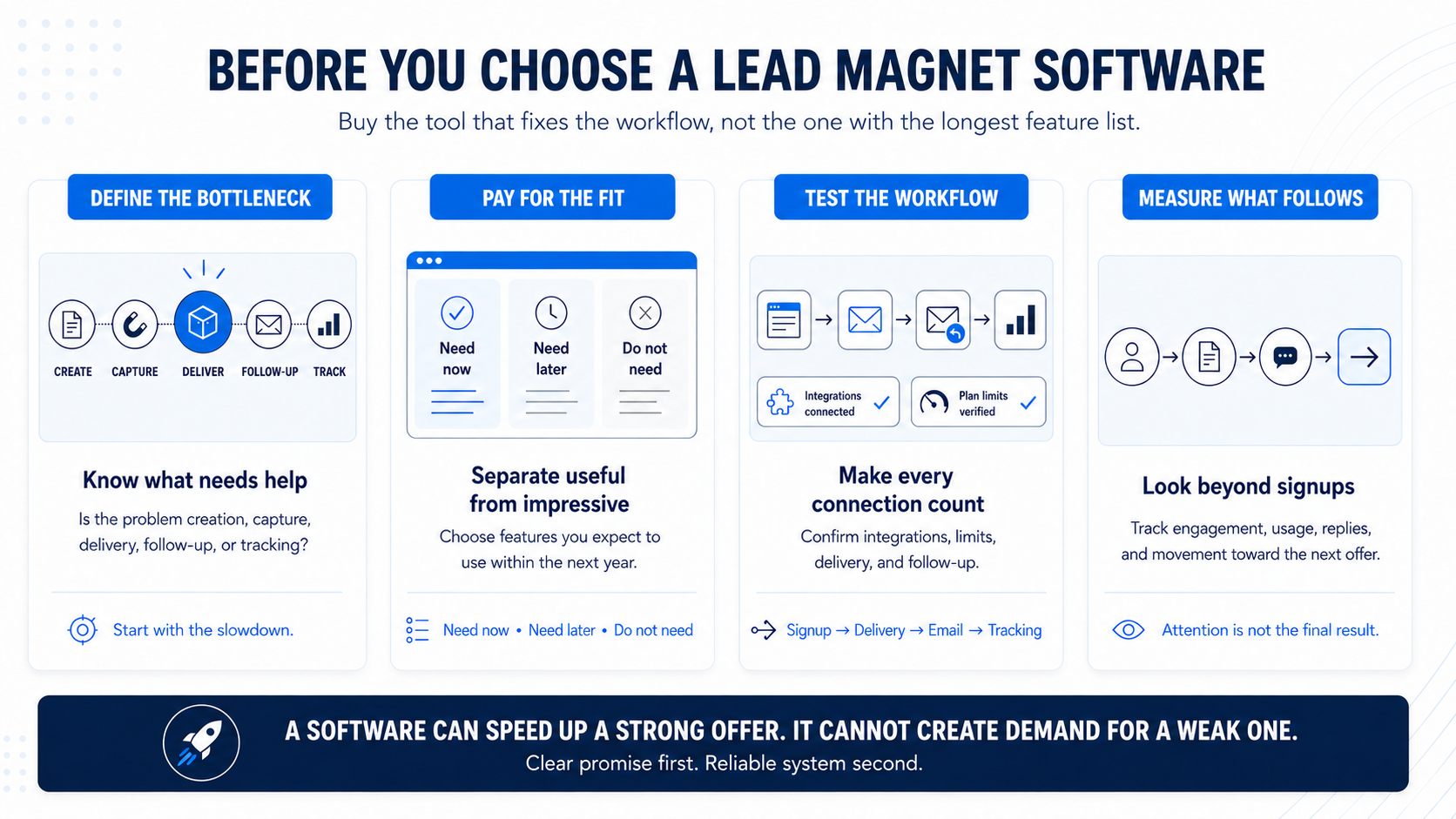
Choosing a Tool Before You Know What You Need
Do not begin with the longest feature list.
Start by identifying where your current process slows down. Do you need help creating the content, designing the resource, collecting email addresses, delivering the lead magnet, running follow-up emails, or tracking results?
A platform built for quizzes may be impressive, but it will not solve a design problem. An email tool may deliver the resource perfectly, but it may not help you create it.
Define the problem first. Then compare the tools that solve that part of the workflow well.
Paying for Features You Will Never Use
More features do not always mean more value.
Agency workspaces, advanced automation, large response allowances, team access, custom domains, AI credits, and detailed analytics can be worthwhile when you genuinely need them. For a business launching one simple checklist, they may add cost without improving the campaign.
Look at what you expect to use during the next six to twelve months. A platform should give you room to grow, but you should not have to fund an entire marketing department’s feature set before you need it.
Expecting the Software to Fix a Weak Offer
A polished template cannot make a vague idea irresistible.
The lead magnet still needs a clear audience, a specific problem, and a result people care enough about to exchange their email address for.
A lead magnet software can help you produce the resource faster, present it more professionally, and deliver it automatically. It cannot create demand for a topic your audience does not want.
Build the promise before you build the funnel.
Overcomplicating the Setup
It is easy to create a software stack that looks powerful on paper but becomes difficult to manage.
One tool creates the PDF. Another hosts the landing page. A third collects the email address. A fourth delivers the file. A fifth tracks conversions. Every additional connection creates another place where something can fail.
That does not mean every business needs an all-in-one platform. It means every tool should have a clear purpose.
Use the smallest number of platforms needed to create a reliable experience from signup to delivery and follow-up.
Ignoring Integrations and Plan Limits
A platform may look affordable until you reach a limit that matters.
Before subscribing, check whether it connects to your current email service, CRM, website, and domain. Then review the restrictions that could affect your campaigns, including:
- Monthly leads or responses
- Number of lead magnets
- Custom domains
- File exports
- Branding removal
- Automation limits
- Team access
- Analytics
- Renewal terms
A low starting price may become expensive once you need the features required to run the campaign properly.
Focusing Only on Design
A beautiful lead magnet can still be difficult to find, slow to receive, or disconnected from the rest of the customer journey.
Design matters because it shapes the reader’s first impression and makes the resource easier to use. But it is only one part of the system.
The signup form should be clear. The delivery should be immediate. The file should open correctly. The follow-up emails should match the promise that brought the subscriber in.
Choose a lead magnet software that supports the complete experience you want to create not only the appearance of the download.
Judging Success Only by the Number of Sign-Ups
More subscribers can look like success, but the number alone does not tell you whether the campaign is helping the business.
A lead magnet may attract hundreds of people who never open another email, click an offer, start a trial, or become a customer.
Track what happens after the signup. Look at email engagement, resource usage, replies, consultations, trials, purchases, and long-term fit.
The strongest lead magnet system does not simply collect more email addresses. It attracts people who have a real reason to stay connected.
Conclusion
A Lead magnet software can save time, simplify delivery, and help you turn more ideas into campaigns that actually reach your audience.
But the tool is only part of the result.
The strongest lead magnets still begin with a clear problem, a compelling promise, and something worth exchanging an email address for. Software helps you create, publish, promote, and track that offer faster but it cannot make a weak idea high-converting.
That is why the best platform is not always the one with the most features. It is the one that removes the biggest bottleneck in your current process without adding unnecessary cost or complexity.
Start by identifying where your system slows down. Then choose the software that helps you move from idea to subscriber with less friction and more control.
Frequently Asked Questions About Lead Magnet Software
What does a lead magnet software do?
A lead magnet software helps you create, publish, deliver, promote, or track resources offered in exchange for contact information. Some platforms handle most of the process, while others focus on one area, such as design, quizzes, forms, email delivery, or analytics.
Do I need a dedicated lead magnet software?
Not always. You may already have tools that can create the resource, collect email addresses, and deliver it. A dedicated lead magnet software becomes more valuable when you want a faster workflow, fewer integrations, better campaign tracking, or a system you can reuse across several lead magnets.
Can one lead magnet software handle the entire process?
Yes. Some platforms combine content creation, design, publishing, lead capture, delivery, and tracking. Others require you to connect a design tool with an email platform or form builder. Review the full workflow before subscribing so you know exactly which steps the software handles.
Which lead magnet software is easiest for beginners?
The easiest option depends on what you want to create. Canva is approachable for visual downloads, Typeform works well for quizzes, Kit can manage delivery and email follow-up, and all-in-one platforms such as LeadCreator reduce the need to connect several separate tools.
Can a lead magnet software connect to my email platform?
Many platforms connect with popular email services and CRMs, but the available integrations vary by product and plan. Confirm that your current email system is supported and check whether the connection can apply tags, trigger automations, and transfer the subscriber information you need.
How much does a lead magnet software cost?
Costs vary widely. Some platforms offer free plans, while others charge based on subscribers, responses, leads, users, domains, or advanced features. Check the current pricing, usage limits, and renewal terms instead of comparing only the advertised starting price.