Introduction
Designrr is positioned as a content repurposing tool built to convert existing material into professionally formatted ebooks and digital lead magnets. It focuses on speed, structured layouts, and simplified publishing compared to traditional design software.
In 2026, digital publishing tools compete heavily on automation, formatting flexibility, and ease of export. Understanding how Designrr fits within that landscape requires clarity around its features, workflow, pricing structure, strengths, and limitations.
This article provides a structured breakdown of Designrr’s core capabilities, pricing tiers, pros and cons, and available alternatives so you can assess how it compares within the current ebook creation software market.
Key Takeaways
- Designrr focuses on turning existing content into formatted ebooks and digital lead magnets.
- Its core strength lies in content import and template-based layout automation.
- Pricing varies by plan tier, with feature access expanding at higher levels.
- It simplifies formatting compared to traditional design software, but offers less design flexibility.
- Alternatives may offer stronger customization or broader design control depending on your needs.
Affiliate Disclosure: Some of the links on this site are affiliate links. That means if you click and make a purchase, I may earn a small commission at no extra cost to you. I only recommend tools and resources I genuinely believe in and that align with the content we share here.
What Is Designrr?
Designrr is an online ebook and digital publication creation tool. It is designed to convert existing content into structured, professionally formatted ebooks without requiring advanced design skills.
The platform allows users to import material from various sources, including blog posts, Word documents, PDFs, and web URLs. Once imported, the content can be styled using pre-built templates and layout options.
Instead of designing pages manually in software like Adobe InDesign, Designrr focuses on template-driven formatting. This makes it more accessible for marketers, bloggers, agencies, and content creators who want to publish lead magnets, reports, or ebooks efficiently.
Designrr operates as a web-based platform, which means no installation is required. Users work directly inside the browser to edit, format, and export digital publications.
How Designrr Works
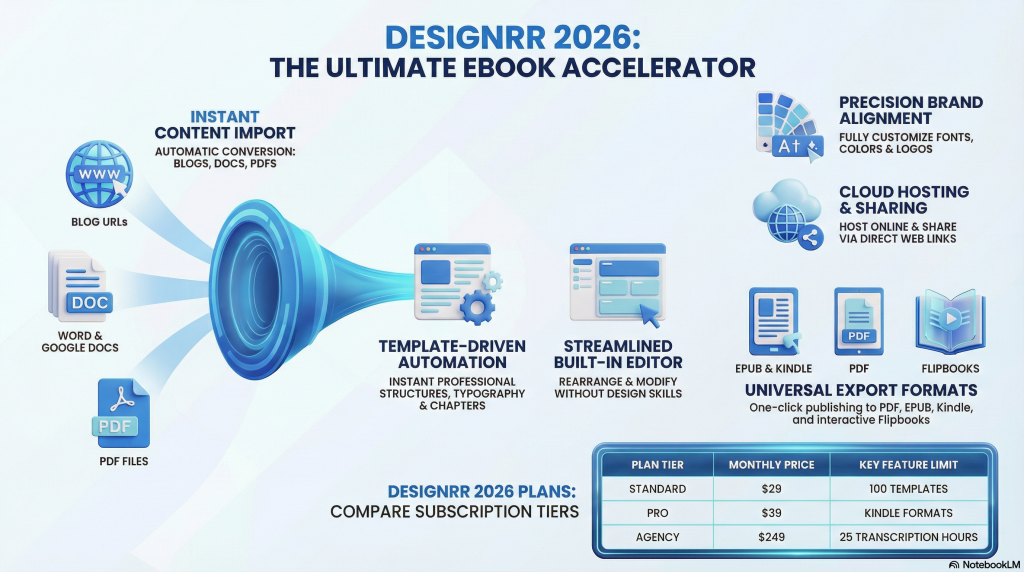
Designrr follows a structured import-to-export workflow. The platform is built around converting existing content into formatted digital publications rather than starting from a blank canvas.
Here is how the process typically works:
1. Import Content
Users begin by importing content from supported sources. This may include blog URLs, Word documents, PDFs, Google Docs, or existing text files. The system extracts the text and prepares it for formatting.
2. Apply a Template
Once imported, users select from pre-designed ebook templates. These templates control layout structure, typography, and general formatting style.
3. Customize Layout and Branding
After selecting a template, users can adjust fonts, colors, headers, images, and branding elements. While customization is available, it remains template-based rather than fully design-freeform.
4. Edit and Refine
Content can be edited inside the platform. Sections can be rearranged, styled, or adjusted to improve readability and presentation.
5. Export or Publish
The final publication can be exported in formats such as PDF, EPUB, or other supported file types depending on the selected plan. Some versions also include options for online hosting or flipbook-style presentation.
The workflow prioritizes efficiency and automation. Instead of designing every element manually, the system streamlines formatting through templates and guided customization.

Key Features of Designrr
Designrr centers its functionality around content conversion and structured formatting. Its feature set focuses on speed, automation, and simplified ebook production rather than advanced graphic design control.
Here are the core features available within the platform.
Content Import Options
Designrr supports multiple import sources. Users can pull in:
- Blog posts via URL
- Microsoft Word documents
- PDFs
- Google Docs
- Direct text input
The system extracts text and prepares it for formatting inside the editor.
Template-Based Ebook Layouts
The platform includes a selection of pre-designed templates. These control:
- Page structure
- Typography
- Chapter layout
- Header and footer styling
Templates are intended to reduce manual formatting time while maintaining a professional appearance.
Branding Customization
Users can adjust design elements to match brand identity, including:
- Fonts
- Color schemes
- Headings
- Cover styling
- Logo placement
Customization exists within the boundaries of the selected template rather than full freeform design control.
Editing and Formatting Tools
Inside the editor, users can:
- Modify text
- Rearrange sections
- Insert images
- Adjust spacing
- Format headings and subheadings
The editing interface is structured for content formatting rather than advanced layout manipulation.
Export Formats
Depending on the pricing tier, users can export files in formats such as:
- PDF
- EPUB
- Kindle-ready files
- Flipbook-style presentations
Export flexibility may vary by subscription level.
Hosting and Sharing Options
Some plans include online hosting capabilities. This allows users to share digital publications via a link rather than only downloading files.
Designrr’s feature set prioritizes speed and structured output. It is built to streamline ebook creation rather than replace full design software.

Designrr Pricing (2026)
Designrr uses a tiered pricing structure. Each plan expands access to features such as export formats, content sources, and advanced customization tools.
While pricing may change over time, the platform typically offers multiple levels that differ based on functionality and output capabilities.
Entry-Level Plan
The base plan generally includes:
- Core ebook creation tools
- Basic templates
- Standard PDF export
- Limited import sources
This tier is designed for users who want to create simple lead magnets or reports without advanced publishing needs.
Mid-Tier Plans
Higher plans expand functionality with:
- Additional templates
- More export formats, such as EPUB or Kindle
- Enhanced customization options
- Expanded content import features
These plans are structured for users producing ebooks more frequently or requiring broader format flexibility.
Advanced or Premium Plans
Top-tier plans often include:
- Full export capabilities
- Flipbook or interactive publication options
- Additional design tools
- Commercial or agency-level permissions
These tiers are positioned for agencies, content marketers, or businesses publishing multiple digital assets.
Lifetime Deals
Designrr has periodically offered lifetime purchase options instead of recurring subscriptions. Availability of lifetime deals varies and may not be permanent.
Before purchasing, it is important to verify:
- Current pricing tiers
- Included features per plan
- Upgrade costs
- Refund policy terms
Because pricing structures can change, reviewing the official website ensures the most accurate details.
Pricing At a Glance
| Plan Name | Price | Key Features |
|---|---|---|
| Standard | $29 per month | 100 templates and PDF exports. |
| Pro | $39 per month | 300 templates and Kindle formats. |
| Premium | $49 per month | 4 transcription hours and HTML tools. |
| Business | $99 per month | 8 transcription hours and custom layouts. |
| Agency Premium | $249 per month | 25 transcription hours and team access. |
| Lifetime Deal | $27 one time | Core features and standard PDF exports. |
Pros and Cons of Designrr
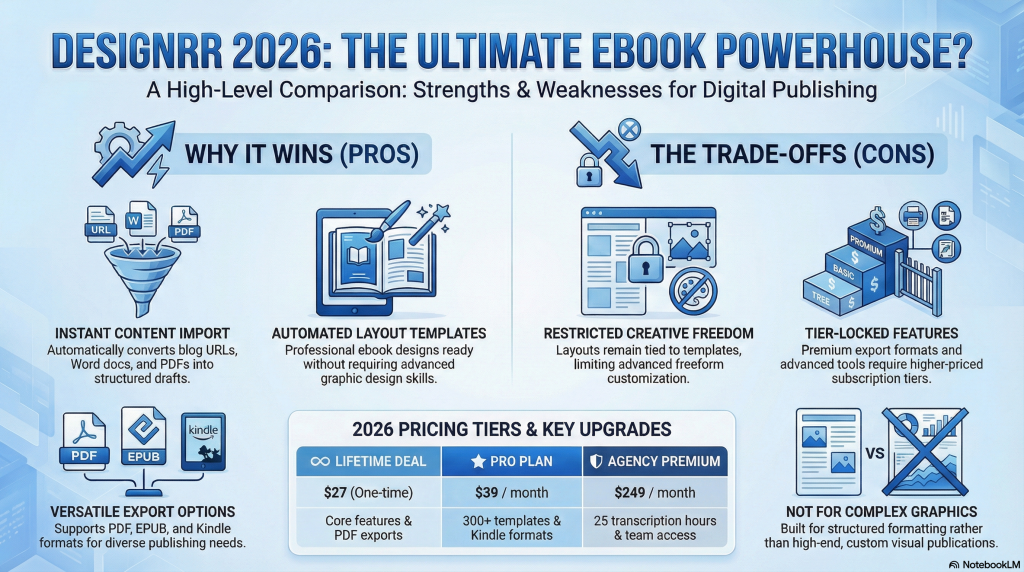
Like most content creation tools, Designrr offers clear advantages in certain areas while presenting limitations in others. Evaluating both sides helps clarify whether it aligns with your publishing needs.
Pros
- Efficient content conversion: The ability to import existing blog posts, documents, or URLs reduces manual formatting time.
- Template-driven layouts: Pre-built designs simplify ebook creation without requiring advanced design skills.
- Multiple export formats: Support for PDF, EPUB, and Kindle-ready files increases publishing flexibility depending on the plan.
- Browser-based platform: No installation is required. Projects can be created and edited directly online.
- Structured workflow: The guided process makes it accessible for non-designers.
Cons
- Limited design flexibility: Customization remains tied to templates, which may restrict advanced layout control.
- Feature restrictions by plan: Some export options and tools are locked behind higher-tier pricing.
- Not a full graphic design solution: It is optimized for formatted ebooks, not highly customized visual publications.
- Learning curve for layout adjustments: While simpler than professional design software, users may still need time to adapt to the editor.
Designrr focuses on structured, efficient ebook production. Its strengths lie in automation and simplified formatting, while its limitations relate primarily to design depth and plan-based feature access.
Best Alternatives to Designrr
Designrr operates in the ebook and lead magnet creation space, but it is not the only option available. Depending on your design needs, workflow preferences, or budget, other tools may offer stronger customization or broader functionality.
Here are several commonly compared alternatives.
Beacon
Beacon is focused specifically on lead magnet creation. It allows users to turn blog posts into downloadable PDFs and gated content upgrades.
Where Beacon differs:
- Strong lead magnet integrations
- Built-in opt-in form connections
- Simple content repurposing tools
Beacon is often positioned as a direct competitor for marketers focused primarily on lead capture rather than full ebook publishing.
Sqribble
Sqribble is another ebook creation platform designed for fast digital publication formatting.
Where Sqribble differs:
- Emphasis on automated ebook generation
- Template-based layouts
- One-time purchase model (in many cases)
It appeals to users who prefer a simplified ebook creation tool without recurring subscriptions.
Canva
Canva is a broader graphic design platform rather than a dedicated ebook converter.
Where Canva differs:
- Full creative control
- Drag-and-drop design freedom
- Wider template library
Canva provides greater layout flexibility but requires more manual formatting compared to automated import tools like Designrr.
Other Ebook and Publishing Tools
Additional alternatives may include:
- Dedicated publishing software
- WordPress-based PDF generators
- Desktop design applications
The best choice depends on whether speed, automation, or design control is the priority.

Conclusion: Should You Consider Designrr in 2026?
Designrr positions itself as a structured, efficiency-focused tool for turning existing content into formatted ebooks and digital publications. Its strengths center on content import, template-driven layouts, and simplified export options.
It is best suited for users who prioritize speed and structured output over advanced design flexibility. For marketers and creators producing lead magnets or repurposed content regularly, its automation-focused workflow may reduce production time compared to manual design tools.
However, projects requiring deep customization or highly visual layouts may benefit from more design-oriented platforms. Feature access also varies by plan tier, so evaluating pricing against required export formats and functionality is essential.
Ultimately, Designrr fits within the broader ebook creation software market as a streamlined publishing tool. Whether it aligns with your needs depends on how much control you require versus how much efficiency you value.

Frequently Asked Questions About Designrr
Is Designrr a one-time purchase or a subscription?
Designrr has offered both subscription-based plans and lifetime purchase options in the past. Availability of lifetime deals may vary. It is important to review the current pricing structure on the official website before purchasing.
Can Designrr import blog posts automatically?
Yes. Designrr supports importing content from blog URLs, Word documents, PDFs, and other sources. The system extracts the text and prepares it for formatting inside its editor.
Does Designrr support Kindle or EPUB exports?
Export formats depend on the selected pricing tier. Higher plans typically include additional formats such as EPUB and Kindle-ready files. Always verify which export options are included in your chosen plan.
Is Designrr good for lead magnets?
Designrr is commonly used to create lead magnets from existing blog posts or long-form content. Its template-based layouts make it suitable for producing structured PDF downloads efficiently.
How does Designrr compare to Canva?
Designrr focuses on converting and formatting existing content into ebooks quickly. Canva offers greater creative control and broader design capabilities but requires more manual layout work.
Does Designrr require design experience?
No advanced design experience is required. The platform uses templates and guided editing tools to simplify formatting. However, some familiarity with layout adjustments may still be helpful.
Are there free alternatives to Designrr?
Free tools such as Canva or basic PDF generators can be used for ebook creation. However, they may require more manual formatting and design effort compared to automated conversion tools.